The core rule of Meta Ads today is simple: let the algorithm do its job, and put your effort into what it can't do on its own: the offer, the creative, the message and the numbers.
The old playbook was all about targeting and splitting: an ad set per interest, a campaign per product, six ads at most. Today Meta's AI, through Advantage+ and Andromeda, decides who sees each ad. Your job is to feed it clean data and varied creative, then give it room to learn.
This guide follows the order you'll actually need it in:
Foundations: the account, the Pixel and the Conversions API.
Strategy: structure, targeting, funnels, offers and numbers.
Execution: creative, messaging and conversion location.
Management: analysis, testing, scaling and troubleshooting.
Each part opens with a quick summary, and the guide ends with a day-one action plan. It's the same method we use every day in Cresco's Meta Ads service.
50+ conversions per campaign per week for Meta to learn | 20+ varied ads in a single ad set after Andromeda | 60% of businesses find video is their best format |
In this guide | |
01 Foundations: account, Pixel and CAPI 02 Campaign Structure 03 Targeting and Advantage+ 04 Sales Funnels 05 Offers 06 Unit Economics and Budget 07 Conversion Locations 08 Ad Creative 09 Creators and Partnership Ads | 10 Ad Messaging 11 Analysis and Optimisation 12 Testing 13 Scaling 14 Hidden and Advanced Settings 15 Andromeda and MAIBA 16 Troubleshooting 17 Honest Takes |
About the screenshots Every screenshot in this guide comes from a real Ads Manager account in November 2026, using a campaign created as a draft and never published. Account numbers and page names are hidden, and the interface may change after publication. Illustrative images from official Meta materials and Jon Loomer's tutorials are added, each credited underneath. |
PART 01
Foundations: Set Up the Account Before You Spend a Cent
In short Three things come before any spend: a tidy Business Portfolio, a working Pixel and an active Conversions API. Then your first campaign with Meta's recommended settings, step by step with screenshots. |
Every successful account starts with three things: a tidy Business Portfolio, a correctly firing Pixel and an active Conversions API. Without them, the algorithm is working blind.
The Ad Account and Business Portfolio
The Business Portfolio is where all your Meta assets live together. Go to business.facebook.com and set up the following:
Add your Facebook Page and Instagram account. The Instagram account must be a Professional account.
Add your ad account or create a new one. Note that the currency and time zone can't be changed after creation.
Add your team under People and give them partial access, unless someone is a genuine partner in the business.
Ads Manager and the Three Levels
Always work in Ads Manager, not Meta Business Suite, because it has every feature. Every ad is built on three levels:
Level | What you set there |
|---|---|
Campaign | The objective (such as Sales or Leads), which sets the goal Meta optimises for |
Ad Set | Targeting and placements |
Ad | The creative itself: an image or video, plus the copy |
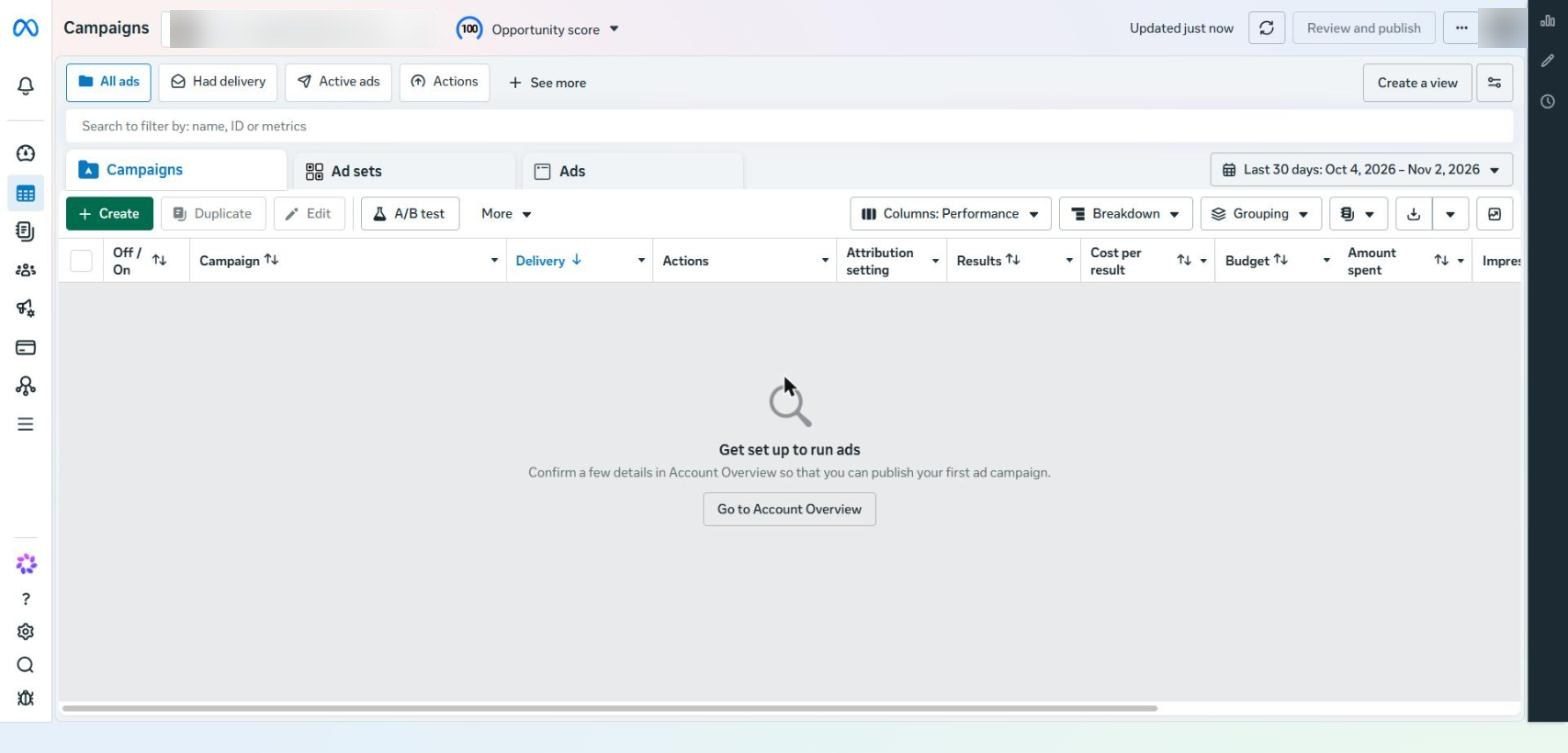
The Ads Manager home screen: the Campaigns, Ad sets and Ads tabs, and the + Create button that starts every campaign
The Pixel
The Pixel tracks what happens on your website after someone clicks an ad, such as a Purchase or a Lead, and sends that data back to Meta so it knows who to target.
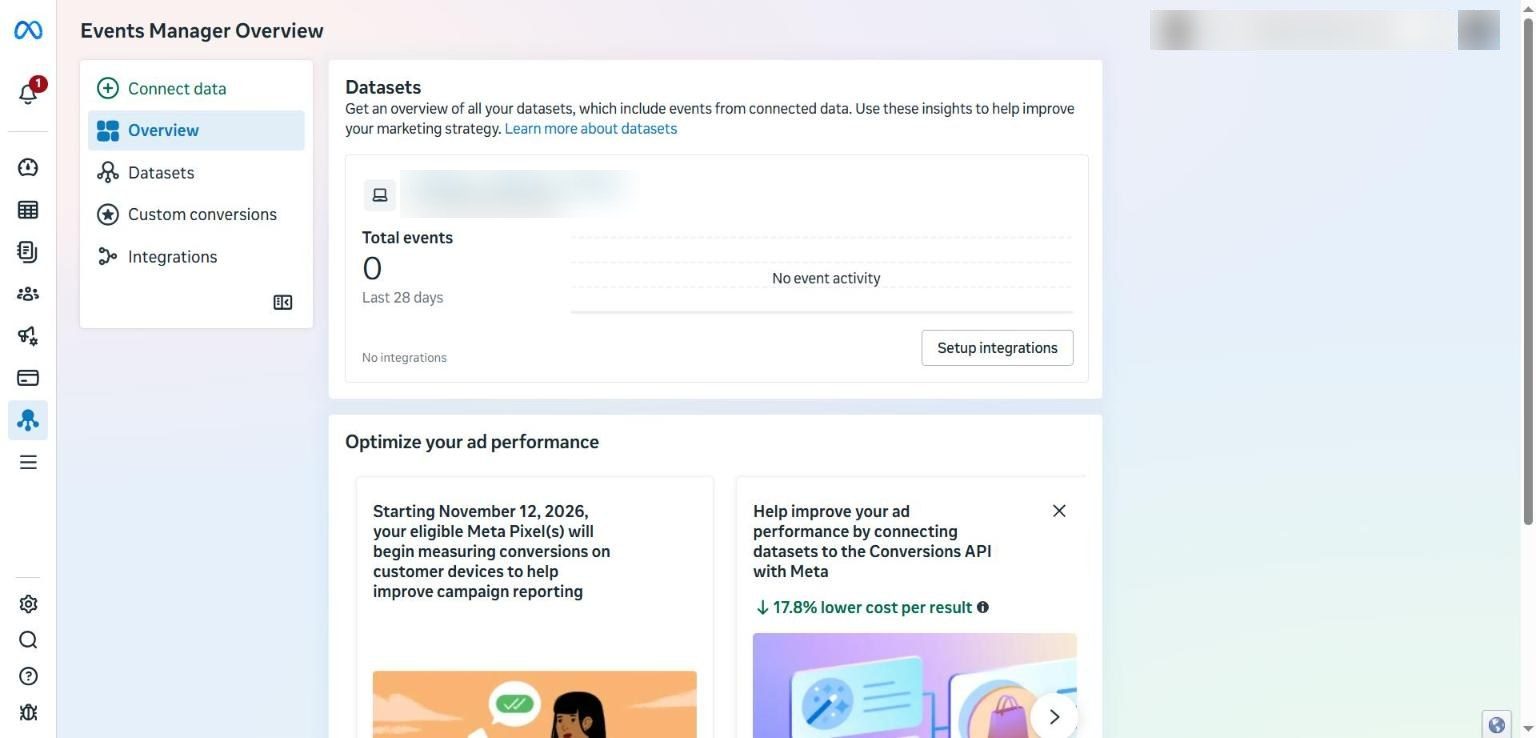
Events Manager: the side menu includes Datasets, Custom conversions and Integrations
Notice the banner saying that from 12 November 2026 the Meta Pixel will start measuring conversions on customers' own devices to improve reporting, and another card noting that connecting the Conversions API may lower your cost per result.
Creating the Pixel step by step
Open Events Manager from the Ads Manager side menu.
Click Connect data. A window appears with five data sources.
Choose Web for your website, then click Next.
Name the dataset after the business, and pick the right ad account if you have more than one.
Finish the install through a partner integration: the built-in Shopify integration, or the WordPress plugin instead of manual code. If you're not confident, hiring a freelancer is better than breaking your tracking.
Check it with the Meta Pixel Helper Chrome extension, and don't ignore warnings such as duplicate events.
Create your conversion events with the Event Setup Tool, ideally tied to a specific URL load such as the thank-you page.
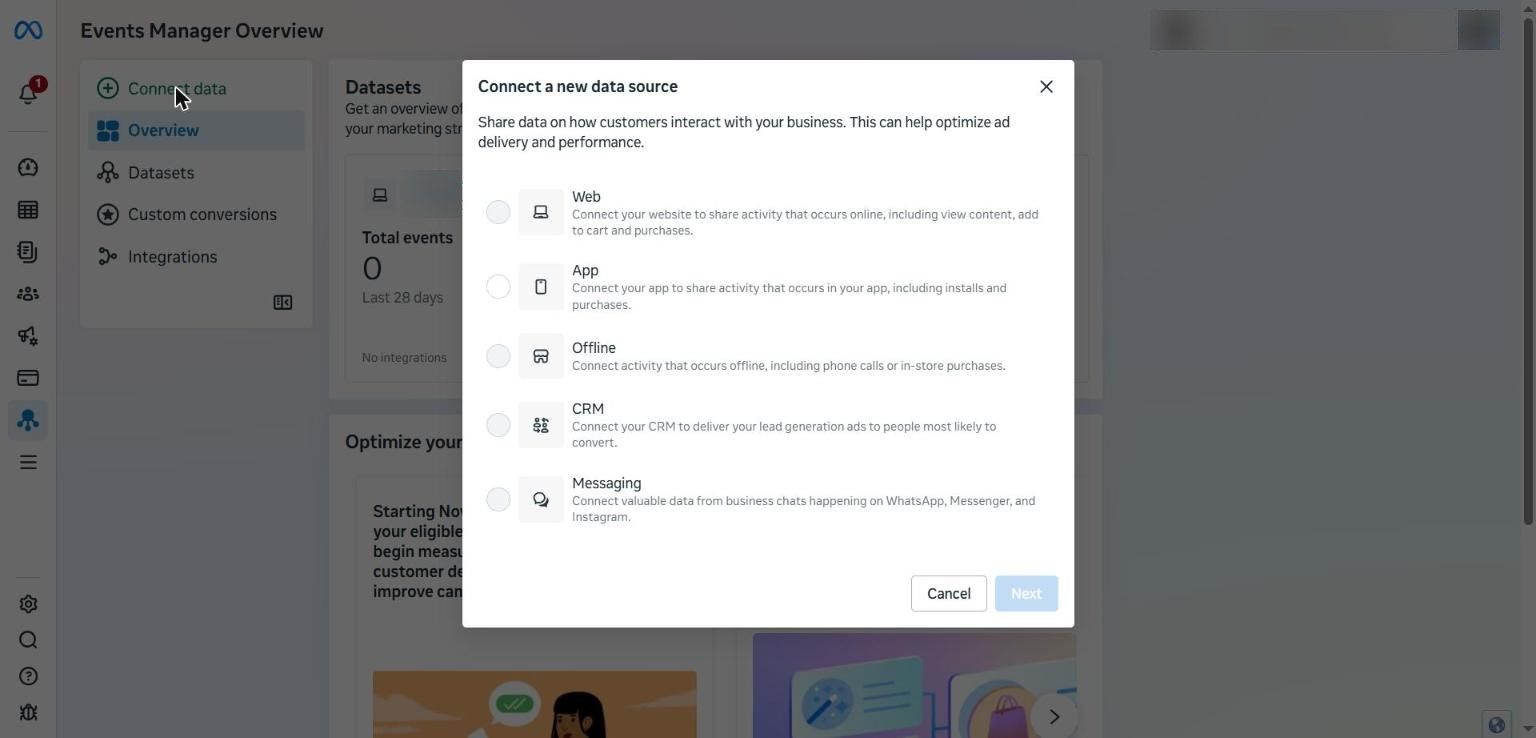
The Connect a new data source window: Web, App, Offline, CRM and Messaging
The same window also offers CRM and Messaging. If your business runs on lead generation, connecting your CRM tells Meta which leads actually became customers. If you sell over WhatsApp, connecting Messaging does the same job.
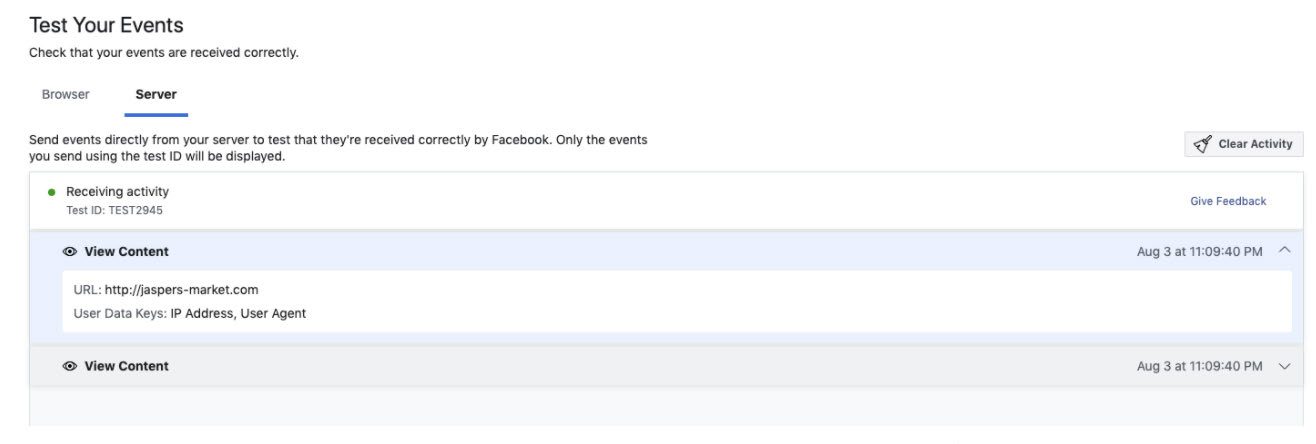
Verify incoming events in Test Events · Source: Meta Conversions API Direct Integration Playbook archival interface
The Conversions API
The Pixel runs in the browser, and privacy rules keep shrinking what it can see. The Conversions API sends the same events from the server, and together they give Meta the most accurate picture possible. In Events Manager, choose the free one-click setup and make sure the status shows Active. The technical details are in Meta's official guide: Conversions API.
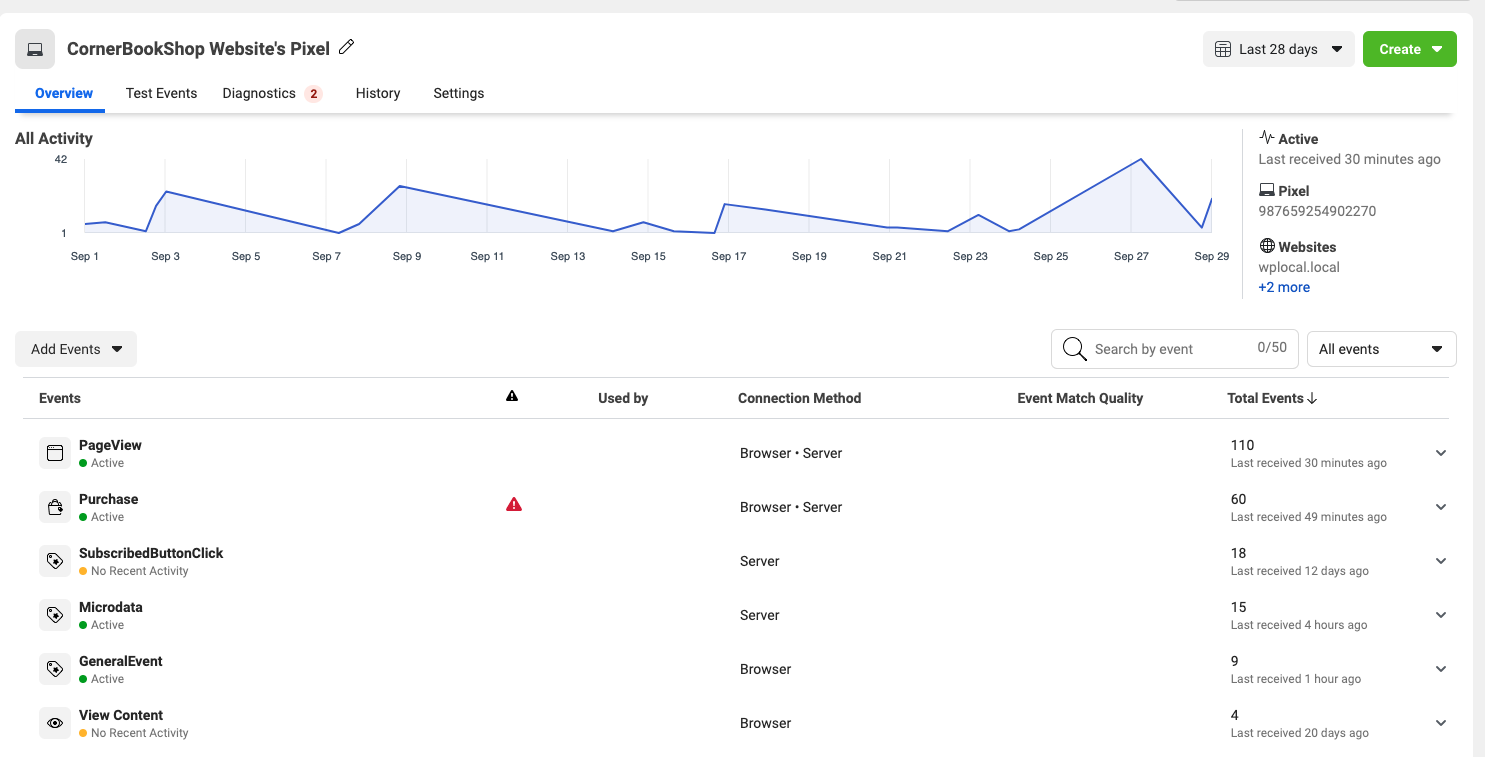
Check Browser and Server under Connection Method · Source: Meta Conversions API Direct Integration Playbook archival interface
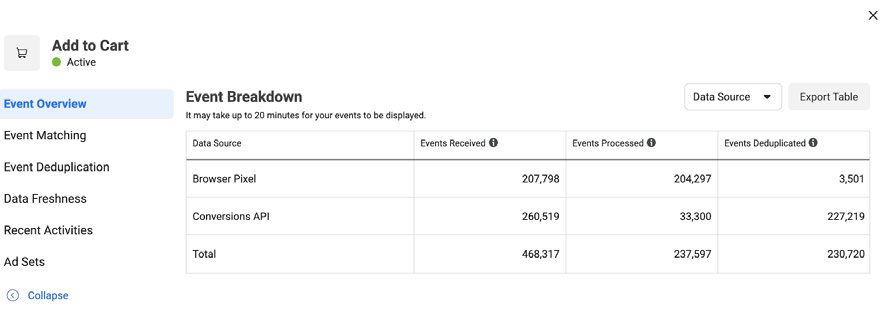
Review received processed and deduplicated events · Source: Meta Conversions API Direct Integration Playbook archival interface
Cresco tip Before launching any campaign, open Events Manager and check the Event Match Quality for each event. If the data is weak, every optimisation that follows is built on a weak foundation. |
Your First Campaign, Step by Step
These steps follow the order you'll see them in Ads Manager.
Step 1: Choose the objective
In Ads Manager, click + Create to open the Create new campaign window.
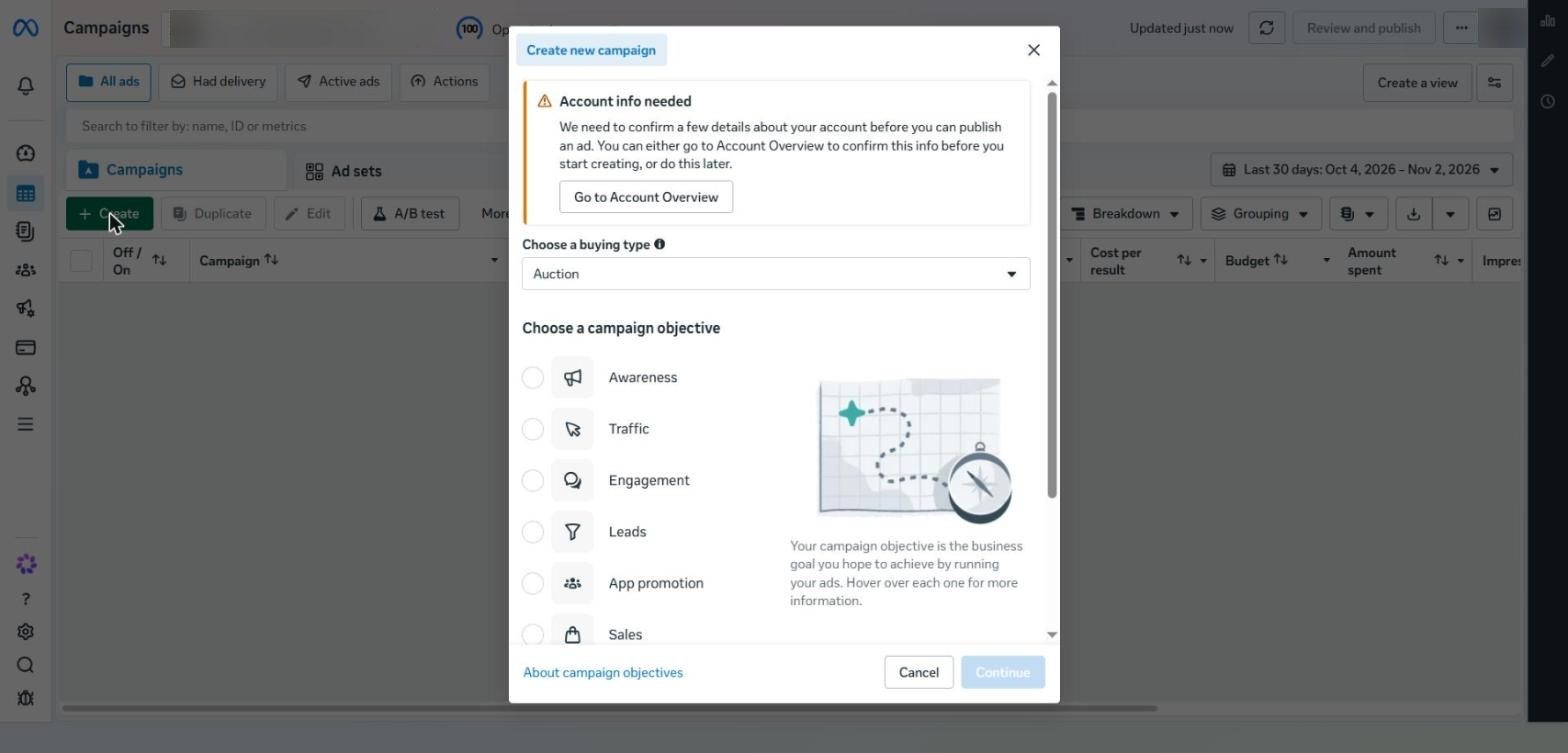
The Create new campaign window: buying type and the six objectives
Buying type: leave it on Auction.
Campaign objective: there are six options: Awareness, Traffic, Engagement, Leads, App promotion and Sales. For your first campaign, choose Sales if customers buy online, or Leads if you're collecting contact details.
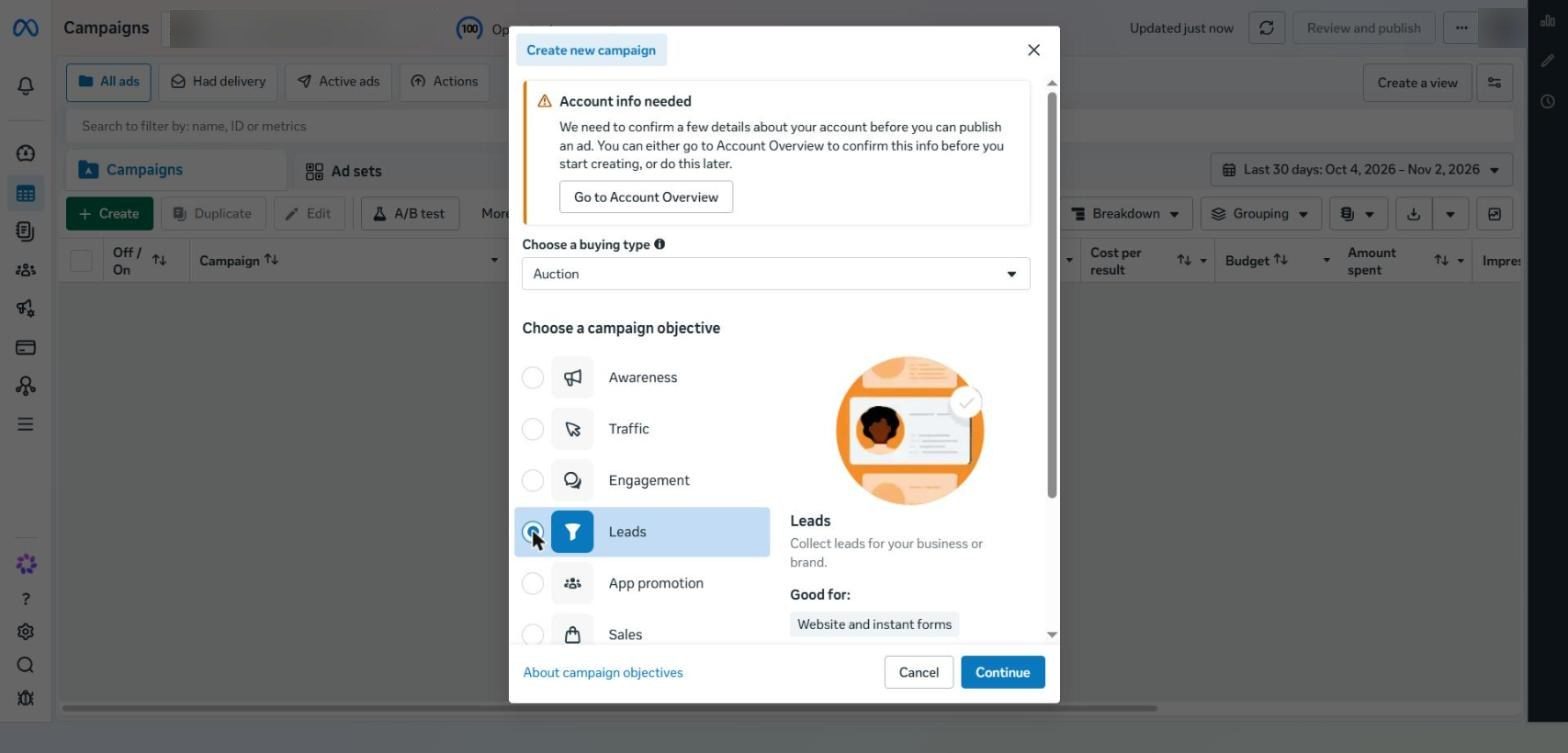
When you choose Leads, Meta explains it works for websites and Instant Forms
Step 2: Campaign settings
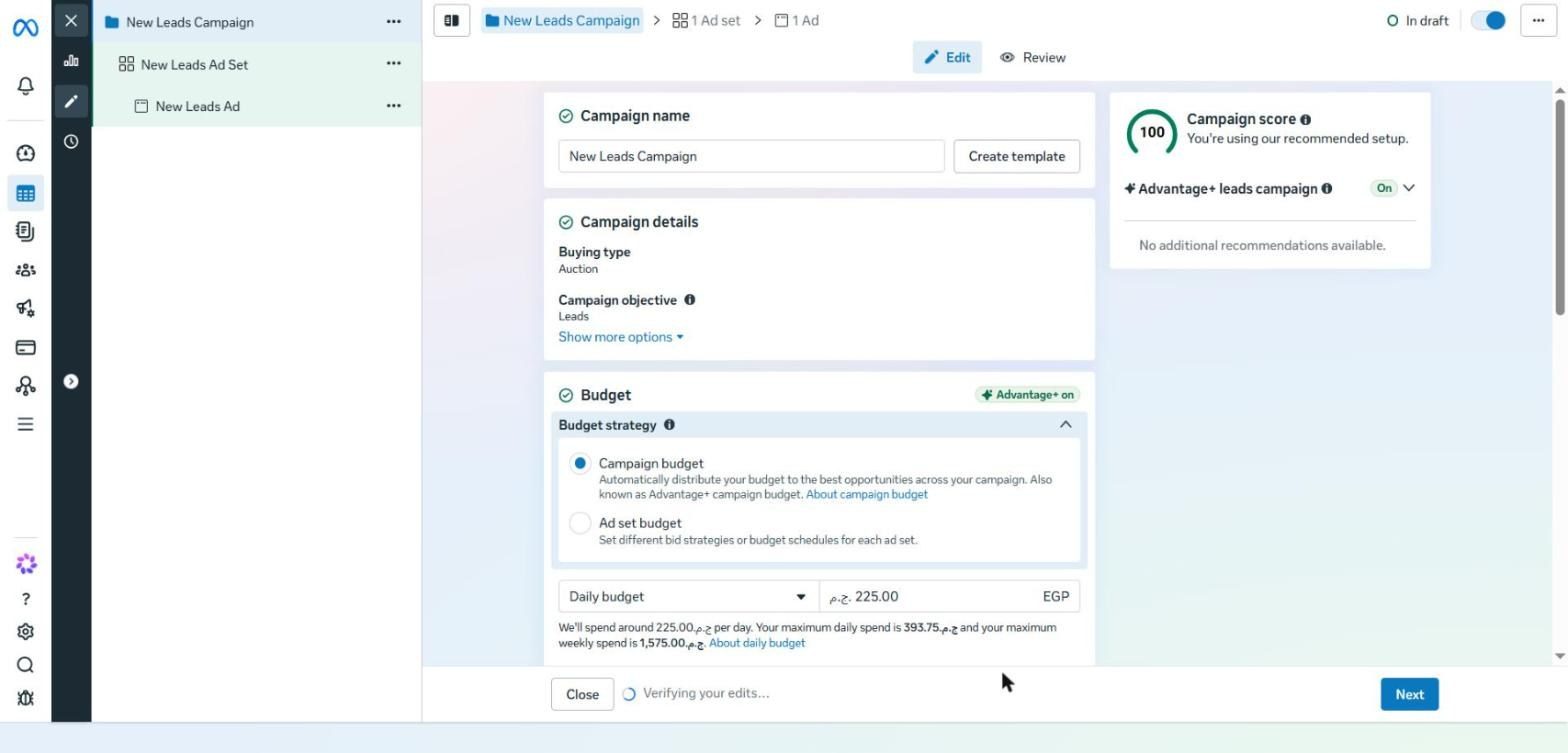
Campaign setup: the campaign score, Advantage+ status and budget strategy options
Campaign name: use a consistent naming convention, such as Leads | Offer | Country | Date.
Campaign score: a score out of 100 showing how close your setup is to Meta's recommendations, with the Advantage+ leads campaign status underneath.
Budget strategy: Campaign budget (also called Advantage+ campaign budget) spreads the budget across ad sets automatically, while Ad set budget lets you set a budget for each ad set.
Daily budget: Meta may spend up to 75% over your daily budget on a given day, so EGP 225 could reach EGP 393.75, but weekly spend never exceeds seven times the daily budget.
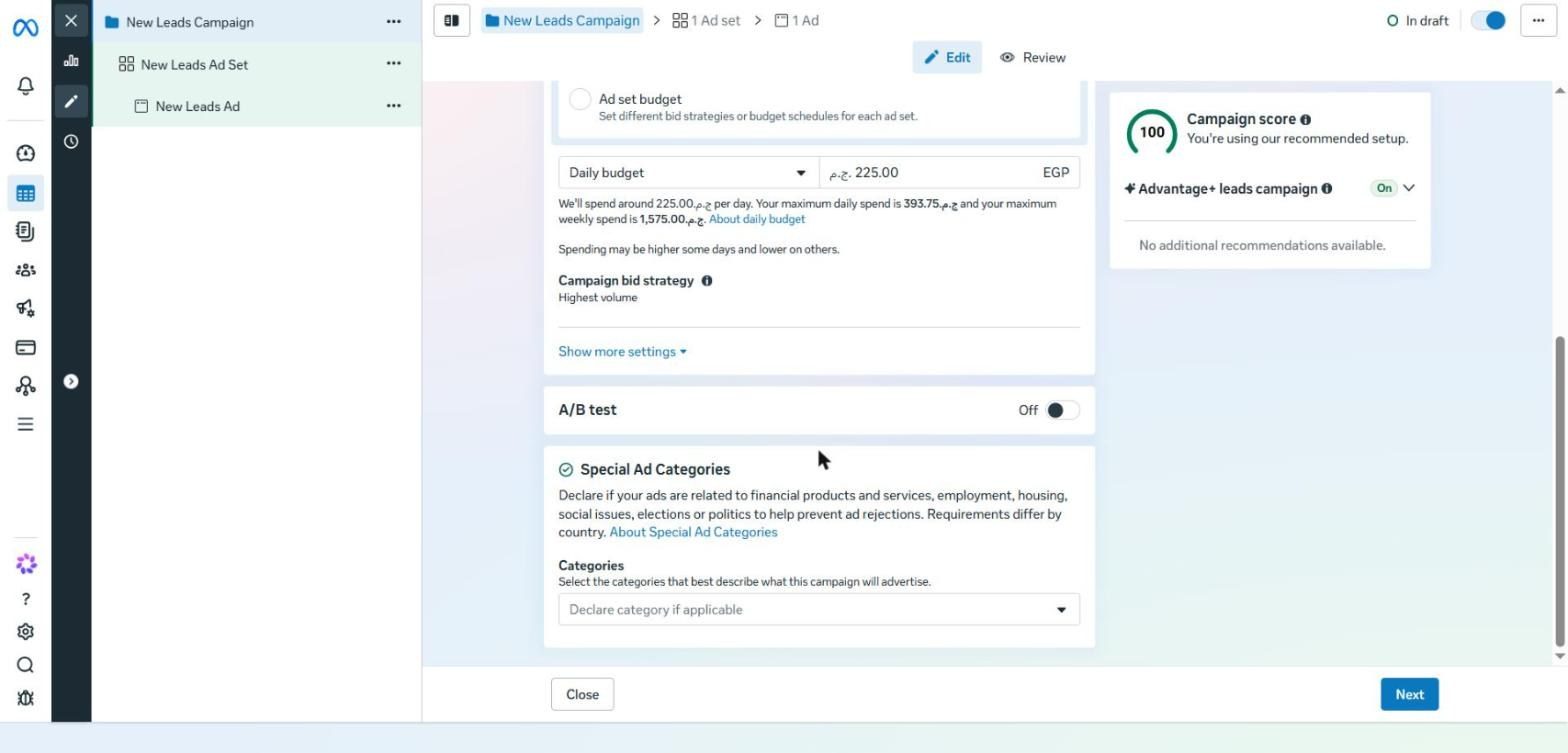
The rest of the campaign settings: bid strategy, A/B test and Special Ad Categories
Campaign bid strategy: leave it on Highest volume to start.
A/B test: leave it off. Testing is done differently, as Part 12 explains.
Special Ad Categories: if you advertise financial products, employment, housing or social and political issues, you must select the category. Requirements vary by country, and ignoring them can get your ads or account restricted. Details are in Special Ad Categories. If you advertise real estate projects, see how we run these campaigns in real estate marketing with Cresco.
Step 3: Ad set settings
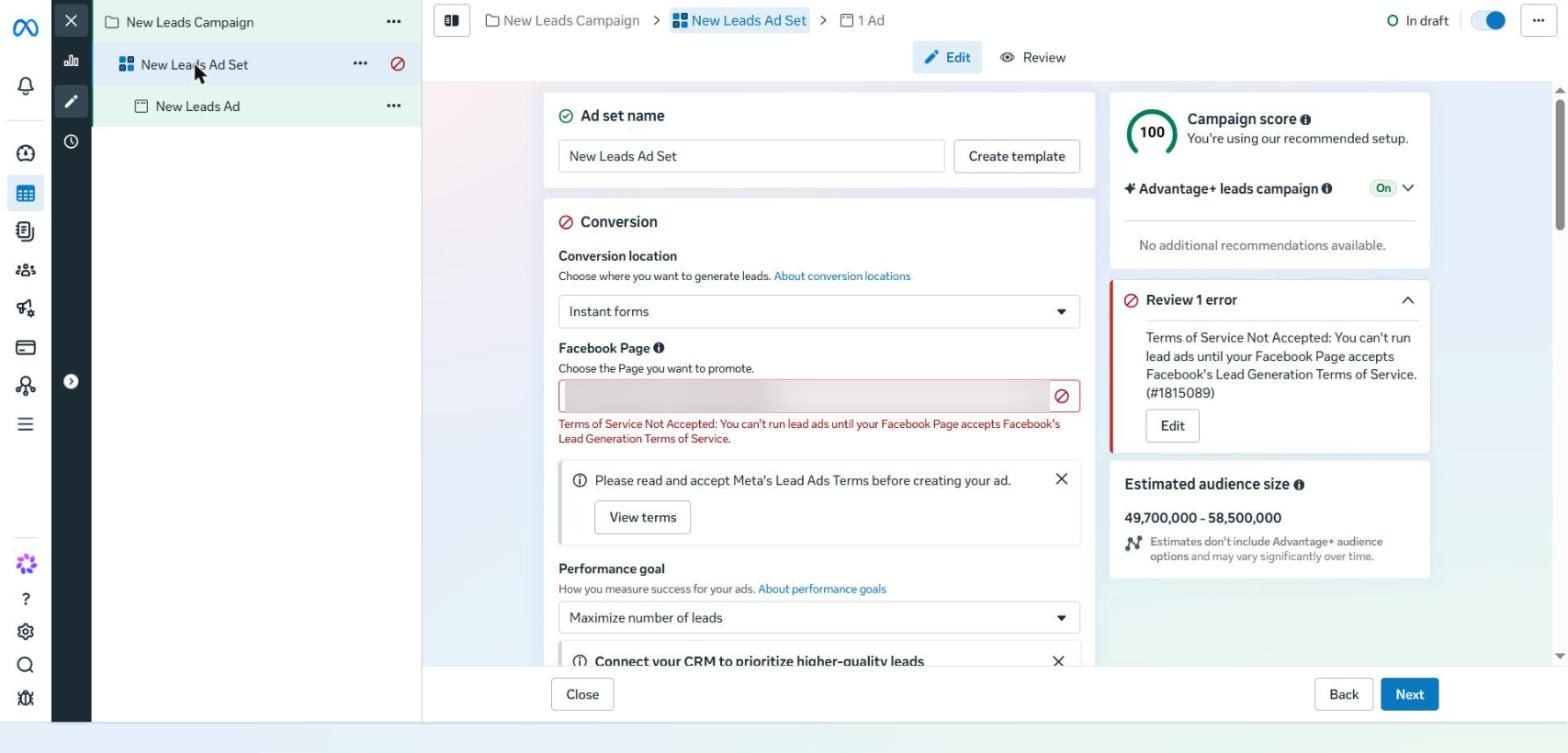
The ad set screen: Conversion location, Facebook Page and Performance goal
Conversion location: where the customer will convert. Part 7 covers this in detail.
Facebook Page: the page you advertise as. If you see a Terms of Service Not Accepted message like the one in the screenshot, accept the Lead Ads Terms from View terms before using any Instant Form.
Performance goal: for example Maximize number of leads or conversions. Below it, Meta suggests connecting your CRM to prioritise higher-quality leads.
Audience: Controls and Suggest an audience, both covered in detail in Part 3.
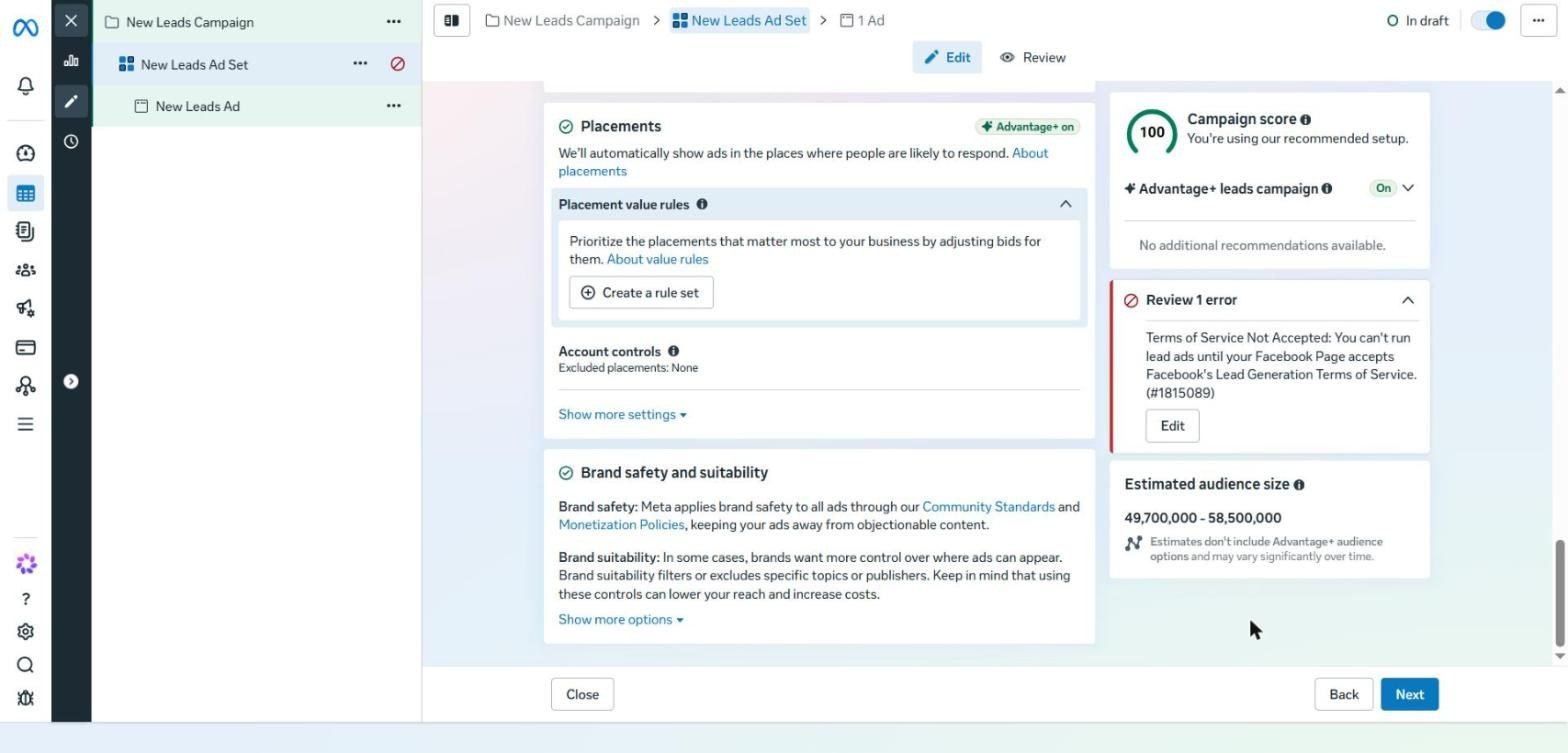
The Placements section with Advantage+ on and the Placement value rules option
Placements: leave them on Advantage+ as shown. If you want to prioritise a specific placement without switching the others off, use Placement value rules (Part 14).
Step 4: Ad settings
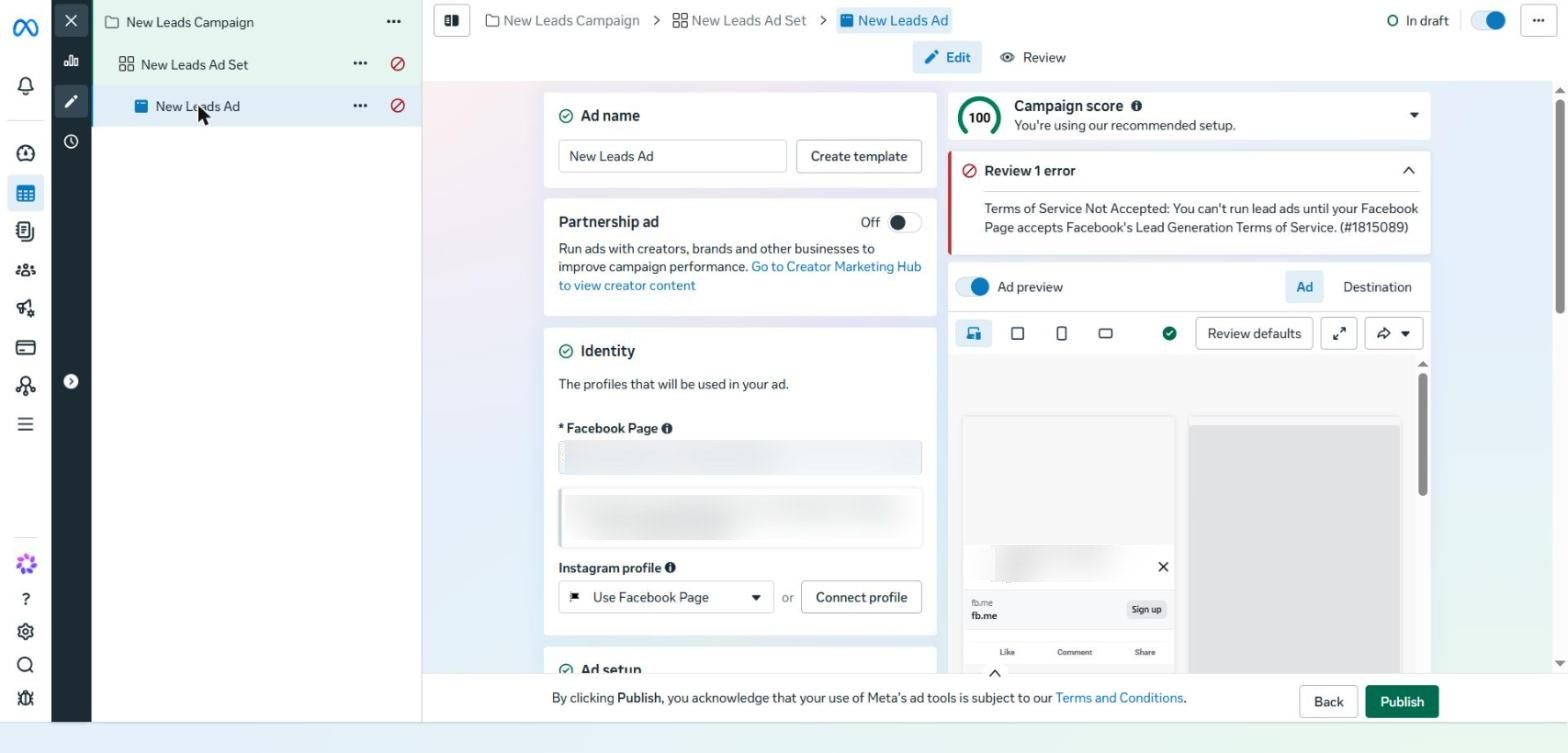
The ad screen: Ad name, Partnership ad and Identity
Ad name: a name that describes the creative, such as UGC | Price hook | 9x16.
Partnership ad: leave it off unless you're working with a creator (Part 9).
Identity: the Page and Instagram account that will appear on the ad.
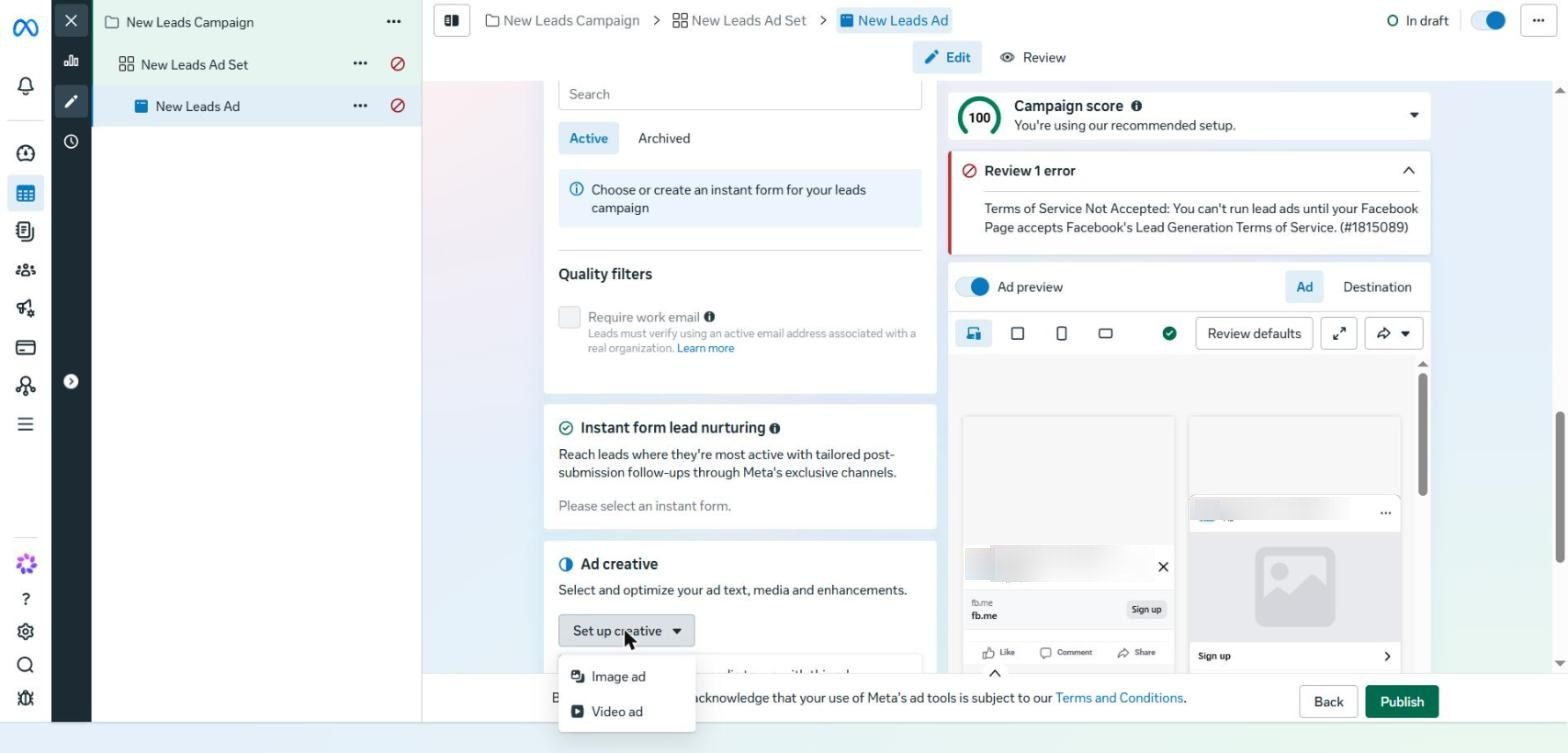
The Ad creative section and the Set up creative menu with Image ad and Video ad
Ad creative: under Set up creative, choose Image ad or Video ad and upload the file. Pick a suitable crop for each placement, then write the primary text and headline and choose a fitting call to action.
Creative enhancements: turn them off for your first ad, or review every AI-generated version yourself.
Check the ad preview for each placement, then click Publish.
Recommended settings at a glance:
Setting | Recommended choice |
|---|---|
Objective | Sales if people buy online, Leads otherwise. Avoid Traffic and Engagement at the start |
Budget | Campaign budget with a comfortable daily amount |
Special Ad Categories | Mandatory for real estate, employment and financial services |
Conversion Location | Website, since it usually brings higher-quality leads |
Performance Goal | Maximize number of conversions, or Value if customer value varies a lot |
Location | Where you can actually serve customers. Start with one country |
Age and Language | Leave them on default unless there's a clear reason |
Placements | Advantage+ placements |
Creative Enhancements | Off for your first ad. Review any AI version before it goes live |
After publishing, let the campaign run for a few days before judging it.
PART 02
Campaign Structure: Fewer Splits, Faster Learning
In short One campaign and one ad set per offer, warm and cold together, and all the variety inside the ads. Only split for a genuinely different product, offer or price point. |
The default structure today is one campaign and one ad set per product range or offer, with many ads inside it. Meta needs to pool conversions in one place to learn, and over-splitting slows the algorithm down.
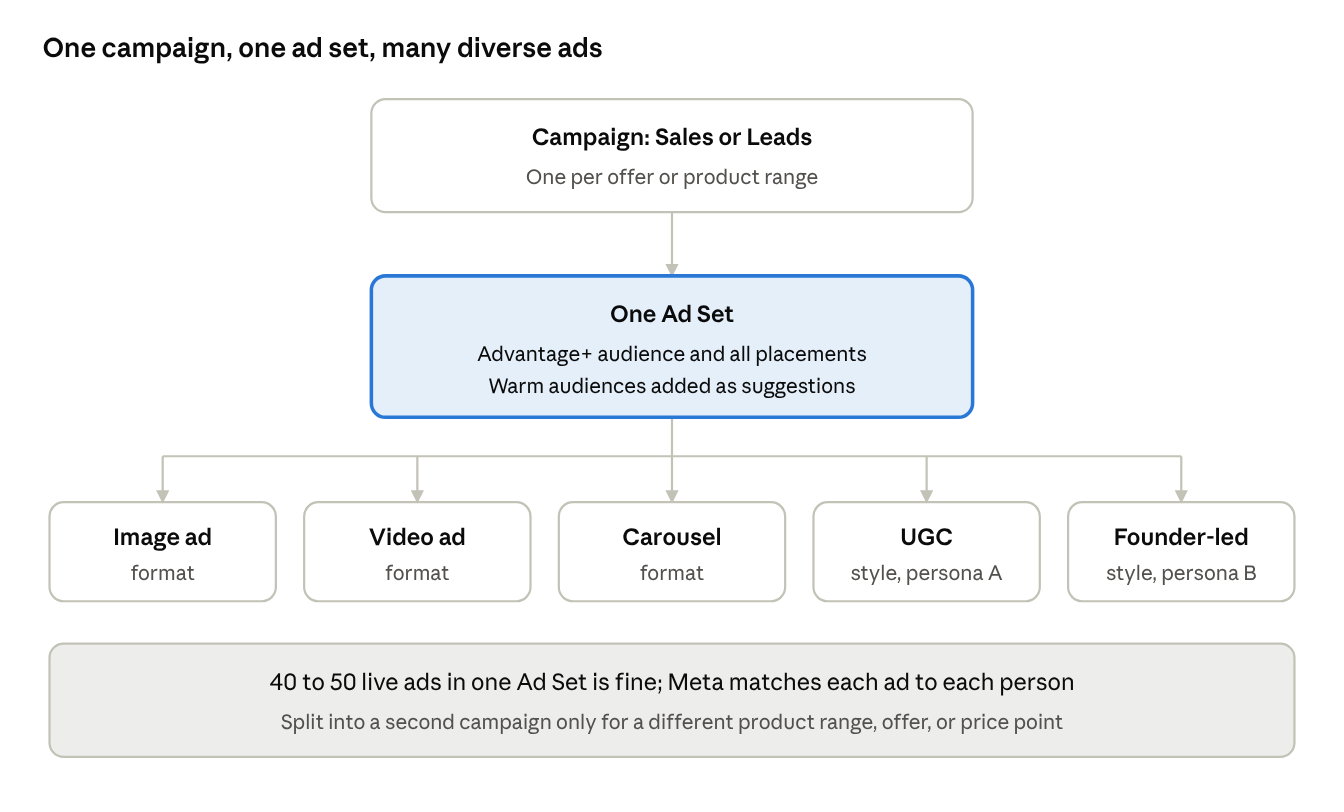
The default campaign structure: all the variety sits at the ad level, not in extra ad sets or campaigns
When to Split into Separate Campaigns
A genuinely different product range: bags and shoes get a campaign each. A brown shoe and a black shoe are two ads in the same ad set.
An offer with a different optimisation: for example Book a Call for a high-ticket service versus a free lead magnet.
A big price difference: each price level converts differently.
When in doubt, the rule is: reduce variables, don't add them.
Further reading on the Cresco blog |
Warm and Cold in One Ad Set (Hybrid)
Targeting today is a suggestion, not a rule. The ad set you call cold will reach warm people and vice versa, so separating them scatters your data for no gain.
In the ad set, open Suggest an audience and add your warm audiences: website visitors, your email list and people who engaged with you.
Don't turn on Further limit the reach of your ads. It usually weakens results.
Define your Engaged Audience and Existing Customers in Advertising Settings, then use Breakdown, then Audience segments, to see where Meta actually spent.
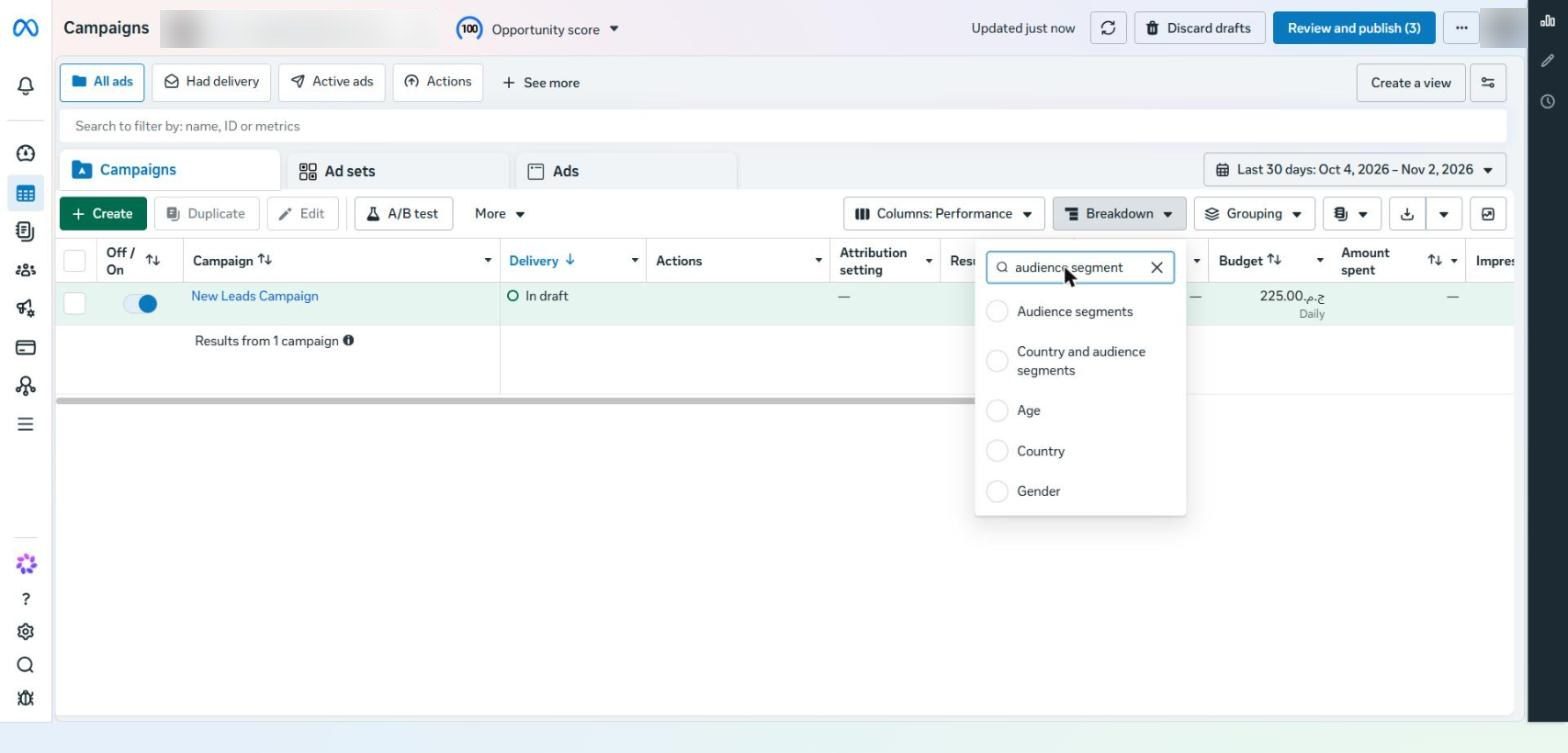
The Breakdown menu in Ads Manager with the Audience segments option
To view this breakdown: on the Campaigns screen click Breakdown, type audience segment in the search box, then choose Audience segments. Results split into New audience, Engaged audience and Existing customers. The breakdown only works once you've defined the segments in Advertising Settings.
Only separate warm audiences when the offer itself makes no sense to someone who doesn't know you, which is rare.
The 50 Conversions a Week Rule
Aim for 50 or more conversions per campaign per week, where a conversion is the event you optimise for. This number decides three things: how long to wait before judging, how many campaigns you can run, and whether you'll exit the learning phase quickly.
Weekly volume | What to do |
|---|---|
Around 20 | Put the whole budget behind your best or most profitable offer, and add no variables |
Around 50 | The default structure works well |
Around 400 | You have enough data to split out extra offers or campaigns, if your team can produce creative for each |
Creative Mix and Diversification
Put images, video and carousels in the same ad set. Meta sequences delivery, for example a video that explains the offer followed by a stronger image for retargeting.
Don't hunt for one winning format. Different people respond to different formats.
Make ads for every persona and use case, in several styles such as UGC, founder-led and demo, all inside the same ad set.
The six-ad rule is gone. An ad set with 40 to 50 active ads is completely normal.
PART 03
Targeting and Advantage+: Give Meta Direction, Not Restrictions
In short Controls are hard limits (location and legal age); everything else is a suggestion. Keep Advantage+ on, and remember that the creative decides who the ad reaches. |
Manual targeting matters far less than it used to, because Meta can tell who will buy from their behaviour and how they engage with your ads. Your job is to set the right limits and leave the rest flexible.
Controls vs Suggest an Audience
Type | How it works | What it covers |
|---|---|---|
Controls | Hard limits Meta won't go beyond | Location, minimum age, languages, and excluded custom audiences such as existing customers |
Suggest an Audience | A signal only; Meta may follow it or go beyond it | Custom audiences, age range, gender and detailed targeting |
Here's how they look on the ad set screen. Note the line under Controls, “We won't reach people beyond these settings”, and the one under Suggest an audience, “We'll reach people beyond these settings”.
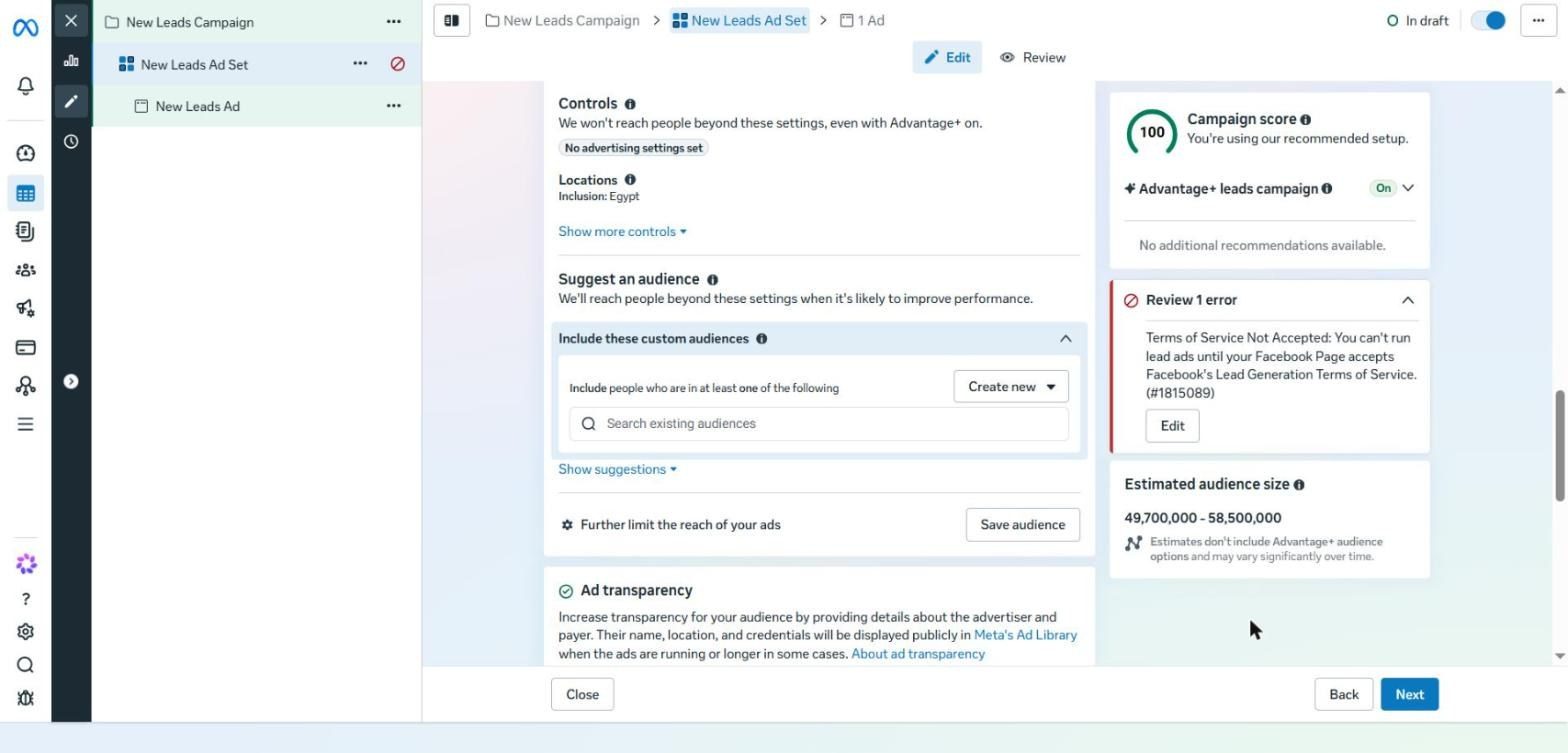
The Audience section: Controls, then Suggest an audience, then Further limit the reach
Clicking Show suggestions reveals the rest: Age, Gender and Detailed targeting. The default is 18 to 65+, all genders and all interests.
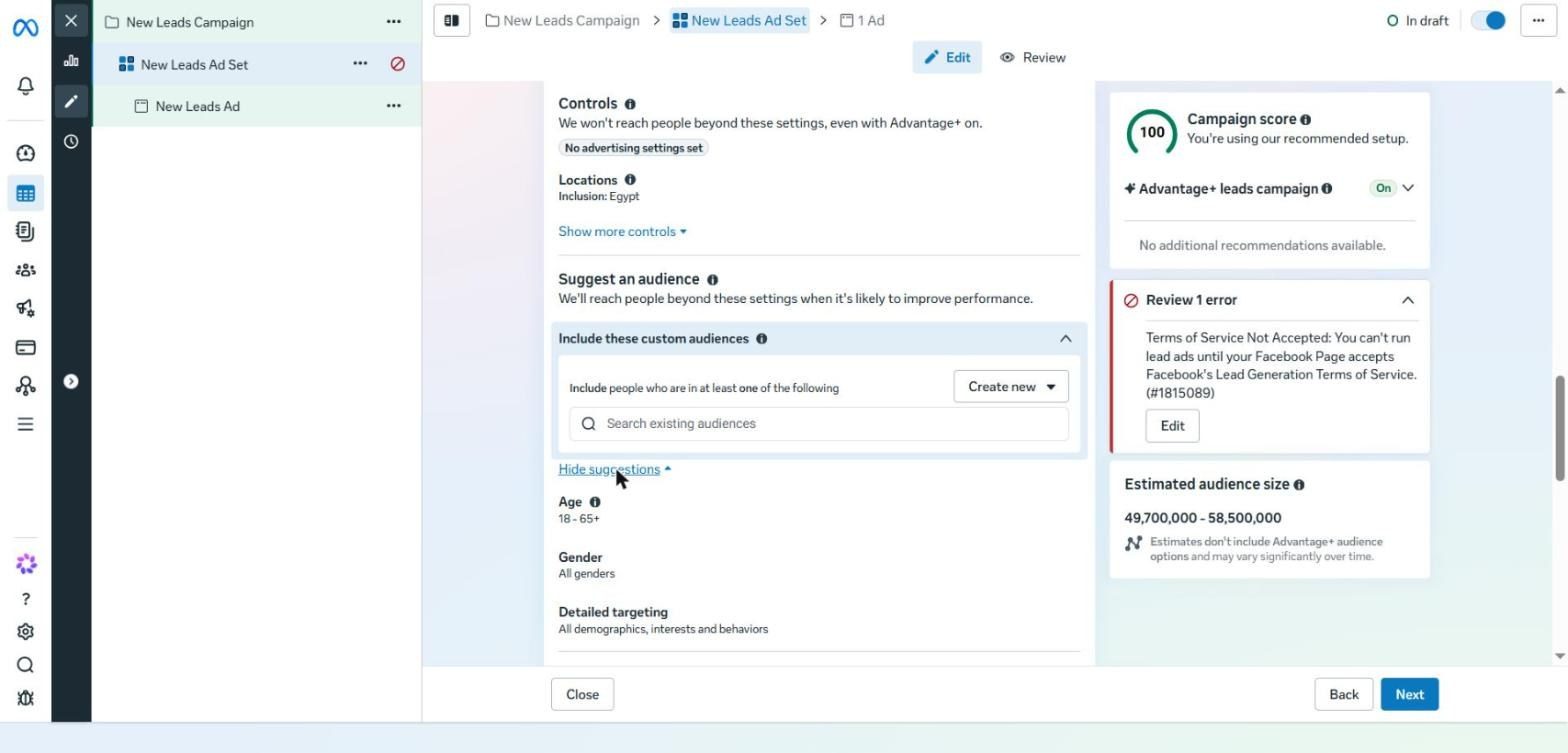
The expanded suggestions: Age, Gender and Detailed targeting
Setting up the audience step by step
Under Controls, click Show more controls and review Locations. This is the limit Meta won't cross.
If there's a legal minimum age, set it with Minimum age inside Controls, not with the age suggestion.
To exclude existing customers, for example for a one-time purchase, add them under Exclude inside Controls.
Under Include these custom audiences, add your email list and website visitors.
Open Show suggestions and add a few sensible interests if the account is new.
Leave Further limit the reach of your ads untouched.
Watch the estimated audience size, and make sure the campaign score is still 100.
Meta itself warns that Further limit the reach usually raises your cost per result, and it's the most common targeting mistake. For more on the difference between controls and suggestions: How Advantage+ Audience Works — Jon Loomer.
Cresco tip When you take over an account that has Further limit the reach switched on, simply turning the settings back into suggestions and bringing the campaign score back to 100 is often the fastest improvement available. |
The Right Location
Target the area you can actually serve, no bigger and no smaller. This is the one setting where a mistake has a real cost.
Local businesses: set the city and a sensible radius around it, and untick Reach more people likely to respond so you don't pay for tourists or people who are only interested in the city. A real example: Dentra Clinic cut costs by 54% within a 32 km radius.
Selling to several countries: start with your core markets, group similar countries in one ad set (such as Saudi Arabia and Kuwait), and separate countries where CPM and conversion rates differ a lot. This is one of the few exceptions to the no-splitting rule.
New Account vs Mature Account
New account | Account with plenty of conversions | |
|---|---|---|
Age | Broad, such as 25 to 65+, not 25 to 30 | 18+ |
Gender | All, unless 80% or more of customers are one gender | All |
Detailed Targeting | One to eight sensible interests or behaviours | None |
Custom Audiences | Usually not enough data yet | Less important |
In both cases, location and any legal limits stay inside Controls.
Custom Audiences and Lookalikes
Create an All website visitors audience over 180 days, and if you track Purchase, create one that goes back up to 730 days.
Upload your customer list. Ideally separate buyers from non-buyers and add a column for customer value.
Lookalikes are no longer essential, but they help an established business with strong customer data that's new to Meta Ads.
Don't bother with page or Instagram engagement audiences; Meta already sees them. Focus on data from outside the platform, such as your email list.
Creating a custom audience step by step
From the Ads Manager menu, go to Audiences and click Create audience.
You'll see three types: Custom, Lookalike and Saved. Click Create a custom audience.
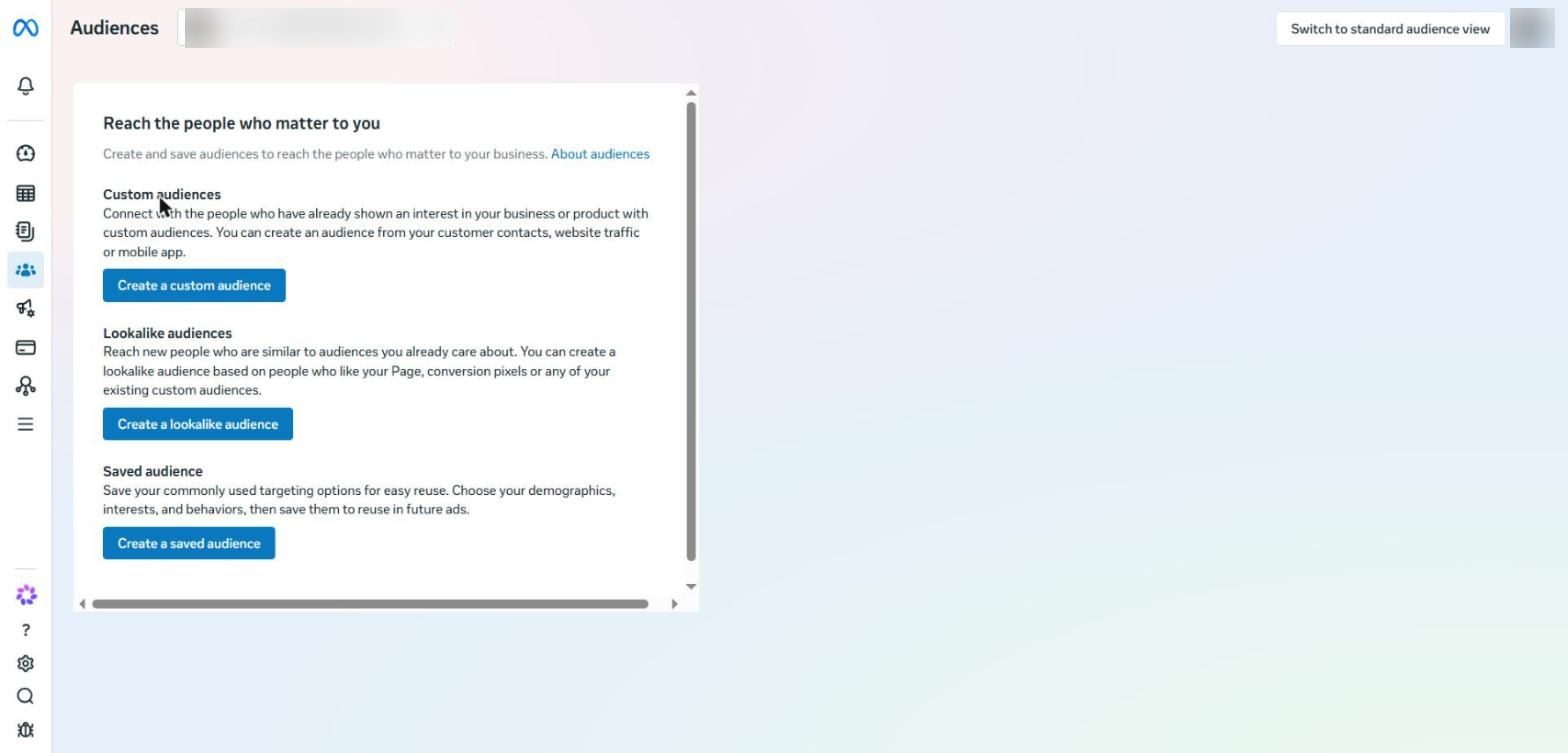
The Audiences screen: Custom, Lookalike and Saved audience
Sources are split into Your sources and Meta sources. Focus on Your sources, especially Website and Customer list.
For the website: choose All website visitors with a 180-day retention.
For the customer list: upload a CSV, map each column (email, phone, first name) and add value if you have it.
Give the audience a clear name, such as WEB | All visitors | 180d.
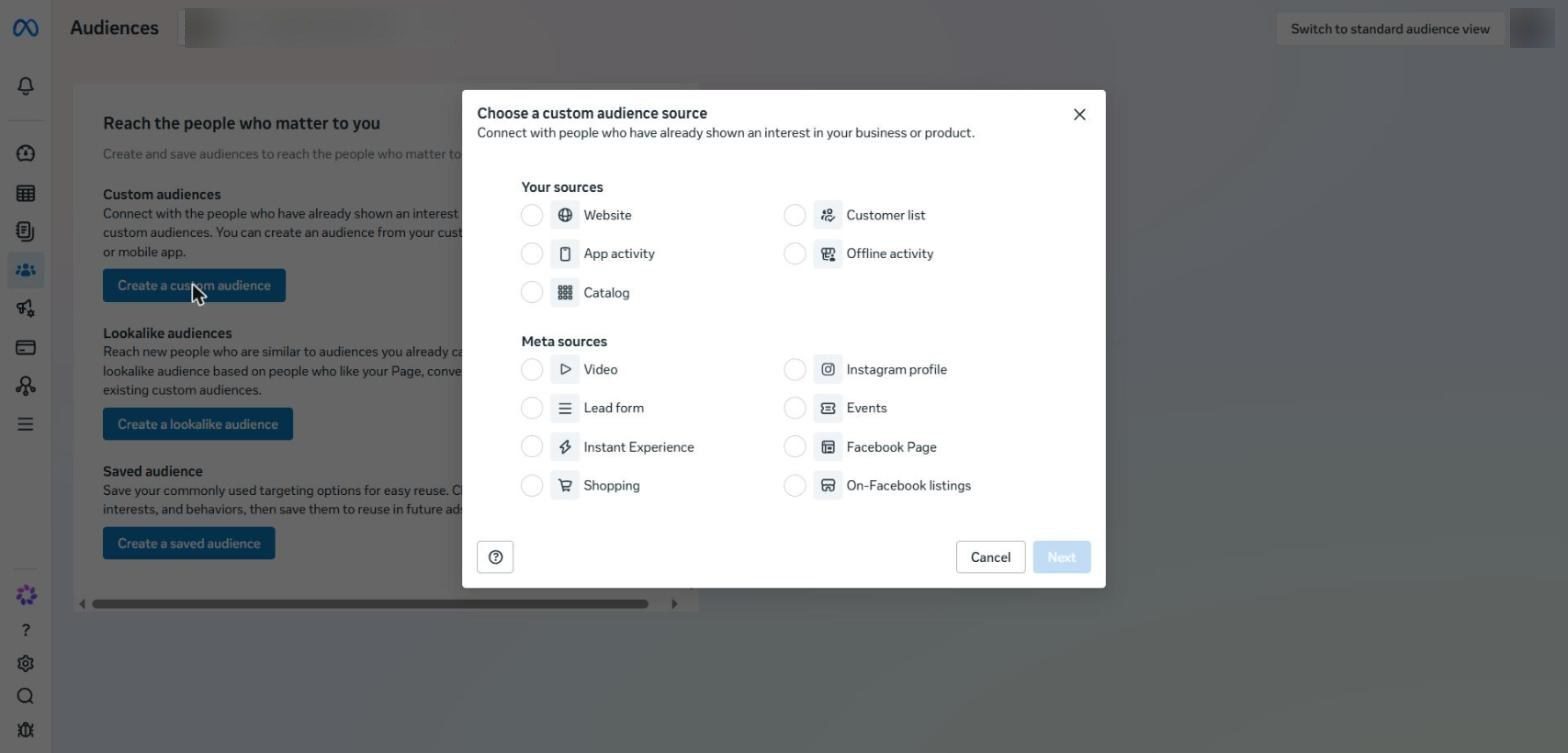
The Choose a custom audience source window: Your sources and Meta sources
Creative Is the Real Targeting
Meta shows your ad to different people and learns from who engages, so what the ad says decides who it reaches. If you feel you're reaching the wrong people, review the message before the ad set.
A common mistake is that educational how-to content, or hot takes about your industry, attracts people who work in that industry rather than customers. The fix is to focus on results and social proof, such as “look at these results for people like you”.
Advantage+ Is a Status, Not a Campaign Type
Advantage+ is no longer a separate campaign type. It's a label any campaign earns when it follows Meta's recommendations, and it depends on three things:
Budget: campaign budget, or any type if you only have one ad set.
Audience: every setting stays a suggestion. Turn even age into a hard limit and Advantage+ switches off.
Placements: all placements.
Keep it on in 90 to 95% of cases. The exceptions are when you need a warm-only audience, or when you're forced to use Traffic (for example when selling on Amazon), in which case turn off Audience Network.
PART 04
Sales Funnels: Simple Usually Wins
In short Direct to Offer suits most businesses, Lead Magnet First suits high-ticket offers, and Omnipresent Content builds trust over the long term. |
Old step-by-step funnels make you pay at every stage, and drop-off between stages is high. Today there are three core shapes, and the first is what most campaigns run on.
Funnel | How it works | Who it suits |
|---|---|---|
Direct to Offer | One Sales or Leads campaign that sells the product directly | Most businesses, and essential if your average order is under $100 |
Lead Magnet First | Something free in exchange for an email or number, then the sale | High-priced products, expertise-based services and products people need help choosing |
Omnipresent Content | Paid content that builds trust with a warm audience over time | Coaches, consultants and high-ticket services in a crowded market |
Direct to Offer for High-Ticket Services
You don't have to ask for a purchase. Change the ask instead: a Free Quote for a high-priced service, or Book a Call for a high-ticket offer.
Lead Magnet First
A good lead magnet solves one specific problem close to your service, not the whole problem. It saves time, can be used straight away and delivers a small but real win. The most common formats are checklists, cheat sheets, templates and quizzes.
Run it in a separate campaign from Direct to Offer, because the optimisation is different.
One campaign per lead magnet, one ad set, and variety in the ads.
Many businesses run both: warm audiences go straight to the offer, while cold audiences are warmed up with the lead magnet.
Omnipresent Content
The idea is to recreate the feel of organic content, but with ads. It's a trust campaign, not a sales campaign, and it's used less since Andromeda because regular campaigns now deliver similar variety.
Objective: Awareness, since it's the only one that allows a frequency cap.
14 ad sets, each with a single ad.
Frequency cap: once every 7 days per ad set.
The same targeting everywhere, ideally a warm audience such as an email list built from a lead magnet.
A very small budget, around $1 a day per ad set.
The 14 ads split across four types: Value, Demonstration, Testimonial and Call to Action.
Leave it running for at least three months, and measure it by engagement, not conversions.
PART 05
Offers: The Offer Matters More Than the Campaign
In short If you get no results at all, the problem is usually the offer, not the targeting. Score it with the Value Equation, and add a real guarantee, urgency and scarcity. |
A strong offer can work even with a badly set up campaign, but no perfect setup can rescue a weak offer. That makes the offer the highest-leverage lever in this entire guide.
The Mistake Most Advertisers Make
When a campaign doesn't perform, the first thing people suspect is targeting, because it's easier to change than the offer. But if a campaign brings in no leads or sales at all, the problem is usually the offer.
The offer isn't just the product. It's everything that comes with it: bonuses, buy one get one, discounts, free installation, fast delivery and the guarantee.
The Value Equation
The clearest way to score any offer is the Value Equation from Alex Hormozi's book $100M Offers:
Value = (Dream Outcome × Perceived Likelihood) ÷ (Time Delay × Effort & Sacrifice)
Your aim is to grow the top half and shrink the bottom half:
Element | The question | How to improve it | Example |
|---|---|---|---|
Dream Outcome | What does the customer want to achieve? | Make the result clearer; you usually won't change it | “A new kitchen, fully installed” instead of “high-quality wood” |
Perceived Likelihood | Do they believe you'll get them there? | Testimonials, reviews, certifications and case studies | “Over 500 kitchens in New Cairo” |
Time Delay | When will they get the result? | Cut the time; people pay more for speed | “Delivered in 21 days” |
Effort & Sacrifice | How much effort does it take from them? | Remove steps and do the work for them | “Free home visit and 3D design” |
Work on one element at a time. The biggest opportunity is usually in the last two: time and effort.
Perceived likelihood alone can move the numbers: at Sila Visions Academy, trust-led offers cut the cost per lead by 78%.
Guarantees
A good guarantee hits several parts of the equation at once, because it lowers the risk the customer feels. A kitchen renovation company that guarantees its delivery date clarifies the outcome, builds trust and eases the pain of a long renovation.
Guarantee type | What it strengthens | Example |
|---|---|---|
Results-based | Dream Outcome and Likelihood | “We'll cut your tax bill by 25% or you don't pay” |
Process-based | Effort & Sacrifice | “We'll get you there without you having to do X and Y” |
A guarantee can be a refund, a discount or free work until the result is achieved. Two important warnings:
Don't guarantee what you can't deliver. You'll pay for it months later.
For premium brands, a guarantee can cheapen the image. If you use one, focus on speed and convenience rather than “we succeed or your money back”.
Cresco tip In Egypt and the Gulf, try a guarantee on time or effort, such as “free home visit” or “delivered within a week”. It's usually easier to deliver than a results guarantee. |
Urgency
People see the ad, like it and plan to buy, then forget. Urgency gives them a reason to act now.
It has to be real: if you say the offer ends at the end of the month, end it at the end of the month.
Build a yearly promotional calendar around real moments: Ramadan, Eid, White Friday, back to school and your company anniversary.
Give every offer a clear end date.
When an offer ends, launch a new and different one rather than extending the old one.
An example from our clients: for White Friday we rebuilt the offer for Max Muscle, Egypt's largest supplement store, and it generated 597 purchases and a 24× ROAS in seven days.
Scarcity
Urgency is about time; scarcity is about quantity. Most businesses have real scarcity they never use: limited stock, or limited capacity to take on new clients.
Say it plainly in the ad, for example “only 3 spots left in our done-for-you service this month”. And don't assume people who put it off will come back; in reality most of them are lost.
PART 06
Unit Economics and Budget: Know Your Numbers Before You Spend
In short Calculate LTGP:CAC and your break-even point before any budget decision. Start with an amount you can afford to lose, and hold it steady until the campaign proves profitable. |
The business that grows most on Meta isn't the one with the cheapest cost per purchase. It's the one that earns the most from each customer over the whole relationship. Unit economics means: what a customer is worth versus what it costs you to win them. (The figures here are in dollars; the logic works in any currency.)
Two Examples That Show the Difference
Interior design company: a lead costs $100 and one in ten buys, so each customer costs $1,000. A scary number, but a customer is worth around $100,000, so the campaign is very profitable.
Barbershop: a haircut costs £20, so a booking would need to cost about £6, which isn't realistic.
The difference isn't in the campaigns; it's in the economics of the business. Raising the average order from 60 to 110 is often easier than meaningfully cutting the cost per customer.
Step 1: Calculate LTGP:CAC
This ratio tells you how much gross profit comes back for every dollar you spend on ads, and it matters more than cost per purchase on its own.
LTGP = Average order × Number of purchases × Gross margin
CAC = Total ad spend ÷ Number of new customers
Step | Calculation | Result |
|---|---|---|
LTV | Average order of 200 × 5 purchases | $1,000 |
LTGP | 1,000 × 50% gross margin | $500 |
CAC | 10,000 spend ÷ 200 new customers | $50 |
LTGP:CAC | 500 ÷ 50 | 10 |
A ratio of 10 means every ad dollar brings back $10 in gross profit, and that's a business that can grow. The biggest lever here is purchase frequency: a good product that brings customers back, add-on products, or a subscription or retainer.
Step 2: Calculate Your Break-Even Point
This is the most you can pay for a lead or purchase without losing money. Calculate it on the first purchase only, because cash flow can't wait for long-term customer value.
For e-commerce:
Max cost per purchase = Average order × Gross margin
Example: 200 × 50% = $100 maximum cost per purchase.
For lead generation:
Max CPL = First deal value × Margin × Lead-to-customer rate
Example: 2,000 × 50% = 1,000 per customer, then × a 20% close rate = $200 maximum CPL.
Notice the effect of the close rate: at 5% your allowable CPL is 50, and at 30% it becomes 300. Improving your sales team makes a bigger difference to your ads than any tweak in Ads Manager.
If the profit per customer is very low (around $20), that's a business model problem, not an advertising problem. The fix is adding products or a monthly subscription.
Step 3: Set the Budget
The practical method for beginners: start with an amount you can afford to lose but don't want to lose; not so small that you don't care, and not so big that it hurts. That might be $10 a day for one business and $10,000 for another. Hold it steady until the campaign proves profitable, then move on to scaling.
The calculated method:
Monthly budget ≈ Cost per conversion × 50 × 4
Cost per conversion | Weekly (× 50) | Monthly (× 4) |
|---|---|---|
$40 per purchase | $2,000 | $8,000 |
$200 per lead | $10,000 | $40,000 |
Important notes on this calculation:
The 50 conversions are per ad set, so each extra ad set multiplies the budget you need. That's another reason for a consolidated structure.
Don't switch to a cheaper event like Add to Cart just to reach 50. It's better to optimise for the deepest event you can track.
If the number is too big for you, go back to the practical method. Plenty of successful businesses have never reached 50 conversions a week.
Raising the budget alone won't fix a weak campaign. The problem is usually the offer or the creative.
Further reading on the Cresco blog |
When to Change the Budget Despite the Learning Phase
The business comes before the algorithm. The fear of re-entering the learning phase is overblown, and performance returns when you restore the settings.
More leads than your team can handle: cut the budget or pause temporarily.
Out of stock: pause the ads for that product.
Flash sale or peak season: raise the budget without hesitation.
PART 07
Conversion Locations: Where Will the Customer Convert?
In short Instant Forms for volume and lower cost, a landing page for quality and brand, and message funnels can beat both when they're done well. Speed to lead matters more than the funnel itself. |
The conversion location is where the customer goes after clicking the ad, and where they buy or become a lead. It's set at the ad set level, and the default for Leads campaigns is Instant Forms.
Quick Comparison
Option | Best for | Weakness | Who it suits |
|---|---|---|---|
Website / Landing Page | Lead quality and brand building | Higher CPC and CPL | E-commerce, and lead gen that cares about quality |
Instant Forms | The most leads at the lowest cost | Usually lower quality | Lead gen that needs volume |
Messenger / Instagram / WhatsApp | Can beat both when done well | Loses if replies are slow or the bot is weak | Markets like Egypt and the Gulf, where people prefer to buy through chat |
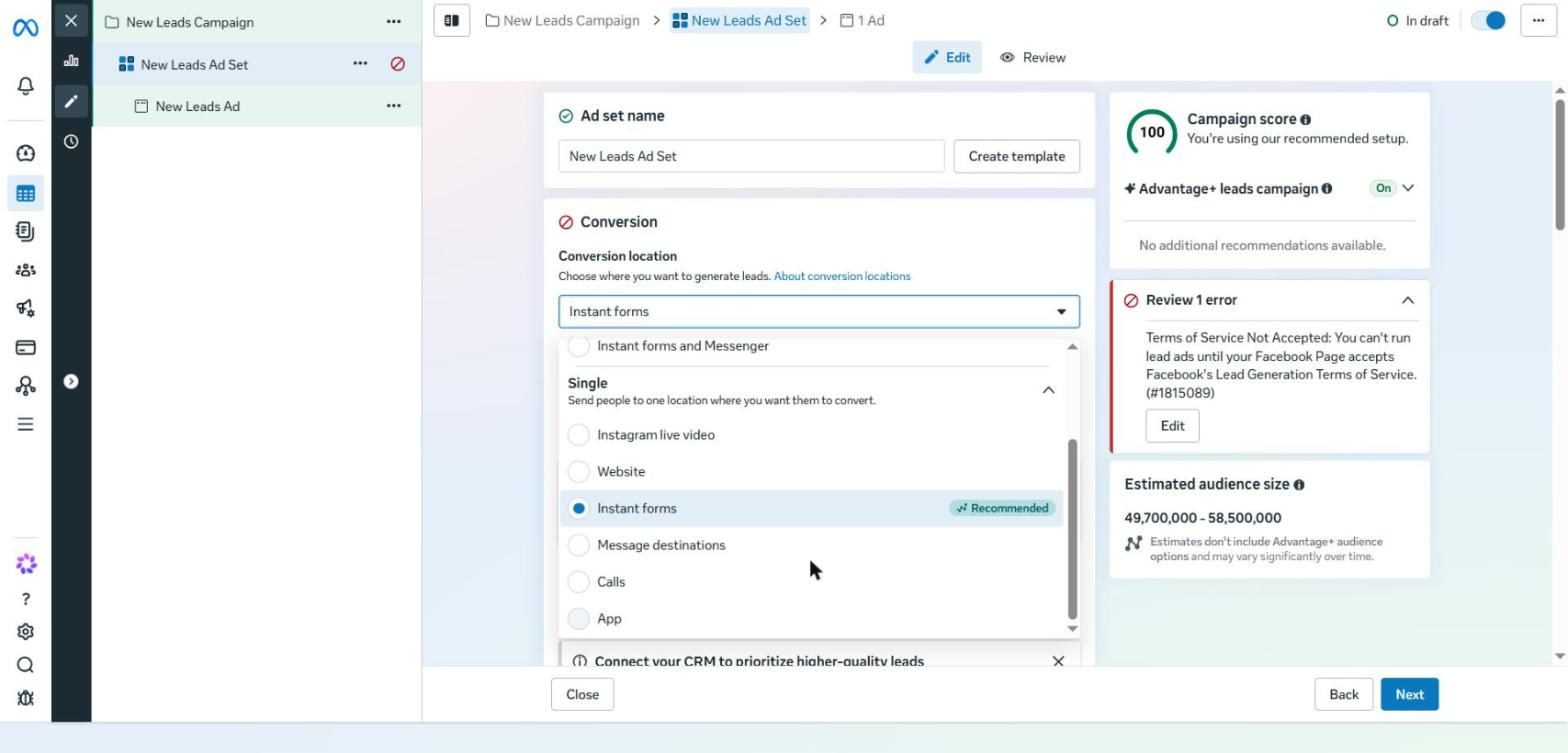
Conversion location options in a Leads campaign: Website, Instant forms, Message destinations, Calls and App
These are the actual options in a Leads campaign, split into Multiple (such as Website and instant forms) and Single. Meta marks Instant forms as Recommended because it's the cheapest per lead, not because it's necessarily right for your business.
The market matters too: in the US, e-commerce converts better through the website, while in markets like India and Brazil WhatsApp wins. In Egypt and Saudi Arabia many people prefer to ask questions in a chat first, so message funnels are worth testing seriously. If you sell online in Egypt, read how to market your online store in Egypt.
Option 1: Landing Page
Most businesses should test a landing page. The lead costs more, but people who leave their details there are usually more serious, and they remember the brand better than someone who fills in a form in a second.
The core structure of any landing page
Header navigation: a logo that links to the homepage and links such as Case Studies. Meta doesn't like closed pages with no way out.
A headline with the result and credibility: the outcome the customer wants, and a reason to believe you.
Who it's for: state the type of business or budget, so the right customer doesn't rule themselves out.
Proof everywhere: testimonials, reviews, case studies, before and after, and result numbers.
Several CTAs on the page, but one step: one short form leading to one outcome.
Personal brand: if you have a known name, use it.
The biggest improvement most pages need: they talk a lot about features and very little about proof. Add more proof; design matters far less than the elements and the message.
To see proof applied to real results, browse Cresco's case studies. And if your current page is slow or doesn't convert, that's what we build in our website and landing page development service.
Option 2: Instant Forms, Step by Step
Instant Forms need a Leads objective. If you select Instant Forms and Website together, Meta will send most of the traffic to the form because it's cheaper.
At the ad level you'll find the Destination section with Instant form inside it. Click Create a form. Note the Multi-advertiser ads option at the top, which allows other ads to appear next to yours.
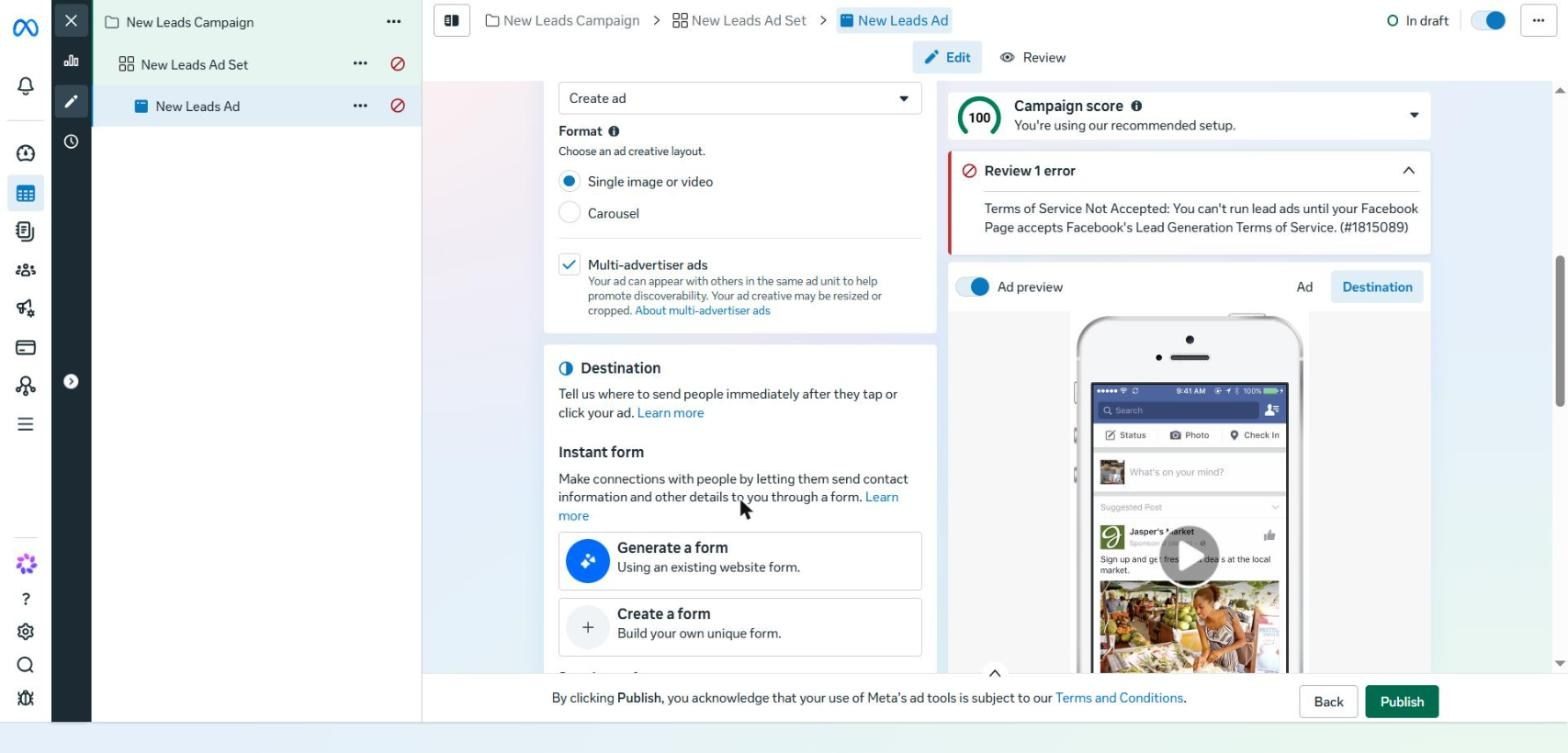
The Format section, Multi-advertiser ads, Destination and the Create a form button
The form builder has five steps down the side: Form type, Intro, Questions, Privacy policy and Ending.
1. Choose the form type
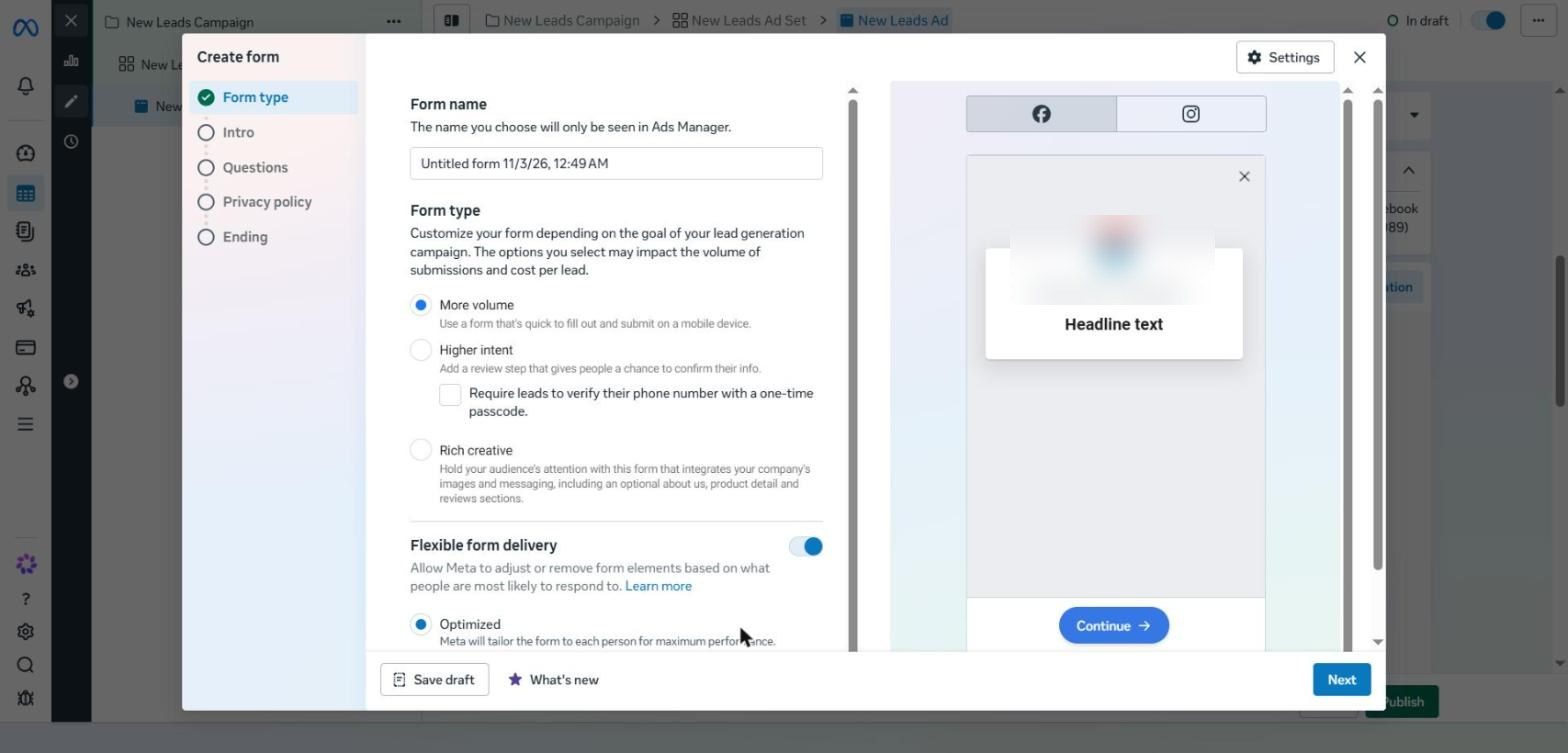
The Form type step: More volume, Higher intent, Rich creative and Flexible form delivery
Type | What it does | When to use it |
|---|---|---|
More Volume | A quick form with no friction | The starting point for any new offer |
Higher Intent | Adds a review screen before submitting | When lead quality becomes a problem |
Higher Intent + OTP | Asks people to confirm their phone number with a code | As a last resort, because it cuts volume sharply |
Rich Creative | Landing-page-style content inside the form | Rarely, because it raises cost without a clear gain in quality |
Friction isn't always a flaw: at Global Implant Centre, friction became a quality filter, bringing the cost per qualified lead down to SAR 1.5 against SAR 5 with the previous provider.
Keep Flexible Form Delivery on so Meta can simplify the form for each person.
2. Intro and questions
Add a background image and a headline that restates the benefit.
Keep name, email and phone number, and make the phone field required so you can call or message on WhatsApp.
Only add questions you wouldn't ask on the call anyway.
Use conditional logic on multiple-choice questions to filter (budget, location, eligibility). This teaches Meta to bring qualified people instead of counting any lead as a success.
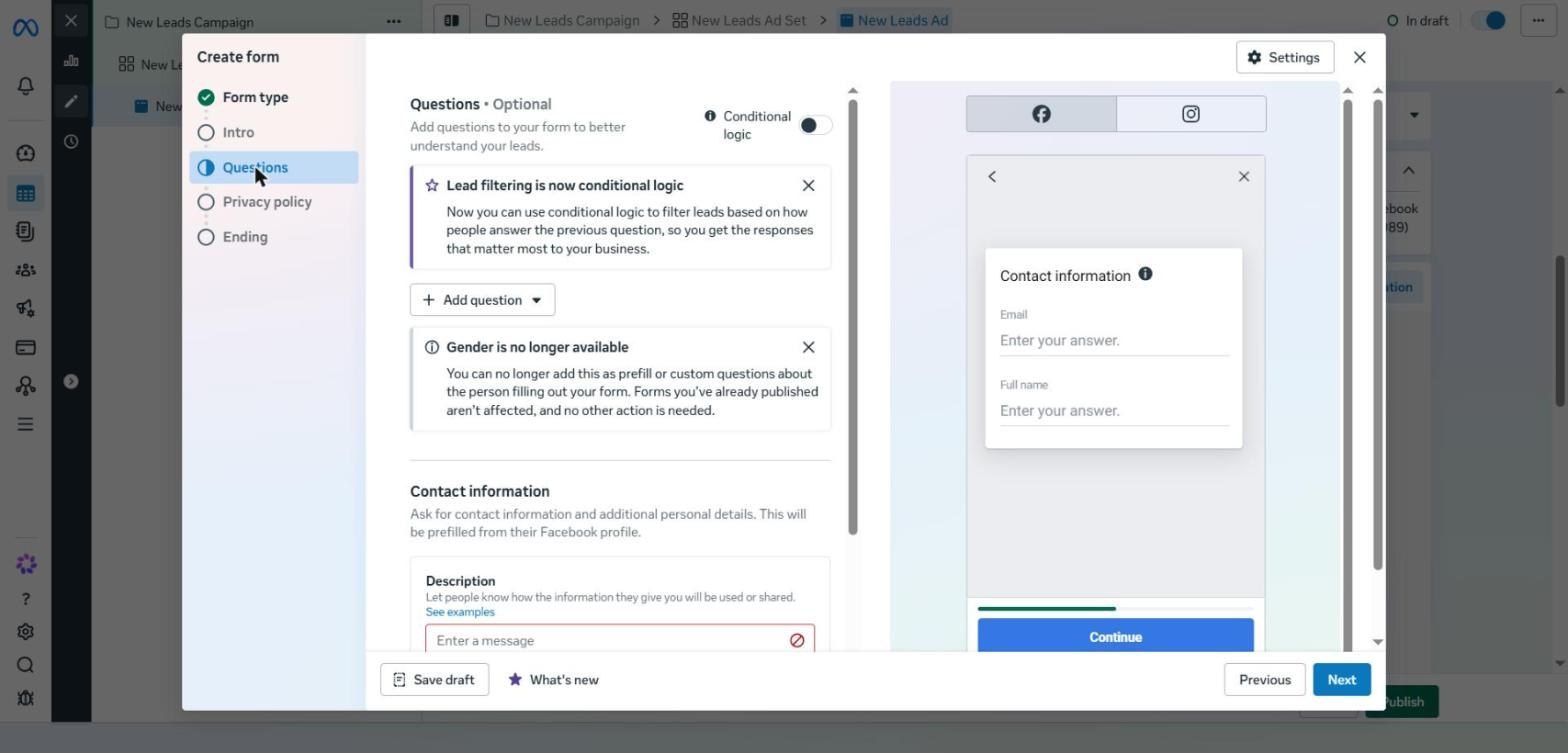
The Questions step: the Conditional logic button, Add question and Contact information
Note the Conditional logic button at the top, which has replaced lead filtering. Also note that the Gender question is no longer available in forms.
3. Ending screens
Add your privacy policy link and any required disclaimer.
An ending screen for qualified leads: “We'll be in touch soon, keep an eye out for our call.”
A second ending screen for unqualified leads that points them to a more suitable offer or content.
Choose an action for each screen: Go to Website, Call Business or WhatsApp Chat.
Turn off Multi-advertiser ads at the ad level if you don't want competitor ads to appear after your form.
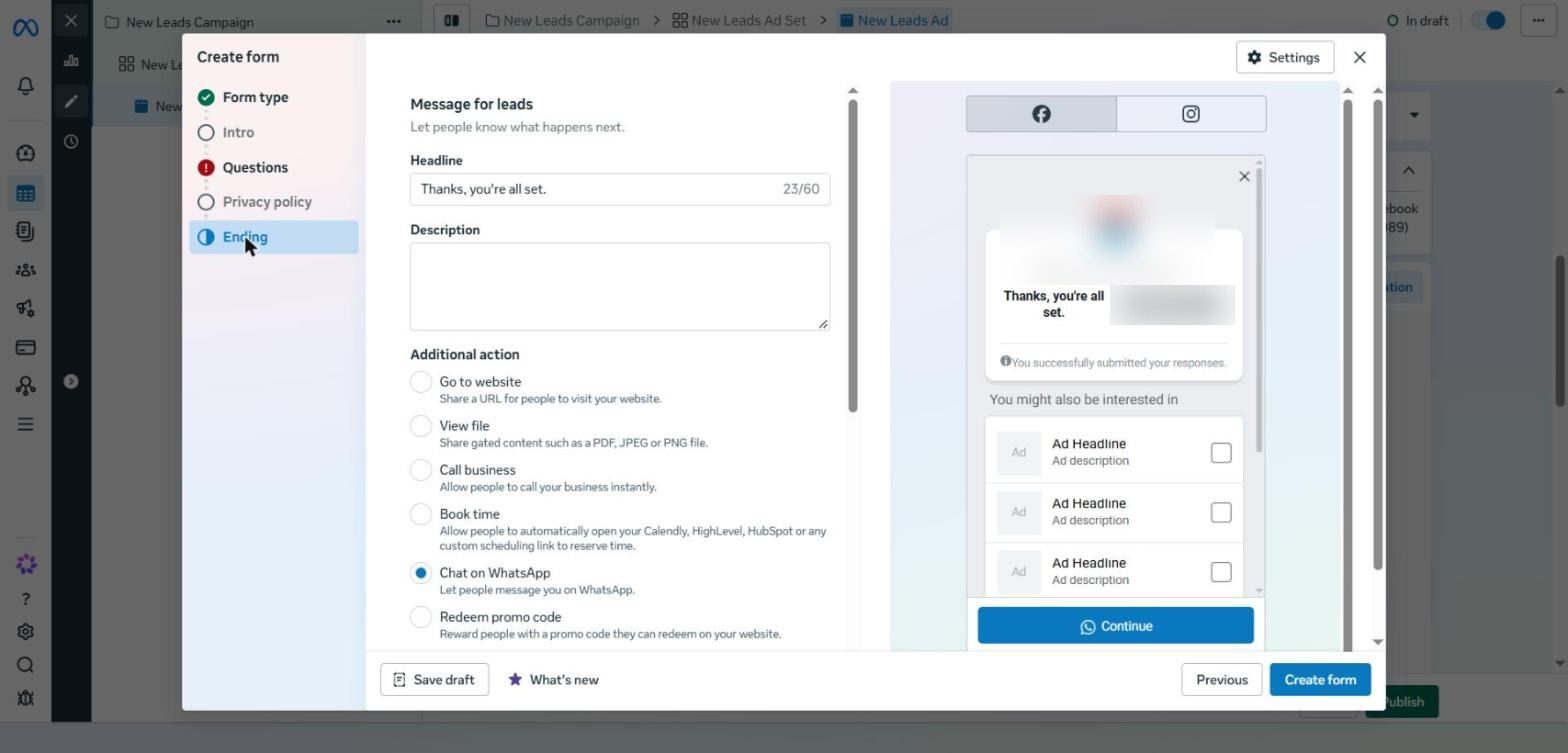
The Ending step: Message for leads and an Additional action such as Book time or Chat on WhatsApp
In the Ending step you'll find options such as Book time (Calendly or HubSpot) and Chat on WhatsApp. In our markets, Chat on WhatsApp lets the lead start the conversation straight away, which helps you reply faster.
Option 3: Message Funnels
In the ad set, set the conversion location to Messenger, Instagram or WhatsApp. The rest of the setup is the same; the difference is the Conversations section at the ad level.
Template | How it works | When to use it |
|---|---|---|
Start Conversations | A welcome message and quick replies, then a real person answers | At the start, to learn customers' real questions and objections |
Automated Chat | A bot that asks questions and qualifies | Once you understand the patterns, and at high volume |
Set the quick replies around your offer, such as “What monthly budget do I need?” or “Do you work in Saudi Arabia?”. Note that WhatsApp in Europe and the UK doesn't allow Maximize number of conversations, so the campaign effectively becomes a Traffic campaign.
How to Choose and Measure Properly
If volume and cost matter most, start with Instant Forms. If quality and brand matter most, start with a landing page.
Test more than one conversion location, especially in lead gen.
Judge on revenue, not CPL. Instant Forms will usually win on CPL, but if their close rate is lower, the landing page may deliver a better return.
24 hours response time before the fix | Under 1 min response time after the fix | 3× results from the same number of leads |
More important than the funnel itself: speed to lead. In one real case, cutting response time from 24 hours to under a minute tripled results from the same number of leads. Why do so many leads drop off before booking? Read why clinic leads don't book, and how to fix it.
PART 08
Ad Creative: Where the Game Is Won Today
In short The gap between average and strong creative can be several times over. Run images, video and carousels together, start with at least four genuinely different creatives, and take inspiration from the Ad Library without copying. |
Now that most targeting is automated, the gap between average creative and strong creative is measured in multiples, not small improvements. Creative here means the visual part: the image, video or carousel, not the copy.
60% video performs best | 25–30% images perform best | 10–15% carousels perform best |
The Three Formats
Format | Strengths | Use it for |
|---|---|---|
Video | Explains and persuades more | Most cases. Don't avoid it just because it's harder |
Image | Fast and easy to produce | A good starting point |
Carousel | Several cards, each with an image and headline | Multiple products, or a story in sequence |
Make all three and put them in the same ad set. Don't specialise in just one.
Volume: How Many Ads Do You Need?
Meta used to recommend six ads at most per ad set. After Andromeda the opposite is true: the more variety you give it, the better Meta can match the right ad to the right person.
A sensible start: four genuinely different creatives in the ad set.
Common practice: around 20 different ads at the first launch. Not the same image with different headlines, but genuinely different images, videos and carousels.
If you have several services: five services × 20 ads = 100 ads to start.
After launch: add new creatives every one, two or four weeks, depending on budget, audience size and how fast fatigue sets in.
Once the offer is proven, most of your time should go into producing creative. That's what keeps campaigns running and growing.
Creative Styles: Pick What Fits Your Business
Style | How it works | Who it suits | What makes it work |
|---|---|---|---|
UGC | An ordinary person shares their experience, like a friend's recommendation | E-commerce and impulse products, and services too | Looks like the target customer, with a strong hook and a clear pain point |
Founder-led | The business owner tells the story | When the founder is the face of the business or has a following | “I had the problem, couldn't find a fix, so I built one”, with objections answered inside the ad |
Demonstration | The product working in front of you, or before and after | Products or visible results | Educates and entertains at once, and justifies the price |
Client Testimonials | A real customer recommends you | Any business with happy customers | A montage of different customer types, with a CTA at the end |
Influencer | A known person with an audience | Most businesses | Often the strongest ad in the account, best run as a Partnership Ad |
Animated | Animation | If you don't want to appear on camera or you have a mascot | Stands out among all the UGC |
Slideshow | A sequence of images with music | Many products, events, or before, process and after | Fast and cheap if you already have images |
How to collect more testimonials
Offer an incentive, such as a discount on the next visit in exchange for a short video.
If you have a physical location (a clinic or a shop), set up a simple filming corner right after the experience.
Ask three fixed questions: Why did you contact us? What was bothering you? What changed?
Ask customers who are far away to film themselves and send it in.
Make it an ongoing system, not a one-off request.
Pick two to four styles that suit you, produce them and test them. When you find a winner, don't switch the others off; the variety itself is the point.
Inspiration: the Swipe File and Meta Ad Library
Instead of inventing from scratch, start from ads that work and build on them.
The swipe file: save any ad you like straight away (a screenshot or link) in one place, such as a shared folder or a Slack channel, and come back to it whenever you plan a new batch.
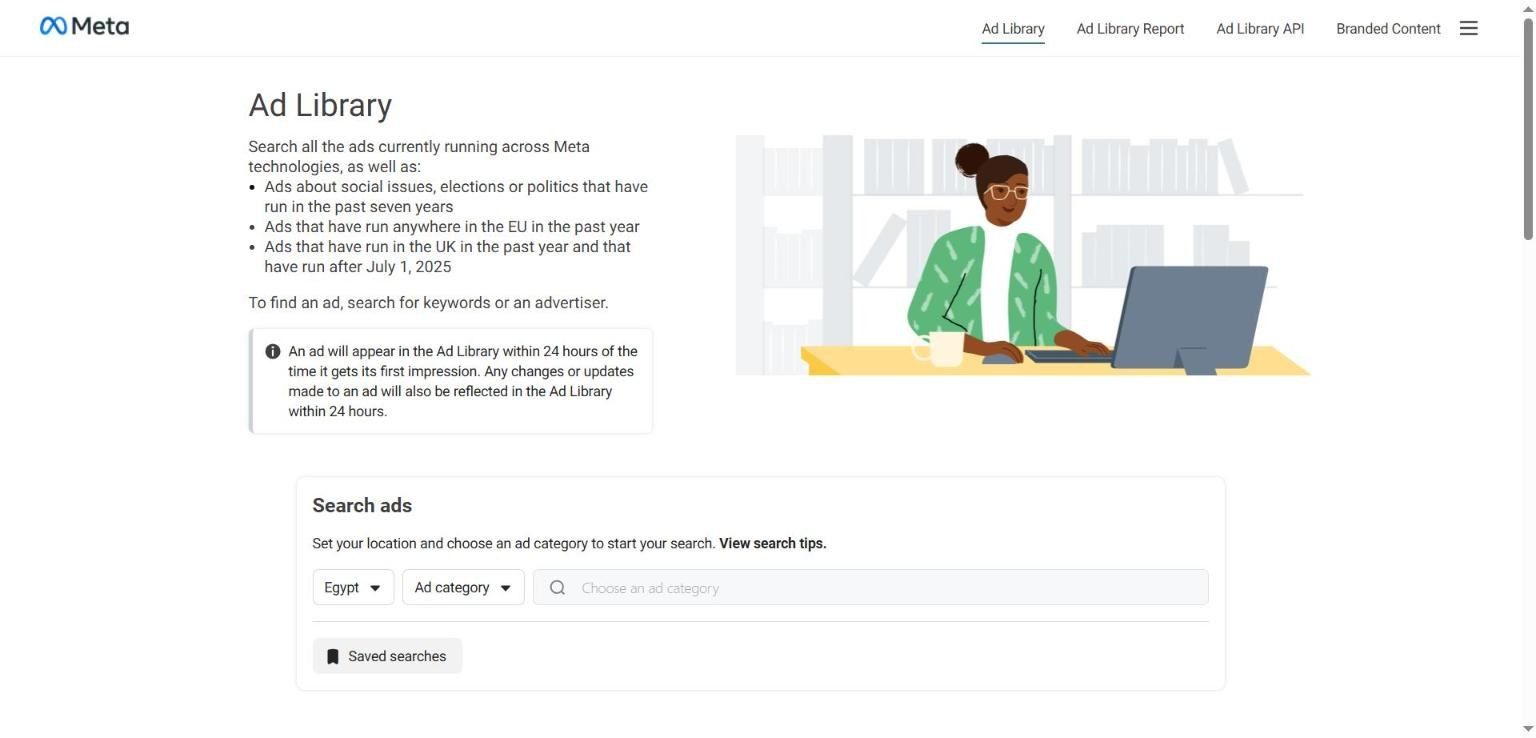
The Meta Ad Library page: country, ad category and the search box
Using Meta Ad Library step by step
Choose the country. This is where the ad is shown, not where the advertiser is based, and you can choose All.
Under Ad category, choose All ads.
Search for a competitor's name or a keyword related to the product.
Open the advertiser and review all their active ads: the creative, primary text, headline, CTA, platforms and start date.
Click the CTA and look at the landing page to understand the full funnel.
How to find the ads that actually work
Sort by impressions from high to low instead of newest. High impressions mean high spend, and high spend usually means good performance.
Look at how long the ad has been running. High impressions plus a long run is the strongest signal.
Break down the hook, style, message, proof, and whether it's a Partnership Ad.
Don't copy word for word. If a customer sees your ad and a competitor's as the same, you both lose.
Learn from a business two steps ahead of you, not a hundred. Huge brands win on their name.
Look at related, more advanced industries. An idea nobody uses in your space can become a competitive edge.
Creative Sizes
Size | Where it appears | Priority |
|---|---|---|
Square or 4:5 | Facebook and Instagram feeds | Always essential |
Vertical 9:16 | Stories and Reels | Make a version adapted for it, not just a crop |
Horizontal | A few placements | Optional; can be left as Original |
If the image shows a product or lifestyle shot without much text, let Meta crop it. If it has a lot of text, turn off automatic adjustments and upload a version for each size.
Creative Enhancements: What to Turn On and Off
Enhancement | Decision | Why |
|---|---|---|
Enhanced media text | Off | It changes the text inside the image and can change the offer itself |
Business AI | Off unless you've planned for it | Real-world use is still limited |
Add overlays | Off if the image has text | The text piles up and becomes unreadable |
Visual touch-ups | Off if you upload a version per size | It crops and expands the image automatically |
Text improvements | On | It arranges the copy to suit each placement |
Enhanced CTA | On | Low risk |
Add animation | On | Subtle motion that catches the eye |
Add product tags | On if your catalog is clean | Shows products next to the ad |
Flex media | On | It chooses between versions you uploaded yourself |
Music | Test it | Music in the live ad is usually better than in the preview, with no licensing issues |
For video, there are fewer enhancements and they're harder to get right, so it's normal to use fewer of them. Show highlights suits long videos and demos, not story-driven videos.
Image generation: Meta creates AI versions of your image. Use them when the background changes but the product stays the same, and reject any version that alters the product or the numbers, or shows work you never actually did.
Lessons from Winning Ads
E-commerce: open with a hook that says what the product does, compare it with the usual alternative, answer the likely objection, and close with a guarantee. 15 to 45 seconds is enough.
Lead gen: open by calling out the audience clearly, such as “If you run a business…”, explain the offer simply, and close with a soft CTA such as “Book a call to see if we're a fit”.
Local businesses: show the place itself, the reviews and how many there are, years of experience, and different kinds of people so every viewer can see themselves.
PART 09
Creators and Partnership Ads: Ready-Made Trust for Less Than You'd Think
In short Creator ads are often the strongest in the account. Always agree the right to run the content as ads, ask for multiple hooks, and run it as a Partnership Ad. |
An ad's first job is to stop the scroll, and people stop more for someone they know and trust. That's why creator ads are often the strongest ads in an account.
40–60% typical ROAS lift versus brand ads | Up to 200% in some cases | Under $1,000 per video from accounts with 500K+ followers |
Why Work with Creators
Attention and trust: a recommendation from someone trusted persuades more in B2B, B2C, high-ticket services and consumer products alike.
The creator has to fit you: their audience overlaps with your customers, and their content is close to what you sell.
It costs less than you'd expect: most creators make their living from brand deals. The exception is business and marketing creators, who are the most expensive.
They solve the production problem: they're already good on camera.
The most important point: don't pay just for a post on their page; organic engagement on a normal post dies within days. Agree to use the content as paid ads, and you'll be able to run it for weeks or months.
Creator Marketplace Step by Step
Open it from Ads Manager under All Tools (usually under Engage audience), or from the Go to Creator Marketplace Hub link in the Partnership ad section.
Meta will suggest creators based on your Facebook and Instagram accounts.
Search by keyword or category, and filter by country, follower count, age and gender to match your customer.
Open a profile and review: reach and engagement over the last 30 days, average hook rate, brands they've worked with and their audience data.
Contact them from inside the Marketplace rather than with a normal DM, because these messages land in a dedicated inbox.
Or create a campaign inside the Marketplace, specify the content (stories, reels, posts), dates and fee, and make it invite-only.
Always ask for permission to boost the content as ads. This is the most important setting in the whole process, and it's usually worth paying more for.
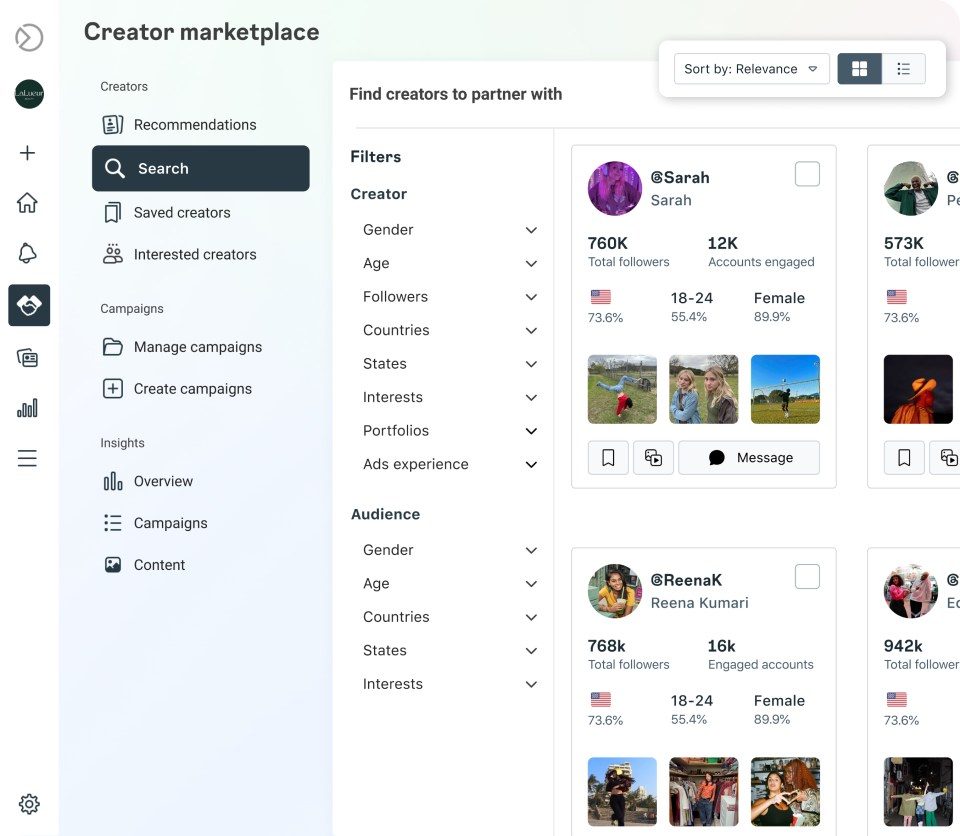
Find creators using market and audience filters · Source: Meta Newsroom 2024
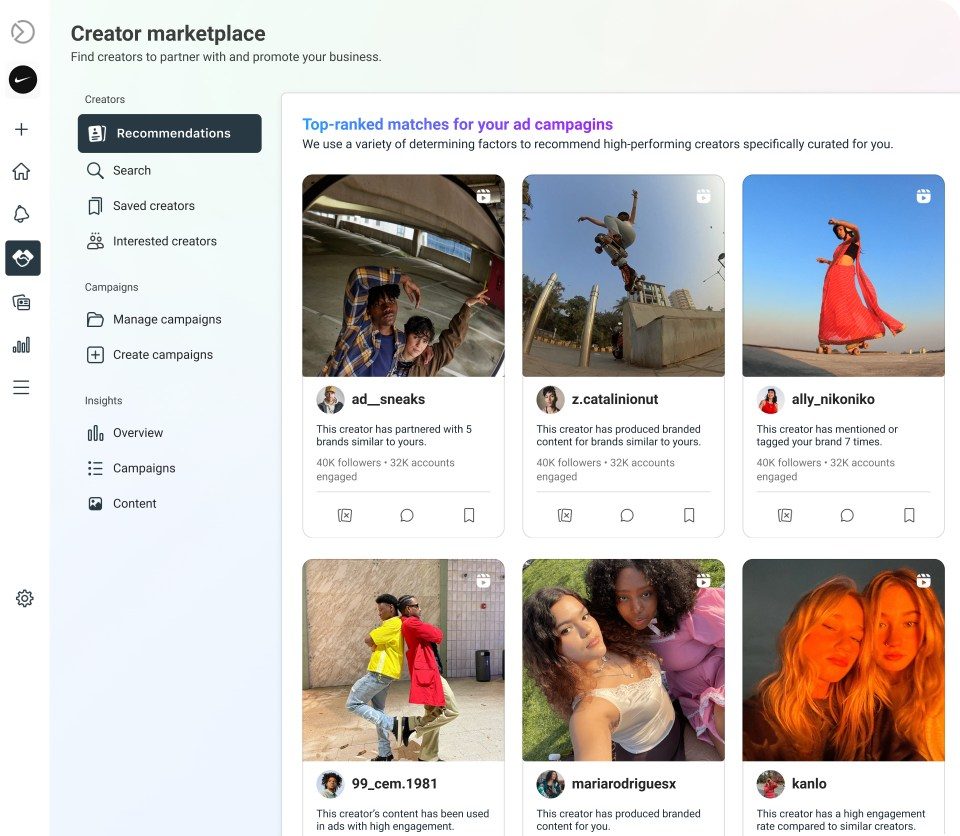
Review recommended profiles in Creator Marketplace · Source: Meta Newsroom 2024
The Brief and Negotiation
Item | Recommendation |
|---|---|
Number of videos | Two to three, in different settings |
Hooks | Five to ten hooks per video. They multiply your ad count with little effort |
CTA | Clear and trackable, such as a creator-specific discount code |
Benefits | A list they can choose from, not a word-for-word script |
Style | Close to their usual content, because that's what their audience responds to |
Price | Start lower than what you expect them to accept |
Pricing has no fixed logic, and accounts of the same size can ask for anything from hundreds to tens of thousands of dollars. So reach out to a lot of creators, start with the smaller and cheaper ones, and accept that some won't work. Invest more in the ones that do, and move up to bigger names gradually.
Partnership Ads Step by Step
A Partnership Ad shows your name and the creator's name together, and reaches the creator's own followers, who are the people they influence most. You'll find it at the ad level in the Partnership ad section (see the ad screen screenshot in Part 1).
On the ad screen, turn on Partnership ad.
Method 1: enter an ad code or post ID sent by the creator. This suits a post they've already published.
Method 2 (most common): click Add Partnership, search for the creator's Page or Instagram account, and pick the account you'll partner with.
Click Send request. The creator has to approve it.
Once approved, you can pick from their content at any time without a new code for each post.
The rest of the campaign (targeting, optimisation and messaging) stays the same, and you stay in control of it.
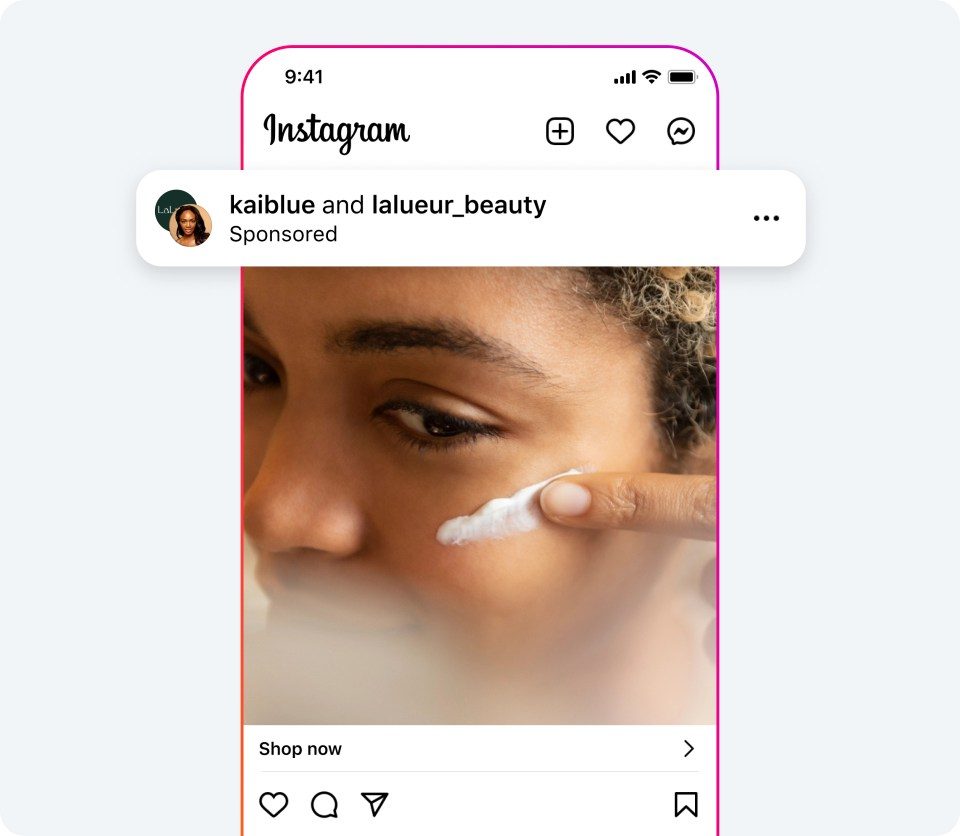
Official example of a partnership ad shown to a user · Source: Meta Newsroom 2024
PART 10
Ad Messaging: Clear Words for a Specific Person
In short The message is part of the targeting. Call out your customer from the first line, choose specific and clear over clever, and use all five versions of primary text and headline. |
Messaging isn't just the copy. It's what you want to say about the product, and above all: who it's for. Because Meta reads the text and matches it with user data, the message has become part of the targeting itself.
Rule 1: One Message Everywhere
The ad, the bio, the website, the landing page and your printed materials should all say the same thing. A simple test: if someone described your business to a friend, would they say what you want to be known for?
Write down on one page: who we are, what we offer and who it's for.
Review every digital and printed asset and make sure it matches that page.
Rule 2: The Message Is the Targeting
Meta analyses the text and watches who engages in real time, even before there are conversions. If the message clearly says who it's for, the right people stop and the wrong ones scroll past. That's why broad targeting works.
Use the call-out approach: address your target customer in the first second, in the visual or the first line of copy.
Rule 3: Specificity
Focus on the customer you can serve better than anyone, instead of talking to everyone. Big brands can advertise in general terms because they have a name; you usually don't.
By price: only the top tier, or a specific segment.
By use: professionals, hobbyists or beginners.
In B2B: by industry or by budget.
By stage or situation: for example a photographer who specialises in newborns.
Specialising isn't just a marketing advantage; it makes operations, hiring and training easier. Once you succeed in one lane, you can expand later.
Business | Generic | Specific |
|---|---|---|
Dental clinic | High-quality dental care | Dental implants in Fifth Settlement |
Accounting | Professional accountants | Tax advice for freelancers |
Clothing | The new collection | Linen shirts for hot weather |
Skincare | You'll love your skin | Retinol serum for fine lines |
The same principle works in education: specific messaging for named programmes in HR and marketing cut the cost per enrolment lead by 53% at Nokhba Institute.
Rule 4: Clarity Beats Cleverness
People see ads while scrolling and busy, and wordplay usually won't land. The value proposition and the target customer should be clear at a glance. Clarity plus specificity is what works.
Primary Text in Practice
A single ad can hold up to five primary text versions and five headlines. Use them to test copy instead of creating separate ads with the same image. Meta also suggests AI versions; only use the ones that fit your message.
Business | First line | Why it works |
|---|---|---|
Running shoes | “Do you run long distances?” | Calls out a specific segment |
Mattresses | “Wake up without back pain…” | The problem first, then the reason for the fix |
Furniture | “Need more seating without losing space?” | Reminds people of a solution for a specific situation |
Physiotherapy | “Shoulder pain stopping you from training?” | The problem and the context together |
Financial adviser | “Not sure you're on track for retirement?” | A life stage and a specific service |
Café | “Need a quiet place to work?” | A specific situation instead of a general invitation |
Vet | “Does your puppy need its vaccinations?” | A specific trigger that gets people to act |
The gap between good copy and great copy is much smaller than the impact of the offer and the creative, so don't spend more time on it than it deserves. If you use ChatGPT or Claude, ask explicitly for clarity and specificity, and give real details about the customer and the product.
PART 11
Analysis and Optimisation: One Number Decides, the Rest Diagnose
In short Pick one North Star (ROAS or cost per conversion), ignore the first 48 hours, use hook rate and link CTR for diagnosis only, and stick to a fixed optimisation schedule. |
Good analysis can turn a weak campaign into a strong one over time. The method is simple: one North Star makes the decision, and the other metrics explain why.
Step 1: Choose Your North Star
ROAS if you can track sales value, because it combines the number of conversions and their value. What's a good number for your business? See what a good ROAS is for e-commerce.
Cost per conversion (CPL or cost per purchase) if value doesn't flow back into the account.
This number decides whether an ad is working. A better CTR or a lower CPM doesn't overrule it.
Step 2: Wait the Right Amount of Time
There's no fixed number of days. It depends on conversion volume and on how different the ads are:
A big gap (CPL of 45 versus 125) needs little data.
A small gap (45 versus 48) needs a much larger sample.
Use a statistical significance calculator and aim for 90% confidence or more. Two conversions after a few days mean nothing.
Want a faster answer? Either wait longer, or spend more within what you can afford.
Step 3: Understand the Learning Phase
The learning phase is the period after launching an ad or making a significant edit, usually 24 to 48 hours. Meta tests audiences, placements and timings, so results swing around.
How long it lasts depends on volume, and a low-conversion business may never fully exit it.
Leave the first two days out of your analysis. For example, ROAS over the whole period is 2.5, but without the first two days it may be 3.5.
Don't compare a new ad still in learning with a stable one.
Step 4: Create Hook Rate as a Custom Metric
Hook rate measures the share of people who watch past the first three seconds of a video:
Hook Rate = (3-second video plays ÷ Impressions) × 100
In Ads Manager, click Columns, then Customize Columns.
Click Custom to create a new metric.
Choose 3-second video plays ÷ Impressions, wrap them in brackets and multiply by 100.
Name it Hook Rate and click Create Metric.
Add it to your columns and drag it next to the Results column.
Hook rate format: when using Percentage, enter 3-second video plays ÷ Impressions without multiplying by 100 again.
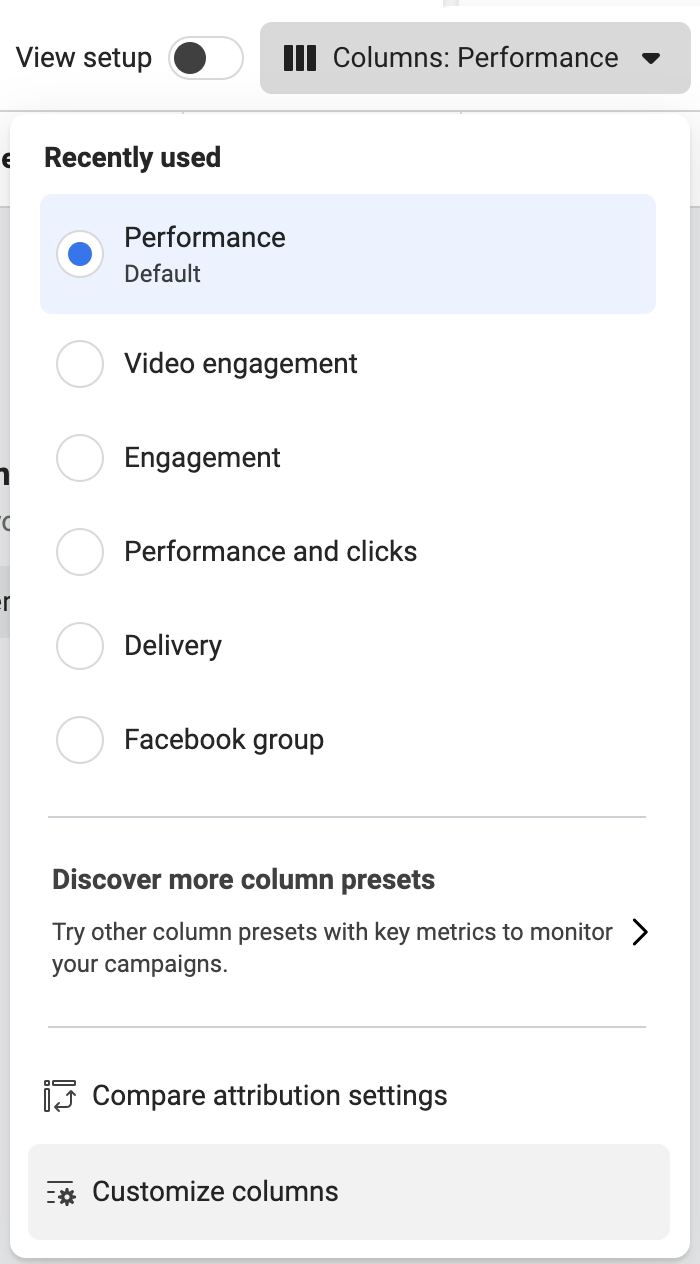
Open Customize Columns from the Columns menu · Source: Jon Loomer 2024 updated 2025
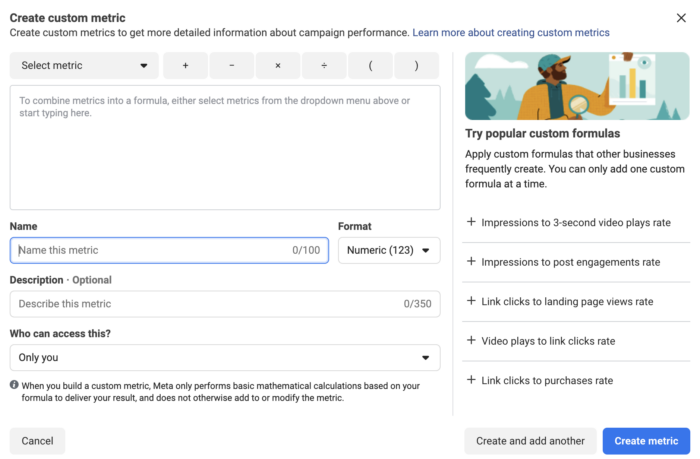
Create a custom metric and select its name and format · Source: Jon Loomer 2024 updated 2025
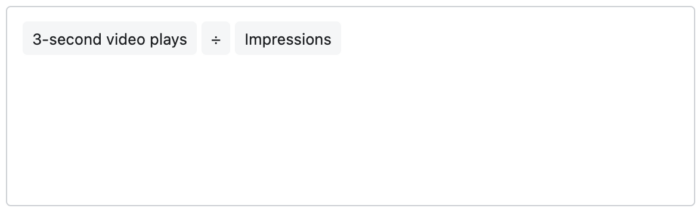
Hook rate formula before percentage formatting · Source: Jon Loomer 2024 updated 2025
Step 5: Use Link CTR, Not CTR (All)
CTR (all) counts any click: expanding the text, enlarging a video or leaving a comment, so it exaggerates, especially on video. Link CTR counts people who actually went to the website. As a rough guide: above 1% is good and above 2% is excellent, but it's still a secondary metric.
Step 6: Understand CPM Properly
CPM is driven more by factors outside the ad (country, platform and audience), and it's mainly useful for comparing ad costs between markets.
Don't change settings just to lower CPM. A lower CPM usually means a weaker audience, such as Audience Network.
A high CPM isn't a problem if the North Star looks good.
What really lowers it is more engaging ads, which can make a difference of around 25% for the same audience.
The Diagnosis Table
Once your North Star tells you whether an ad is working, use this table to find out why:
What you see | What it means | What to do |
|---|---|---|
High hook rate + good cost per purchase | The hook is a strength | Repeat the same type of hook |
Low hook rate + good cost per purchase | The rest of the ad is strong but the hook is weak | Test the same ad with a stronger hook |
Good hook rate + poor cost per purchase | The hook works; the rest of the ad needs work | Work on the body and the offer |
High link CTR + poor ROAS | The ad promises one thing and the page says another | Align the message between ad and page |
High hook rate + low link CTR | The CTA is unclear or unconvincing | Strengthen the ask at the end of the video |
Low hook rate + high link CTR | Those who keep watching are convinced, but few keep watching | Change the hook and keep the rest |
Many landing page views + few conversions | The problem is the page, not the ad | Work on the landing page |
Step 7: A Fixed Optimisation Schedule
Every edit can restart the learning phase, and constant tweaking is one of the most common beginner mistakes.
Set a fixed rhythm based on volume: daily for large accounts, or every 7, 10 or 14 days, or monthly.
Put it in your calendar as a recurring appointment.
Only on that day, review the North Star and the diagnostic metrics.
Make all changes at once: pause the weak ads and launch the new ones at the same time, so learning happens only once.
Adjust the rhythm when volume changes.
PART 12
Testing: Test Inside the Ad Set Without Breaking What Works
In short Set aside 20 to 30% of the budget for testing, use the Creative Testing tool instead of a separate campaign, and don't launch a new batch before you have a reliable result from the last one. |
A consolidated structure (one campaign, one ad set) has an obvious problem: when you add a new ad, Meta often won't spend on it because it prefers proven ads. The fix is a clear testing share and the Creative Testing tool.
Step 1: Set Your Testing Share of the Budget
Where results are | Testing share |
|---|---|
Results are strong | 10 to 20% |
Typical for most businesses | 20 to 30% |
Results are weak | Up to 100%, since there's nothing worth protecting |
Testing dips results slightly in the short term, but it's what uncovers ads stronger than your current ones, and it builds a ready supply for when older ads fatigue.
Step 2: A Separate Testing Campaign? Usually Not
A separate testing campaign also needs 50 or more conversions a week. If you spend 20% on testing, your main campaign needs 200 or more conversions a week, per offer. Below that volume both lose: the main campaign weakens and the test never gets enough data. That's why most businesses test inside the same ad set.
Step 3: Use the Creative Testing Tool
It's a tool inside Ads Manager that very few people know about, and it guarantees new ads get a fair share of budget.
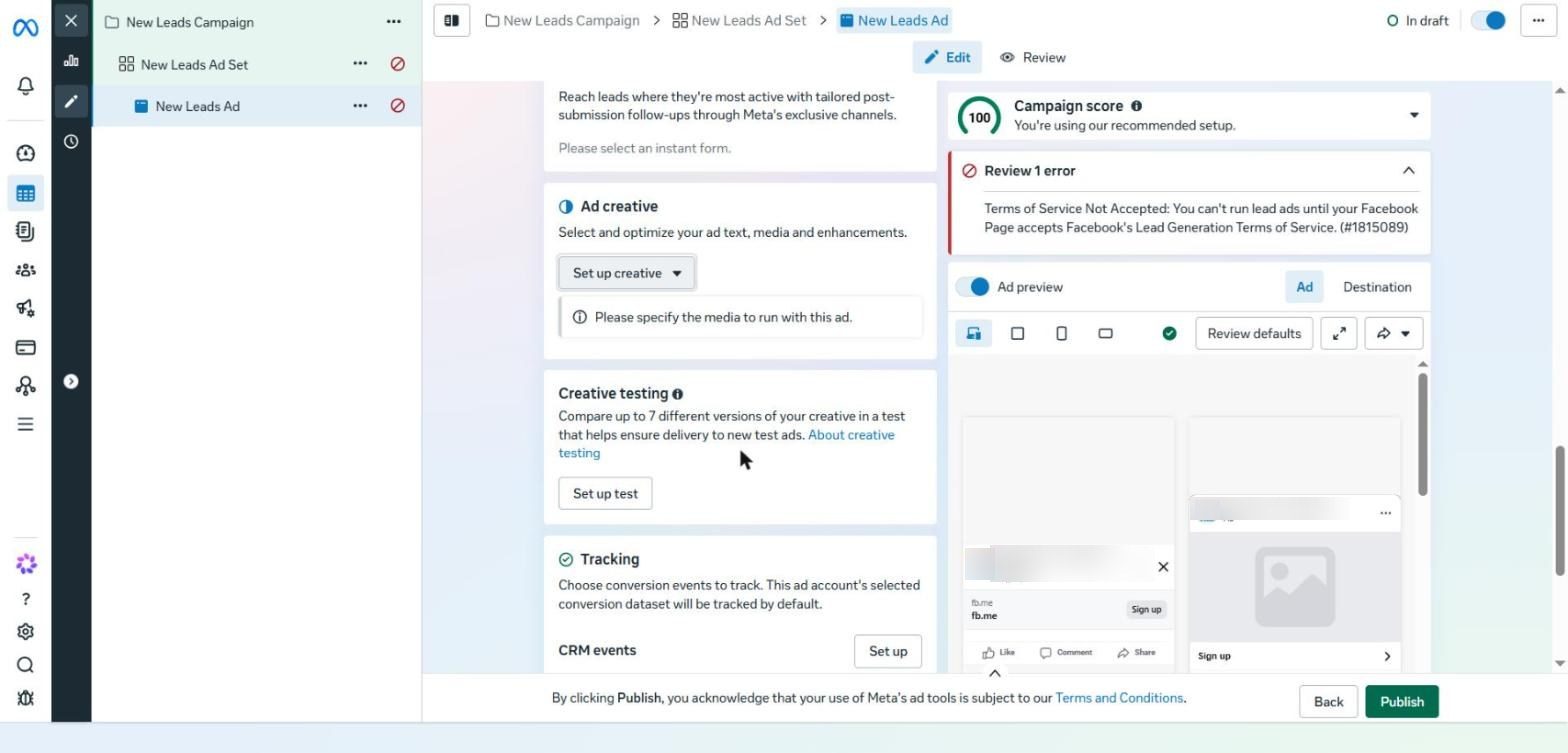
The Creative testing section at the ad level and the Set up test button
Open the ad. Under the Ad creative section you'll find Creative testing. Click Set up test.
Choose the number of versions. The screen allows up to seven, so pick the number of new creatives you actually have.
Meta creates an ad for each version and splits the testing budget between them equally.
Set a share of the daily budget for the test, such as 20% to start.
Open each test ad and give it a different creative.
Choose the comparison metric: your conversion event (cost per lead or cost per purchase), not cost per interaction.
Set the duration. If each ad's budget is small and your cost per conversion is high, you'll usually need more than seven days.
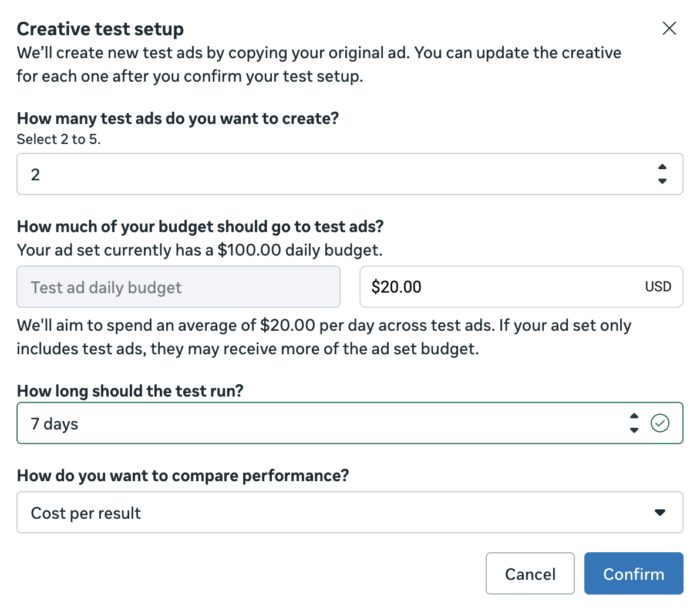
Configure test versions budget duration and comparison metric · Source: Jon Loomer 2025
After the test: your existing ads keep running normally throughout. When it ends, the test ads become regular ads and Meta allocates budget based on their performance. Use what you learned in the next batch.
Step 4: Find Your Real Testing Speed
The rule: don't launch new ads faster than you can get a reliable result from the previous batch.
If you reach statistical significance within days, you can rotate quickly.
If you need two or three weeks, that's your real rhythm, not “new ads every week”.
Two excellent ads are usually better than ten average ones.
Step 5: Dealing with Learning Limited
Learning Limited means the ad set isn't getting enough conversions to exit learning. Meta says this happens below 50 a week, but in practice some ad sets show Active from around 20.
Reduce the number of variables if you're testing many things at once.
If you have a testing campaign and a scaling campaign, merge them and use Creative Testing.
Reduce the number of campaigns overall.
Meta's advice to raise the budget is only right if results are already good. A campaign can stay in Learning Limited and still be profitable, which is normal for a small business.
PART 13
Scaling: Spend More Without Breaking What Works
In short Expect ROAS to drop as the budget rises, and plan for it. Use one rule to scale up and another to scale down, or a gradual manual ladder, and don't duplicate campaigns to grow. |
When you raise the budget, expect your cost per conversion to rise or your ROAS to fall. That's normal: Meta reaches the best people first, and as the audience widens, the share of highly responsive people shrinks. Under $100 a day, doubling usually won't change much, but big jumps will show.
Scaling is still usually worth it: a lower ROAS on a bigger budget can deliver far more total profit and customers, plus market share and word of mouth. To soften the trade-off, strengthen your unit economics (Part 6) and improve your creative before you scale.
Method 1: Automated Scaling with Rules
Ideal if you tend to tweak too much. The idea: one rule to scale up and one to scale down.
The scale-up rule
At the campaign level, click More, then Automated Rules, then Create New Rule, then Custom Rule.
Give it a clear name and choose the campaigns it applies to.
Action: Increase daily budget by a percentage, not a fixed amount. 3% a day is a sensible start.
Set a budget cap if you want protection.
Action frequency: once a day.
Condition: based on your North Star and clearly better than break-even. For example, if break-even is 100, only scale when cost per result is below 60.
Meta requires a minimum number of lifetime impressions (such as 8,000 or more) before the rule runs.
Time range: change the default to a short window such as 7 days, so you don't scale a campaign that was good months ago but is weak now.
Schedule: once a day at a fixed time (such as 12 to 1 am).
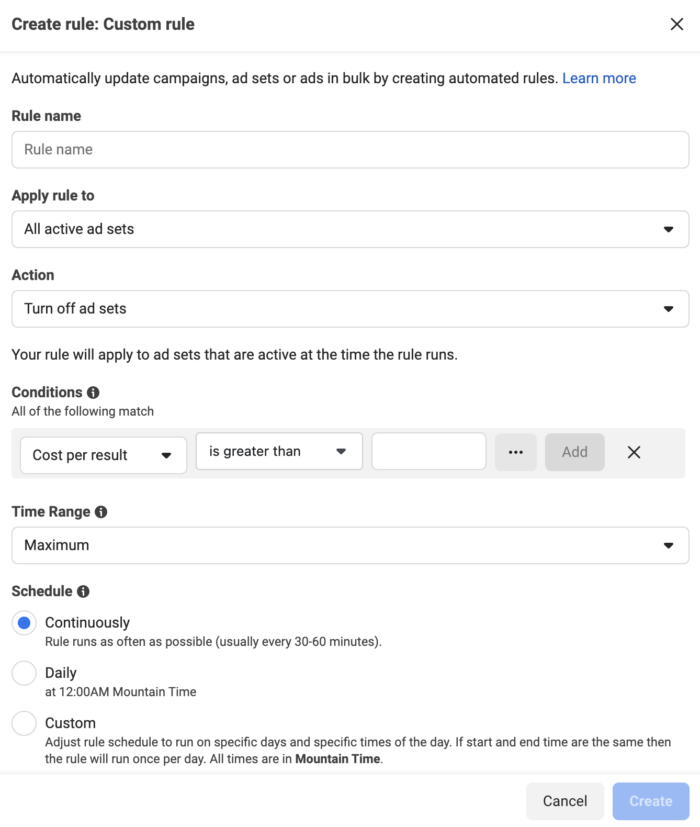
Custom rule scope action and conditions · Source: Jon Loomer 2024 updated 2025
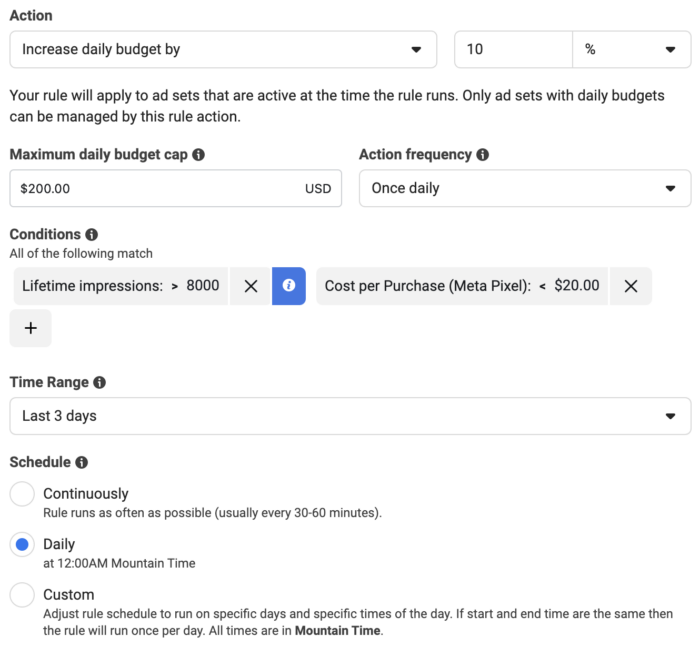
A completed budget increase rule with conditions and schedule using example values · Source: Jon Loomer 2024 updated 2025
The scale-down rule: the same settings, but Decrease daily budget by 3% when cost per result goes above an upper limit (such as 80), with a minimum budget.
Zone | Condition (example: break-even = 100) | What happens |
|---|---|---|
Scale up | Cost per result below 60 | Budget +3% a day |
Hold | Between 60 and 80 | No change |
Scale down | Above 80 | Budget −3% a day |
Method 2: Manual Scaling
Bigger, less frequent increases, suited to experienced and disciplined advertisers. It usually restarts the learning phase.
$100 daily starting point | 7 days at each level | $2,000 after ten gradual steps |
The percentage gets smaller as the budget grows. A sensible ladder in dollars per day: 100, 200, 300, 450, 600, 800, 1,000, 1,250, 1,500, 1,750, then 2,000.
Hold each level for around 7 days, depending on volume.
If results clearly get worse, step back to the previous level, or better still, hold until they improve.
Don't increase again while you're only just under your limit; wait for a clear margin.
Don't double a large budget in one go (such as from 10,000 to 20,000 a day); Meta won't keep up with the optimisation.
When to break the rules: for peak moments such as White Friday, a product launch or an event, scale fast. If capacity or stock can't keep up, cut back or pause. And if your goal is a much higher budget, you can jump straight to it if you're ready for the risk.
Scaling Mistakes
Mistake | Why it's a mistake | The alternative |
|---|---|---|
Horizontal scaling (duplicating the campaign) | It scatters data and creates auction overlap | Raise the original campaign's budget |
Aggressive or frequent scaling | The campaign stays in learning the whole time | Measured increases and a fixed interval |
Not scaling at all | The missed opportunity is far bigger than any temporary dip | Start, knowing you can always step back |
PART 14
Hidden and Advanced Settings Most Advertisers Never Use
In short Some of these take seconds and make a real difference: Combine Social Proof, defining audience segments, keeping 7-day click, conditional logic and value rules. |
These settings don't appear in the standard setup, but some of them take seconds and make a real difference to results.
1. Combine Social Proof
In Ads Manager, go to All Tools, then Advertising Settings.
Scroll down to the Social Information section.
Turn on Allow Meta to combine likes and reactions for similar ads.
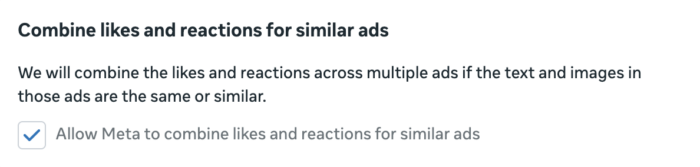
Combine likes and reactions for similar ads · Source: Jon Loomer 2025
If you run similar ads, Meta will combine their likes and reactions into one larger number. That number is social proof, and it can improve your cost per conversion.
2. Engaged Audience and Existing Customers
In Advertising Settings, define your Engaged Audience with custom audiences who engaged but haven't bought (website visitors, email list).
Define Existing Customers as people who have actually bought (a Purchase audience from the Pixel, or your customer list).
You don't need to add page or Instagram engagement audiences.
See the result under Breakdown, then Audience segments (screenshot in Part 2).
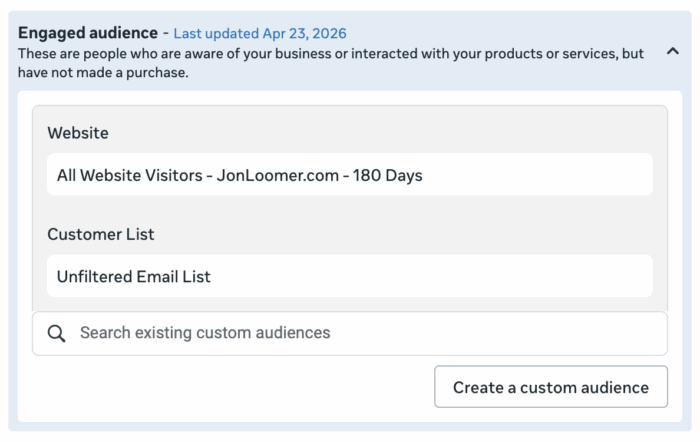
Define the engaged audience in Advertising Settings · Source: Jon Loomer updated May 2026
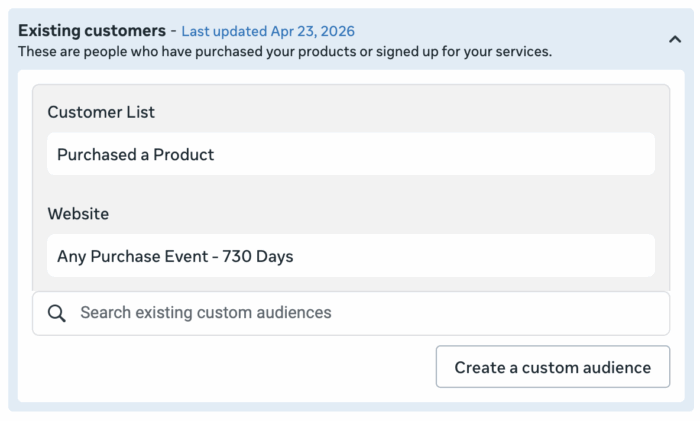
Define existing customers using customer lists and purchases · Source: Jon Loomer updated May 2026
It's normal for cost per result to be lower in Engaged and Existing, and it's also normal for most spend and results to come from the new audience.
3. Attribution Settings
Type | What it means |
|---|---|
1-day click | Bought within a day of clicking |
7-day click | Bought within 2 to 7 days of clicking |
1-day engagement | Engaged (watched a video or commented) without clicking, and bought within a day |
1-day view | Only saw the ad, and bought within a day |
View-through isn't always “they would have bought anyway”; the ad may have reminded them and they searched for you themselves. The setting is in the ad set under Show more settings, then Attribution.
Always keep 7-day click. Cut it to 1-day click and you could lose around half of your recorded conversions.
Turning off 1-day engagement or 1-day view is an option if you feel Meta is over-claiming, but it isn't the default.
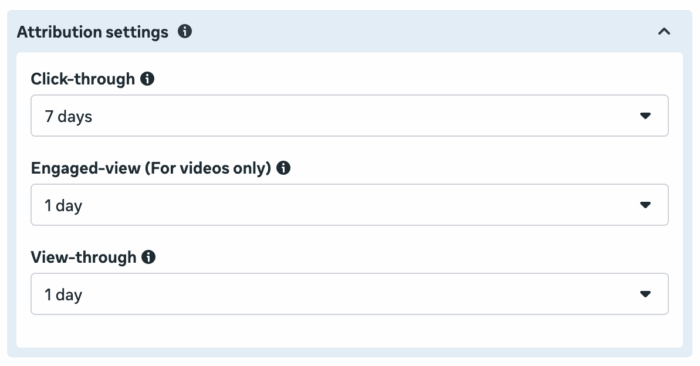
Attribution windows with labels that may vary by interface version · Source: Jon Loomer March 2026
4. Conditional Logic in Instant Forms
Instead of filtering leads after they arrive, filter them inside the form (the Conditional logic button in the Part 7 screenshot).
Make sure the conversion location is Instant Forms.
In the form builder, turn on Conditional logic.
Choose a multiple-choice question, such as “What's your monthly budget?”.
Qualifying answers continue normally and count as a lead.
Non-qualifying answers go to a separate ending screen and don't count as a lead at all.
The difference is in the learning: if everyone counts as a lead, Meta will bring more unqualified people. With conditional logic, it learns from qualified leads only.
5. Value Rules
Value rules tell Meta that a particular segment is worth paying more for. Your cost per result may rise, but you'll bring in higher-value customers.
Go to Advertising Settings, then Value Rules, then Create Rule Set.
Choose the criterion: age, gender, location, device, placement or conversion location.
Set the bid increase or decrease as a percentage.
Apply the rule set at the ad set level (like Placement value rules in the Placements screenshot in Part 1), because it isn't applied automatically.
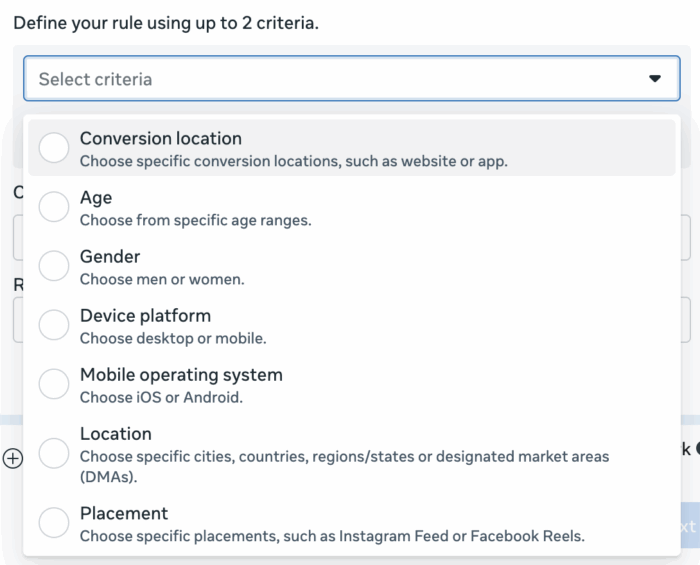
Select value rule criteria such as age location or device · Source: Jon Loomer 2025 updated 2026
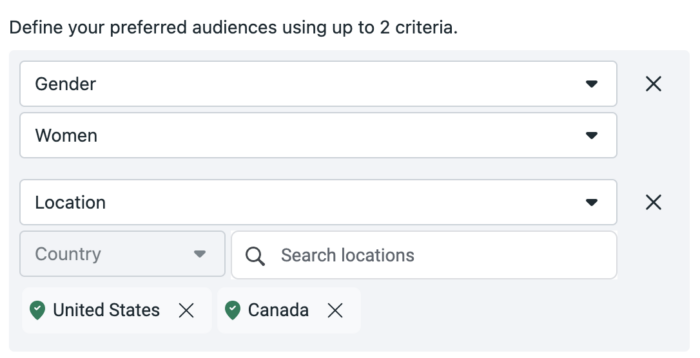
Example of combining two criteria in a value rule · Source: Jon Loomer 2025 updated 2026
Example | What you found | The rule |
|---|---|---|
Jewellery store | Women come back to buy more often than men | Raise the bid for women by a percentage instead of excluding men |
Subscription product | Older customers are worth more over time | Raise the bid for that age group |
Lead gen service | Leads from one city close more often | Raise the bid for that city |
The real barrier isn't the tool; it's knowing your numbers. If you don't have customer value data, start tracking it now.
6. Incremental Attribution
In the ad set, under Attribution Model, switch from Standard to Incremental. Meta will only count conversions that happened because of the ad, and will move away from spending on people who would have bought anyway.
The reported numbers will look lower, so don't compare them with Standard.
It suits big brands with a huge warm audience. If you're still growing, it isn't a priority.
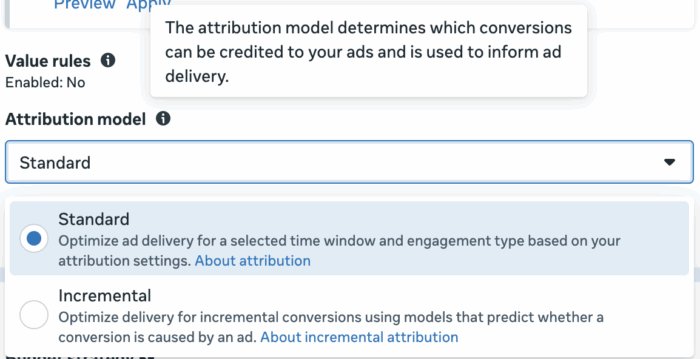
Select Standard or Incremental Attribution · Source: Jon Loomer March 2026
7. Omnichannel Optimisation
One campaign optimises for more than one conversion location, such as the website and a physical store, or a landing page plus an Instant Form. You need to connect your CRM or point-of-sale system to the account and keep its data up to date. It's very useful, because in-store customers usually have a higher average order.
8. CPM Creep
If CPM rises steadily or suddenly for no reason, Meta may be penalising your ads without warning. The two most common causes are weak engagement, or a message that sounds exaggerated or close to a special ad category (medical or financial). But compare like-for-like periods: CPM naturally rises in Q4 and falls in summer, and in our markets Ramadan is a crowded season too.
9. Customer Value Beats Everything
Your LTGP compared with competitors is the strongest predictor of ad success, and it's also what protects you when prices rise:
LTGP:CAC before | Ad costs up 25% | LTGP:CAC after |
|---|---|---|
4:1 | Same increase | About 3:1 |
25:1 | Same increase | About 20:1 |
The improvement here happens outside the ads: upsells and cross-sells, and product and service quality. If results drop for no reason inside the account, check your reviews and what people are saying off the platform.
10. Build Your Best Ad from Two Existing Ones
Pick a video ad with a low hook rate but a good ROAS or cost per conversion (a strong body).
Pick another ad with a high hook rate.
Put the strong hook on the strong body, and make sure the script flows.
Launch it as a new ad. You can also test the same body with several hooks.
PART 15
Andromeda and MAIBA: The AI Behind Everything Above
In short Andromeda is the reason behind every recommendation in this guide: a consolidated structure, lots of varied creative and a specific message. MAIBA is a useful assistant for analysis and support, but you're the filter. |
What Is Andromeda?
Andromeda is Meta's ad retrieval system: the first stage that picks which ads could be shown to each person from tens of millions, before the ranking stage. Meta announced it in December 2024 on the Engineering at Meta blog, saying it improved recall by 6% and ad quality by 8% in selected segments, and increased model capacity 10,000 times.
2.4% lift in Facebook conversions since 2025 | 1B+ ads evaluated per second per GPU server | 0 settings for it in Ads Manager |
In October 2026 Meta said Andromeda had lifted Facebook conversions by 2.4% since 2025, and that it now evaluates more than a billion ads per second on a single GPU server (PPC Land). There's no setting for it in Ads Manager; its impact comes from how you build the account.
Before Andromeda | After Andromeda |
|---|---|
People grouped by characteristics and interests | A specific ad matched to a specific person using thousands of signals |
Six ads at most per ad set | 20 to 30 active ads or more |
An ad set per interest, lookalike and retargeting | One hybrid ad set |
A separate retargeting campaign | Warm and cold together |
Targeting decides the audience | Creative and message decide |
The accounts that kept working with pre-Andromeda logic (many campaigns for the same offer, many ad sets with the same ads) are the ones whose performance dropped.
The Andromeda Strategy in Three Steps
Simplify the structure: one campaign per offer, and one hybrid ad set.
Increase creative volume and variety: every style (UGC, founder-led, demo, testimonial, animated, slideshow, influencer) and every format.
Make the message specific and clear at a glance: so Andromeda understands who each ad is for.
The only challenge is testing, and the answer is Creative Testing (Part 12). From experience, consolidating a scattered account into this structure often brings a quick improvement.
MAIBA: Meta's AI Business Assistant
MAIBA (Meta AI Business Assistant) is the assistant built into Meta's advertiser tools. You'll find it at business.facebook.com/help.
For account problems:
Describe the problem, such as an account disabled after a failed payment, or locked after login attempts.
If it can't solve it, ask to be transferred to a person. That's usually faster than standard support.
For analysis: ask it to analyse an active campaign, show your best ads by CTR, compare countries, or analyse the effect of frequency. It gives recommendations in seconds, such as spotting audience saturation from high frequency.
But you're the filter: it's still in beta and sometimes gets offer or account details wrong. Use it as a starting point for analysis, and review every recommendation before acting on it.
PART 16
Troubleshooting: When Results Drop
In short Don't assume the cause at first glance. Start with reporting delays, then frequency, then audience segments, then tracking, then change history. |
Don't assume the cause at first glance. Work through it in this order:
Symptom | What to check | The fix |
|---|---|---|
The numbers look wrong | Is the data from the last 48 to 72 hours? | Wait a few days before judging |
Performance is gradually declining | Frequency at the ad level | Above 3 usually means ad fatigue |
Performance dropped and frequency is under 2 | Breakdown, then Audience segments | The warm audience has likely run out; the offer needs strengthening for cold traffic |
New ads aren't spending | Budget is going to the old ads | Creative Testing (Part 12) |
Tracking is off | Event Match Quality in Events Manager | Reinstall the Pixel and CAPI, or bring in a developer |
Performance dropped after an edit | View History | Go back to the previous setup |
A long slump with no clear cause | Have you ruled out fatigue and changed the creative and offer? | Campaign reset |
The account was disabled | The reason for the restriction | Account recovery |
1. Ad Fatigue
Fatigue happens when an ad has reached everyone who's going to respond, and the rest scroll past because they've “seen it before”.
Add a Frequency column (impressions ÷ reach) and watch it at the ad level.
Above 3 with a rising cost per result usually means fatigue.
The fix is genuinely different creative, not a small tweak: another format, another style, or a new hook on a proven body.
Fatigue is a normal part of Meta advertising, and it happens faster with a bigger budget or a smaller audience. The best defence is continuous testing.
2. Results Tracking
Rule out reporting delays first: data from the last 48 to 72 hours is estimated and gets adjusted later.
In Events Manager, under Datasets, check the Event Match Quality for each event.
Open the event and review the match parameters (IP, user agent, click ID).
Check Event Coverage and Deduplication so a conversion isn't counted twice from the Pixel and the CAPI.
The first fix: delete the Pixel, reinstall it and set up the CAPI again. If it's more technical than that, bring in a developer; that's completely normal.
3. Change History
At the campaign level, select the campaign, click the three dots, then View History.
You'll see a timeline of every change: turning things on and off, new ads, budget changes, and who made them.
Go back to the last setup where the campaign was working well and start from there. Rolling back an edit that failed is perfectly normal.
4. Campaign Reset
Sometimes optimisation gets stuck on a narrow or wrong audience. If you've ruled out fatigue, changed the creative and improved the offer with no result, pause the campaign and create a new one with the same ads or some of them. It often gives a boost, even if only temporarily.
5. Ad Account Recovery
Try every channel at the same time, not one after another:
MAIBA at business.facebook.com/help, and ask to be transferred to a person if it can't solve it.
Request a review from the restriction notice. It can take weeks.
If you've spoken to a Meta rep before, contact them directly.
Prevention:
Know exactly why the account was restricted, and review the policies.
Watch your rejected ads rate. In each batch, keep most ads “safe” and only a few “bold”, such as 8 to 2.
Keep more than one payment method. A failed payment is one of the simplest reasons for a restriction.
If the violation is serious and the account won't come back, start a new account and avoid the same mistake completely.
PART 17
Honest Takes: What Nobody Tells You
In short Advertising is a competition only the best win, brand isn't a luxury, and the market shifts for reasons outside your account. Work with seasons, not against them, and take the long view. |
Advertising Is a Competition
A campaign that's “good” compared with competitors may be profitable, but it won't grow a business. In most industries a handful of advertisers take most of the results.
Pick a competition you can win: there are fewer competitors locally, and on a wider stage specialising becomes essential.
When you learn from competitors, always look for a way to do it better.
Competition never stops; your competitors will learn from you too.
Brand Isn't a Luxury
Brand is a mental association. It raises your pricing power, increases perceived likelihood in the Value Equation, and makes everything else easier.
Build: consistent content over a long period.
Borrow: creators and influencers, which is faster.
The best approach is both. A generic product in a crowded market without a brand struggles to stay profitable as it scales.
The Market Shifts
Customers are real people, not characters in a game. A competitor launching a new product, major events, the weather, government decisions or a post going viral can all move your results without you changing anything. Before pausing a good ad because of a dip, ask: has the same change caused a problem before?
Meta Alone Isn't the Whole Picture
Meta creates demand, Google captures it when the customer searches, and Snapchat is very strong in the Gulf (see The Complete Guide to Snapchat Ads). The best results we've seen came from combining them:
Uptown October: 10,494 real estate leads across Meta and Google at a 30% lower cost.
Lasirena Group: demand built on Google for a destination almost nobody was searching for.
Ramz Elekhtear: 12,993 leads for a Saudi car dealer with inventory-led targeting across Meta, Snapchat and TikTok.
Seasonality
Every business has its seasons, and some spend 80% or more of their budget in Q4. The common mistake is trying to smooth out revenue by spending more in weak seasons. The right move is the opposite:
Spend hard when customers are easier and cheaper to win, and pull back when it gets harder.
Keep cash in reserve for quiet periods.
Add products that sell in weak seasons, or sell to your existing customers then.
Let the Ads Run
Don't judge or edit on a handful of conversions.
Change one thing at a time, so you know what made the difference.
This isn't set and forget. Once you have enough data, work on it seriously.
A bad week is normal. The answer isn't less effort; it's a longer view.
Frequently Asked Questions
How much should I spend on Meta ads to start?
Start with an amount you can afford to lose but don't want to lose, and hold it steady until the campaign proves profitable. If you want a calculated figure, multiply your expected cost per conversion by 50, then by 4, to get the monthly budget that lets Meta learn. Part 6 has the details, and for online stores specifically see how much to spend on Meta ads for a new online store.
Which is better: campaign budget or ad set budget?
In most cases, campaign budget, because it lets Meta move spend to what's working, and it's part of the Advantage+ status. If you only have one ad set, there's practically no difference. For the full comparison and the scenarios where you need control yourself: CBO vs ABO: How to Actually Choose.
How long does the learning phase last, and when should I judge a campaign?
It usually lasts 24 to 48 hours after launch or after any significant edit, so leave the first two days out of your analysis. After that there's no fixed number of days: a big gap between two ads shows up quickly, while a small gap needs much more data. Aim for 50 conversions per campaign per week, and don't judge on two or three.
How many ads should I put in one ad set?
Start with at least four genuinely different creatives. Common practice after Andromeda is around 20 ads varied in format and style. Having 40 to 50 active ads in one ad set is normal, as long as the variety is real, not the same image with different headlines.
Should I run retargeting in a separate campaign?
Usually not. Add your warm audiences (website visitors and email list) as a suggestion inside the same ad set, and watch how spend splits under Breakdown, then Audience segments. Only separate them if the offer itself makes no sense to someone who doesn't know you.
Instant Forms or a landing page?
Instant Forms bring more leads at a lower cost; a landing page usually brings more serious leads. Test both and judge on revenue and close rate, not CPL alone. More important than the choice itself is how fast you reply to each lead.
Do I still need the Pixel if I have the Conversions API?
Yes, it's best to use both. The Pixel tracks events in the browser and the Conversions API sends them from the server, making up for what privacy restrictions take away. Make sure deduplication is set up so events aren't counted twice.
What is a good ROAS?
There's no single number that works for everyone; it depends on your margin. Break-even ROAS on the first order equals 1 ÷ your gross margin, so with a 50% margin you need a ROAS of at least 2 to avoid losing money. The full method is in what is a good ROAS for e-commerce.
Why did my results suddenly drop?
Don't assume the cause at first glance. Check in this order: is the data from the last 72 hours and not yet complete? Is frequency above 3? Has the warm audience run out? Is tracking working? And was there a recent edit in View History? The full table is in Part 16.
Is Advantage+ worth turning on?
In 90 to 95% of cases, yes. Keep Controls for location and legal limits only, make everything else a suggestion, and keep all placements. The exceptions are when you need a warm-only audience, or when you're forced to run a Traffic campaign.
Summary: Your Action Plan from Day One
Whether you're starting a new account or fixing an old one, work through it in this order:
Phase 1: Foundations (week one) ☐ A tidy Business Portfolio, with the Pixel and CAPI working (Part 1). ☐ I calculated break-even and LTGP:CAC (Part 6). ☐ I reviewed the offer with the Value Equation and added a real guarantee and urgency (Part 5). ☐ I chose the funnel and conversion location (Parts 4 and 7). ☐ I turned on Combine Social Proof and defined Engaged and Existing Customers (Part 14). |
Phase 2: Launch ☐ One campaign and one ad set for the best offer, with Advantage+ on (Parts 2 and 3). ☐ Location set, with warm audiences as a suggestion (Part 3). ☐ 4 to 20 creatives varied in format and style (Part 8). ☐ A specific, clear message, with five primary text and headline versions (Part 10). ☐ A budget you can afford to lose but don't want to (Part 6). |
Phase 3: Ongoing management ☐ One North Star, with hook rate and link CTR for diagnosis (Part 11). ☐ A fixed optimisation schedule in the calendar (Part 11). ☐ Creative Testing with 20 to 30% of the budget (Part 12). ☐ Scaling with rules or a manual ladder once profitability is proven (Part 13). ☐ Creators and Partnership Ads when you're ready (Part 9). ☐ When results drop, work through the troubleshooting table (Part 16). |
Want someone to apply this guide to your account? Cresco Agency runs Meta and Google campaigns for brands in Egypt, Saudi Arabia and Kuwait, from structure and creative to tracking and scaling. |
Launching a project this quarter?
30 minutes, no cost. We’ll show you where your cost per lead is leaking.
Sources
Meta says Andromeda lifted Facebook conversions 2.4% — PPC Land, October 2026
Jon Loomer Digital — source of several illustrative images
Meta Newsroom — Creator Marketplace and Partnership Ads images
The core structure is based on Ben Heath's Meta Ads Academy.