Snapchat isn't just an app for teenagers, as many advertisers assume. In Saudi Arabia in particular, it's one of the most used apps among the age group that buys, books and tries new things more than any other. The numbers are in Part 1.
Just as important, the ad platform itself has changed a lot over the last two years: fewer and clearer objectives, a Smart Audience that works much like Advantage+ on Meta, Sponsored Snaps that land straight in the Chat inbox, and a Conversions API that is now essential rather than a nice-to-have. Anyone running Snapchat with a 2022 mindset is leaving a lot of results on the table.
Each part opens with a quick summary, and the guide ends with a day-one action plan. It's the same approach we use every day in Cresco's Snapchat Ads service.
971M monthly users worldwide (Q2 2026) | 26M+ monthly users in Saudi Arabia | 90% of Saudis aged 13 to 34 |
In this guide | |
01 Why Snapchat? 02 Foundations: account, Pixel and CAPI 03 Objectives and campaign setup 04 Ad set settings 05 Targeting and Smart Audience 06 Custom and Lookalike Audiences 07 Ad formats 08 Building the ad step by step 09 Creative on Snapchat 10 Lead Generation | 11 E-commerce and Catalogues 12 Offers and seasons 13 Budget and bidding 14 Measurement and analysis 15 Testing and scaling 16 Troubleshooting 17 Ad policies and review 18 Playbooks by industry 19 Creators and Partnership Ads 20 Snapchat and Meta: the full picture |
About the screenshots Every screenshot comes from a real Snapchat Ads Manager account in November 2026, using campaigns created as drafts and never published. The account name and client names are hidden, and the interface may change after publication. A few illustrative images from the Snapchat Business Help Center are added, each credited underneath. |
PART 01
Why Snapchat? The Audience Before the Ad
In short A huge, young audience, an exceptional presence in Saudi Arabia and Kuwait, and reach that's often cheaper than on more crowded platforms. But it isn't right for every business. |
Before any setup, ask one question: are my customers on Snapchat? In the Gulf the answer is usually yes, at a far higher rate than in most countries.
The Numbers That Matter
Metric | Figure | Source |
|---|---|---|
Monthly users (global) | 971 million | Snap Q2 2026 results |
Daily users (global) | 493 million | Snap Q2 2026 results |
Monthly users in Saudi Arabia | More than 26 million | Snap via the Saudi Press Agency, November 2025 |
Reach in Saudi Arabia | 90% of 13 to 34-year-olds | Same source |
Average daily use in Saudi Arabia | Around 70 minutes | Snap at the Saudi Media Forum, 2025 |
In a May 2026 study by Performics and Publicis Media for Snap, covering brands in Saudi Arabia and the UAE, Snapchat delivered 29% of all social conversions using just 27% of the social budget, with a median CPA 14% lower than other platforms. The study was funded by Snap, so treat it as a signal rather than a verdict, but it matches what we see in Gulf accounts.
Who Is Snapchat For?
Strong fit | Worth testing | Usually not a fit |
|---|---|---|
E-commerce in fashion, beauty, supplements and electronics | Real estate and automotive (works well with lead forms) | Highly specialised B2B |
Restaurants, entertainment and events | Clinics and medical services | Products whose buyers are mostly over 50 |
Education, academies and universities | Financial services (within the policies) | Markets where Snapchat isn't used (check audience size first) |
An example from our clients: in Saudi Arabia, AUM Isuzu generated 2,277 leads against a target of 1,200 in 20 days across Snapchat and Meta, which breaks the idea that Snapchat can't sell high-ticket products.
Cresco tip Before deciding, open a test ad set, enter the country and your customers' age, and watch Target Audience Size on the right. In the Part 5 screenshot you'll see that Saudi Arabia alone gives an audience of 25.7 to 26.8 million. |
PART 02
Foundations: Account, Snap Pixel and Conversions API
In short A tidy Business Account, a Public Profile, a working Snap Pixel and a Conversions API with correct deduplication. Without these, the algorithm can't learn from real buyers. |
As on any modern ad platform, the quality of the data you send Snapchat decides the quality of the results you get. The most common mistake is starting to spend while the Pixel isn't sending any events.
The Account and Public Profile
Go to ads.snapchat.com, sign in with a Snapchat account and create a Business Account with the business's official details.
Create an Ad Account and set the currency and time zone carefully, because they affect billing and reporting.
Create a Public Profile for the brand. It's the name and logo that appear on the ad, and users can follow it from the ad itself.
Add a payment method under Billing & Payments, and add your team under Members with the right permissions.
Every tool on the platform sits in the main menu at the top left, grouped into Advertise, Assets, Creative, Analyse and Business:
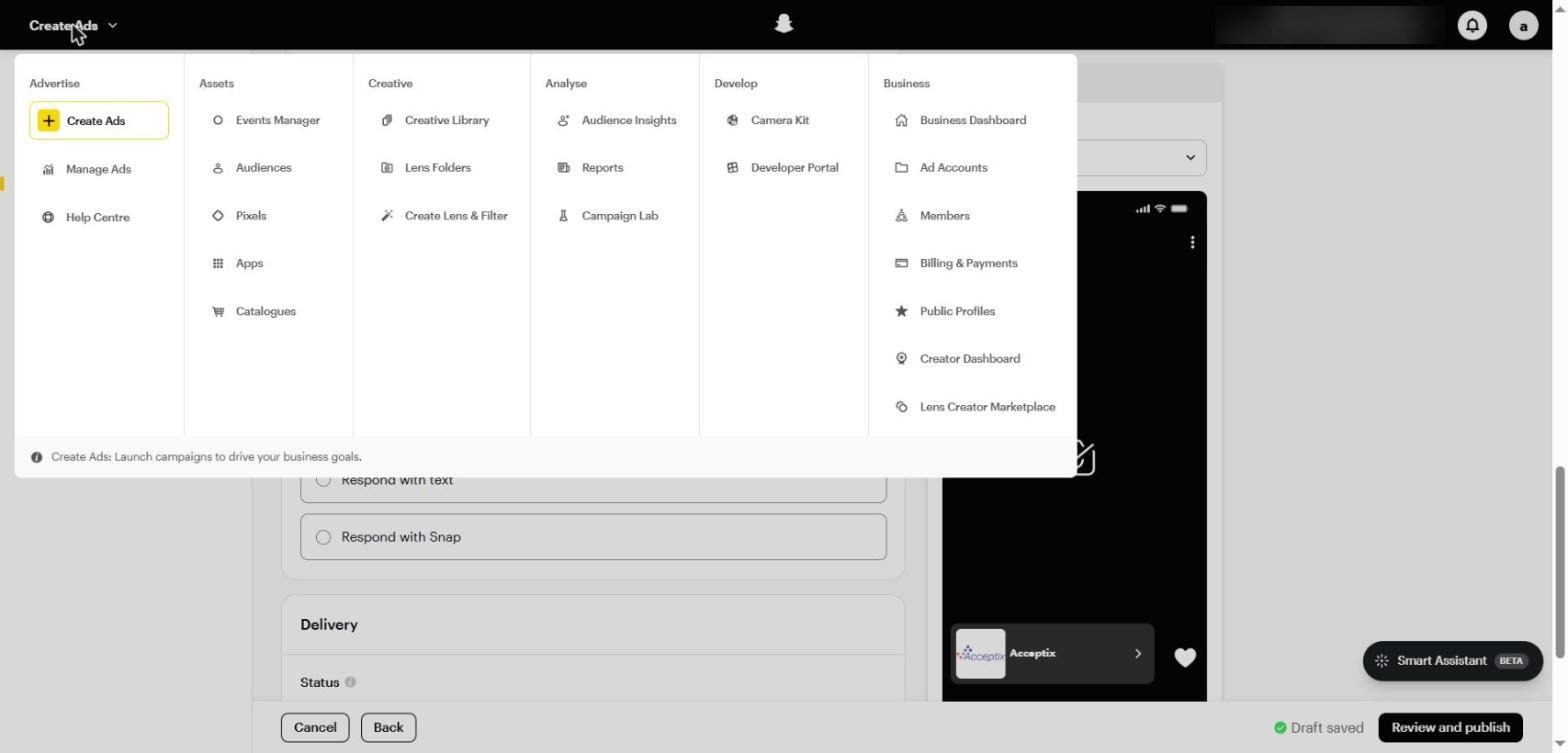
The main menu in Snapchat Ads Manager: Events Manager, Audiences, Catalogues, Reports, Campaign Lab and more
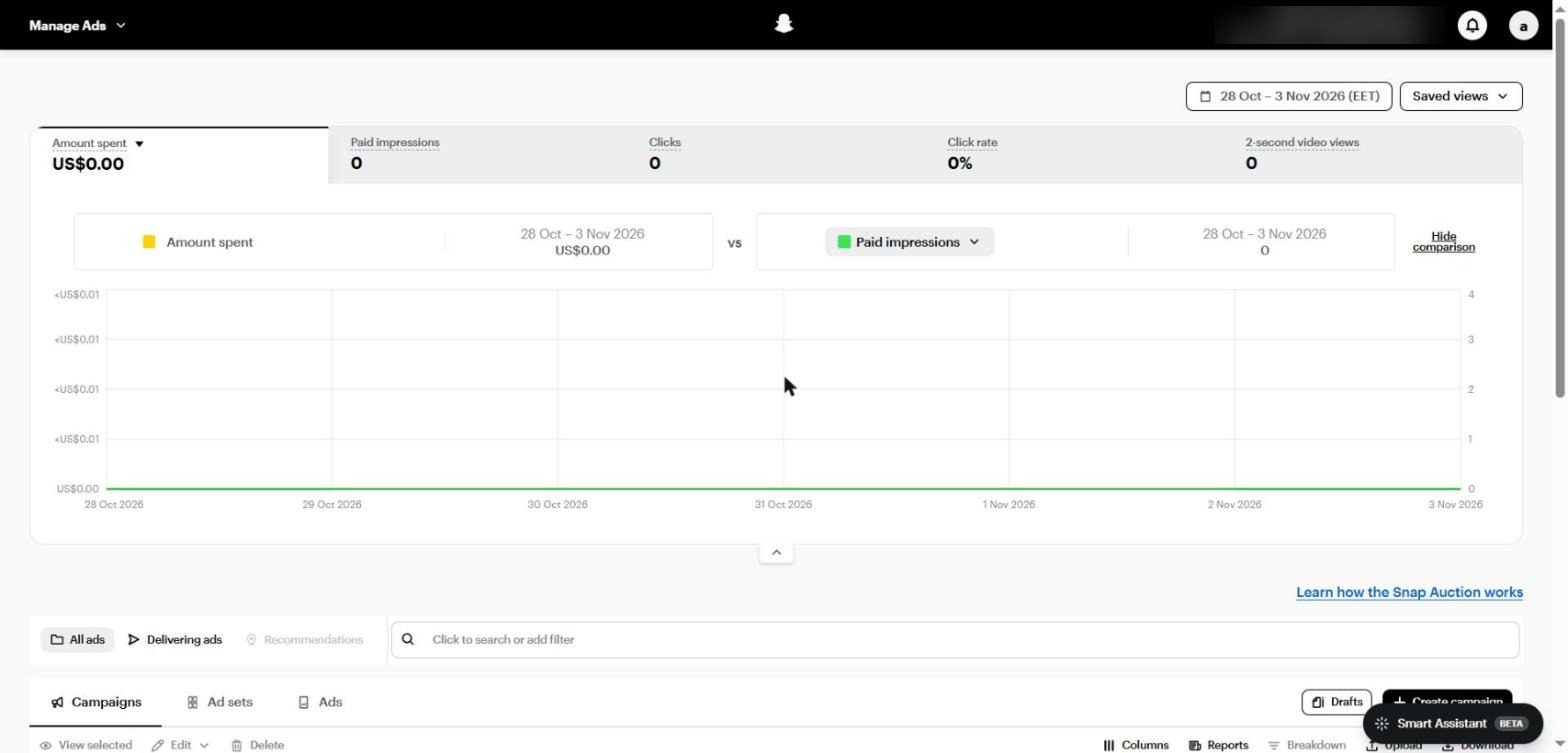
The Manage Ads screen: spend, impressions and clicks at the top, with the Campaigns, Ad sets and Ads tabs below
The Snap Pixel
The Snap Pixel is a piece of code on your website that tracks what happens after someone taps your ad, such as PAGE_VIEW, ADD_CART, PURCHASE and SIGN_UP, and sends that data back so Snapchat knows who actually converts.
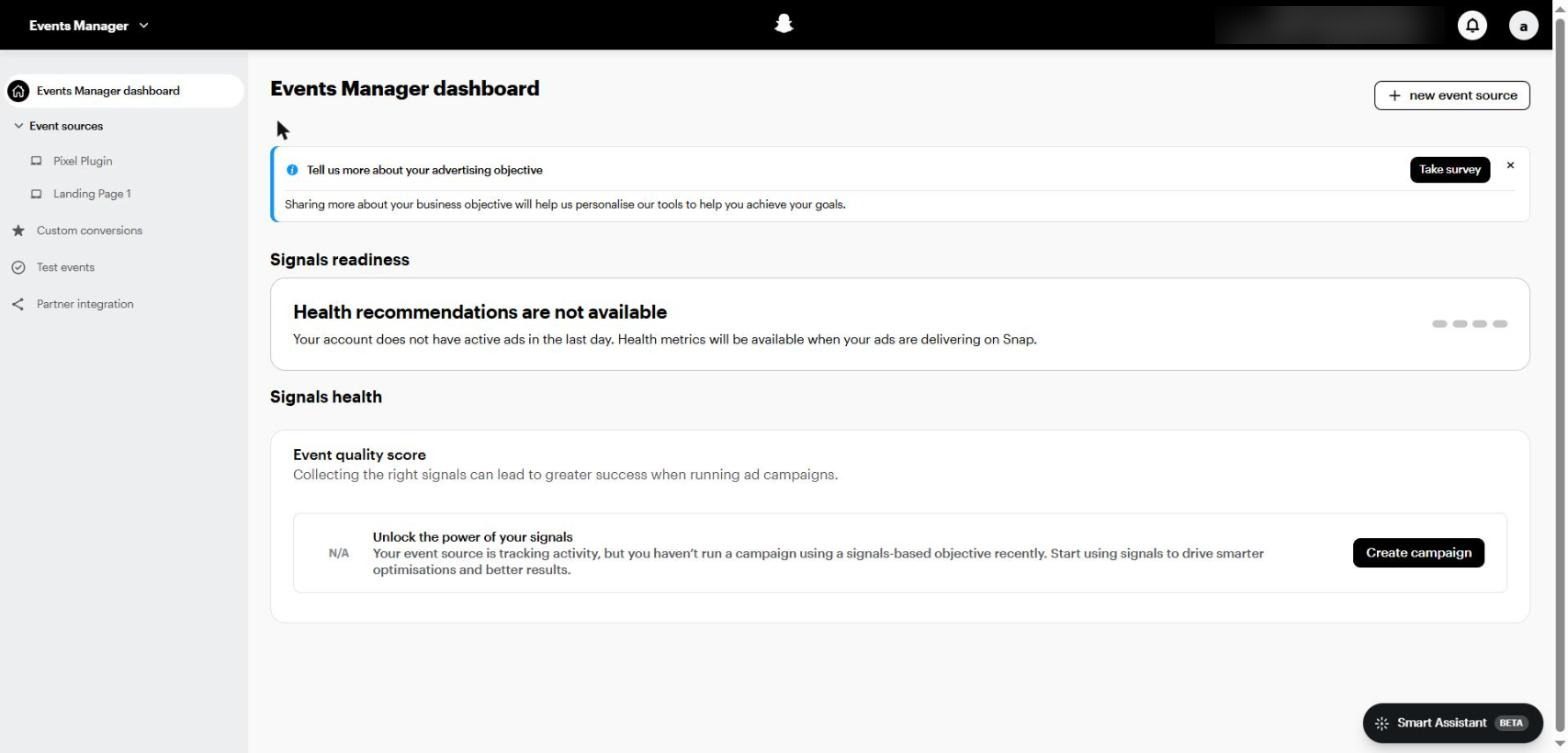
Events Manager: event sources, Custom conversions, Test events, Partner integration and the Event quality score
Creating the Pixel step by step
From the menu, open Events Manager and click + new event source.
Choose Web for a website or App for an app.
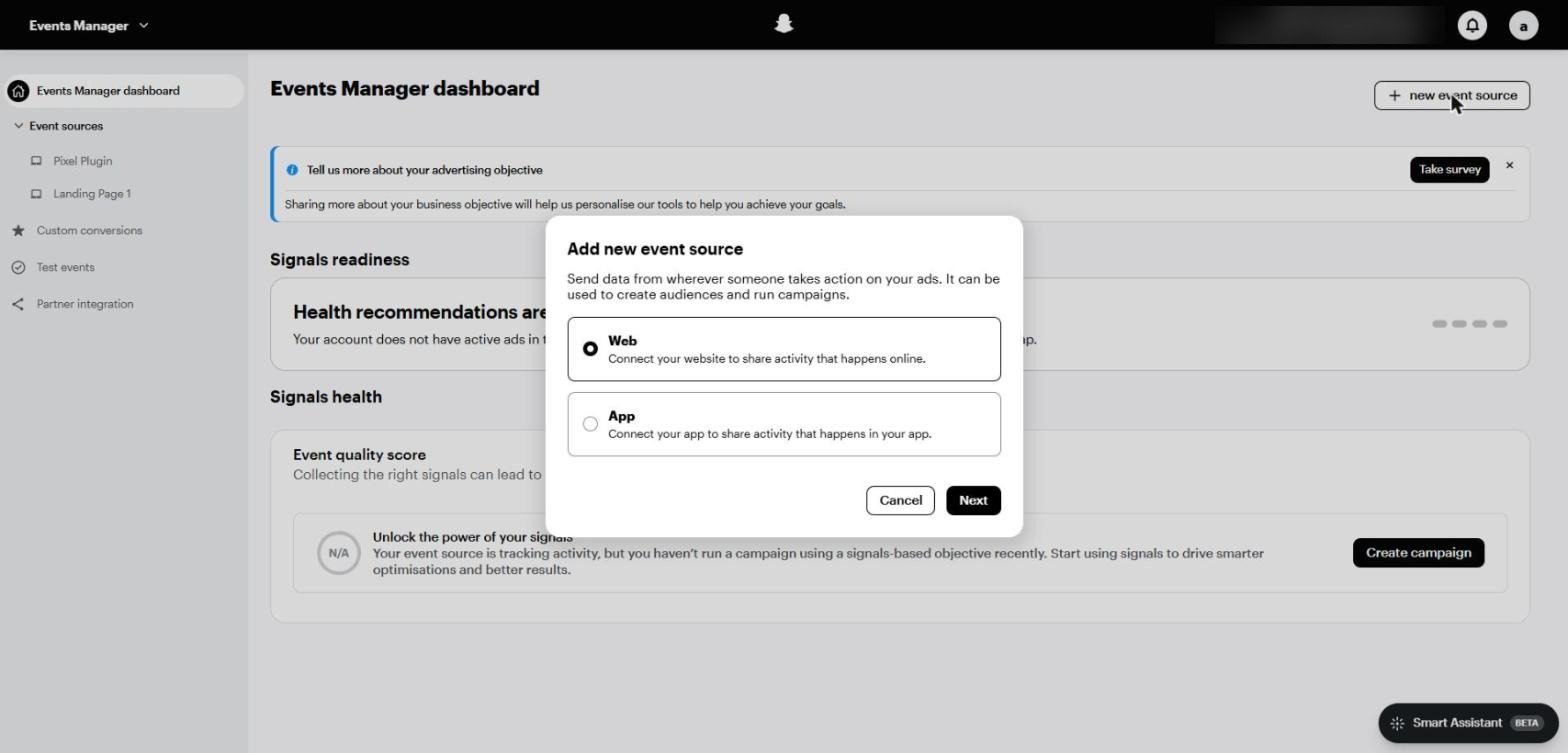
The Add new event source window: Web for websites and App for apps
The Get started with Snap Pixel window appears. Clicking Create my Snap Pixel means you accept the Snap conversion terms on the business's behalf.
Once it's created you'll get the tracking code. The easiest install is through a Partner integration (such as the Snapchat Ads app on Shopify or the WooCommerce plugin) rather than manual code.
Add the key events: PAGE_VIEW, VIEW_CONTENT, ADD_CART, START_CHECKOUT and PURCHASE, or SIGN_UP for lead gen.
Check everything in Test events before launch, and make sure order value and currency arrive with PURCHASE.
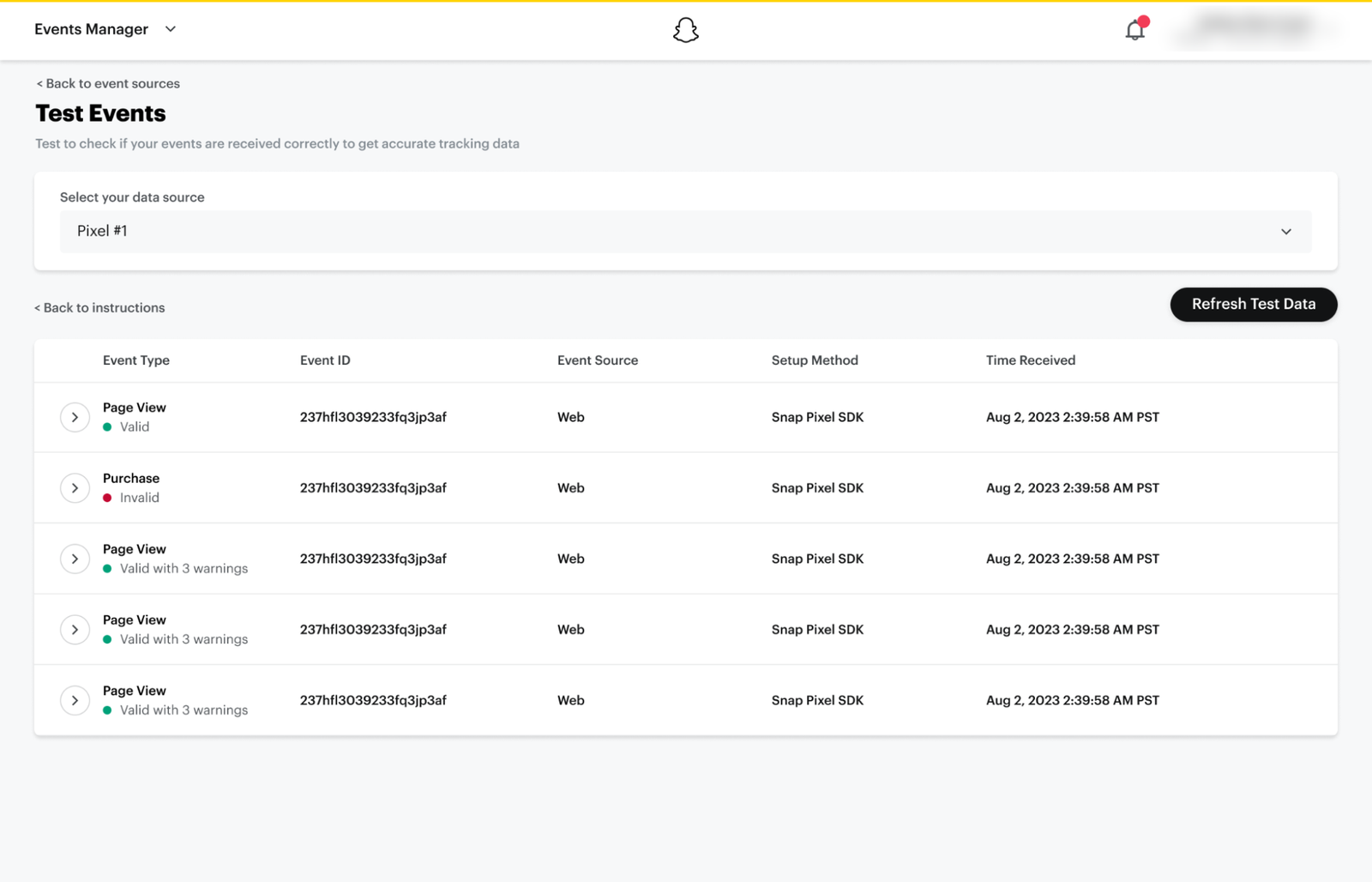
Test Events and browser event delivery · Source: Snapchat Business Help Center
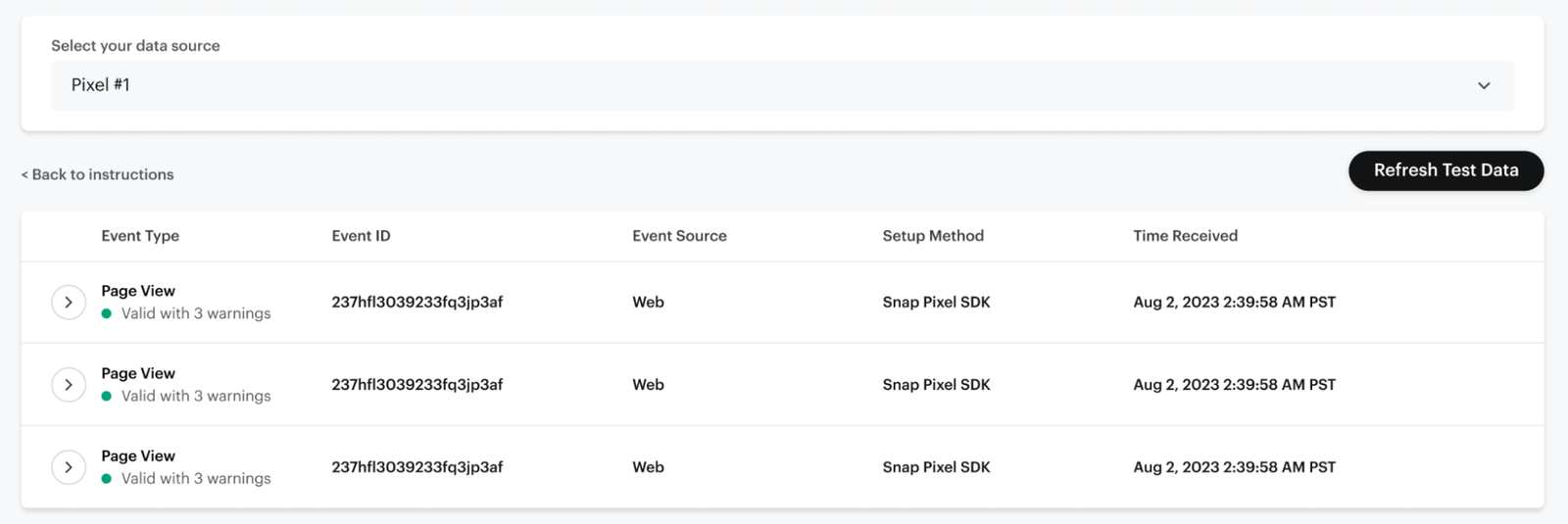
Event validation status and warnings · Source: Snapchat Business Help Center
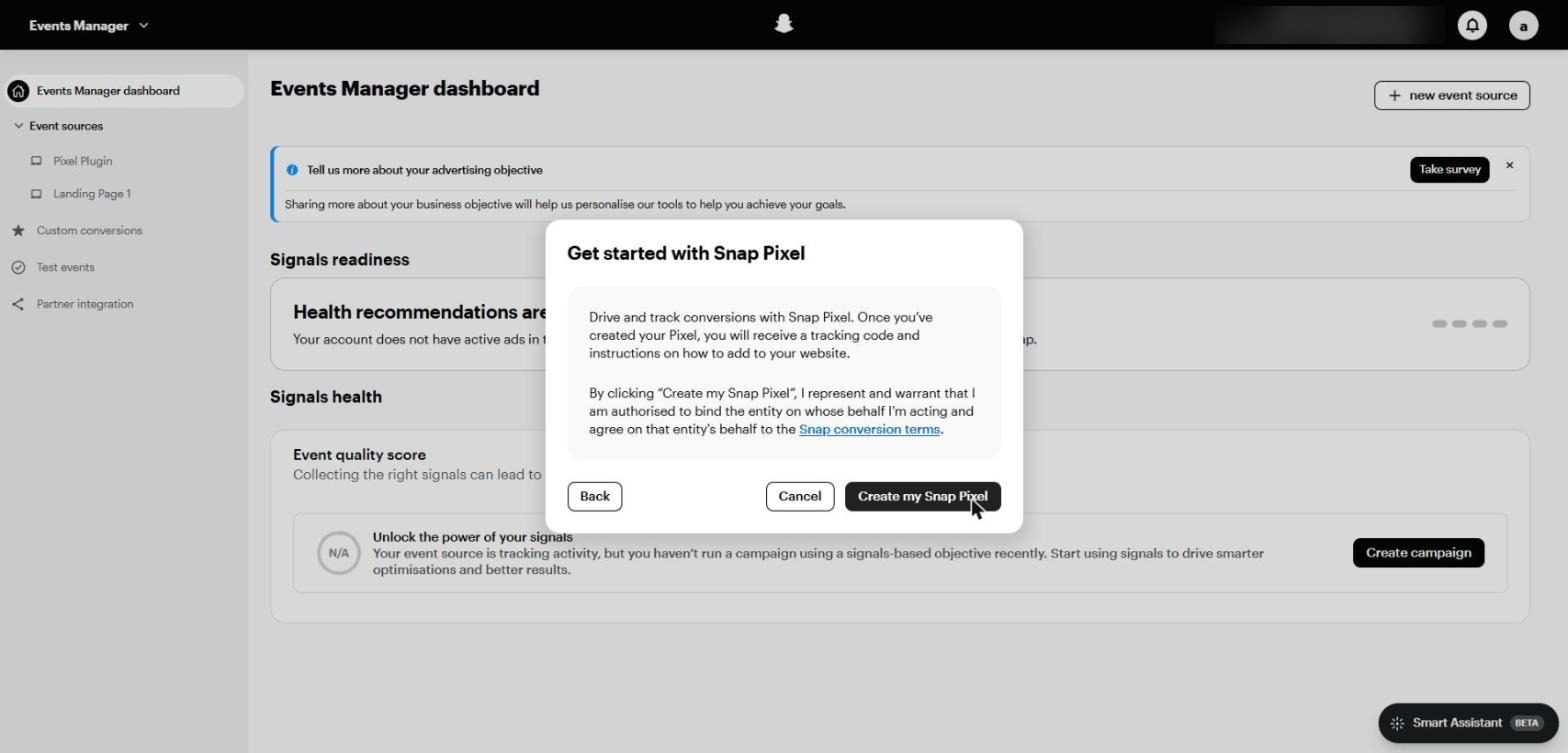
The Get started with Snap Pixel window before creation
The Conversions API
The Pixel runs in the browser, so it loses some events to cookie blocking and privacy restrictions. The Conversions API (CAPI) sends the same events from your server, and together they give the algorithm the most complete picture possible.
Deduplication is essential: if you send an event from both the Pixel and CAPI without linking them, it gets counted twice. According to Snap's developer documentation:
Link | Pixel field | CAPI field | Matching window |
|---|---|---|---|
Any web event | client_dedup_id | event_id | 48 hours |
Purchases | transaction_id | order_id inside custom_data | Up to 30 days |
Use the same value on both sides, ideally the order ID or lead ID, or a fresh UUID for each event.
Don't reuse a session or user ID across events, or different conversions will be merged.
Wait up to 24 hours after any change before judging, and check Diagnostics in Events Manager.
Cresco tip Notice in the ad set screenshot in Part 4 that Maximise number of website conversions is greyed out, because the Pixel hasn't received an event in 28 days. A Pixel that has stopped firing locks you out of the most important optimisation goals. |
PART 03
Objectives and Campaign Setup
In short Just five objectives after the simplification. Choose Sales or Leads when you have tracking, start with Manual build, and run one campaign per offer. |
In August 2024 Snapchat cut its objectives from 11 to 5, and each one now covers several outcomes:
Objective | What it covers | When to choose it |
|---|---|---|
Awareness and engagement | Awareness, video views, engagement and Promote Places | Launching a brand or event, or warming up a new audience |
Traffic | Website or app visits | Rarely, when there's no tracking or deeper goal |
Leads | Lead forms, website sign-ups, calls and texts | Real estate, education, clinics and services |
App promotion | App installs and in-app events | Apps |
Sales | Catalogue sales, website conversions and app re-engagement | E-commerce and any online sale |
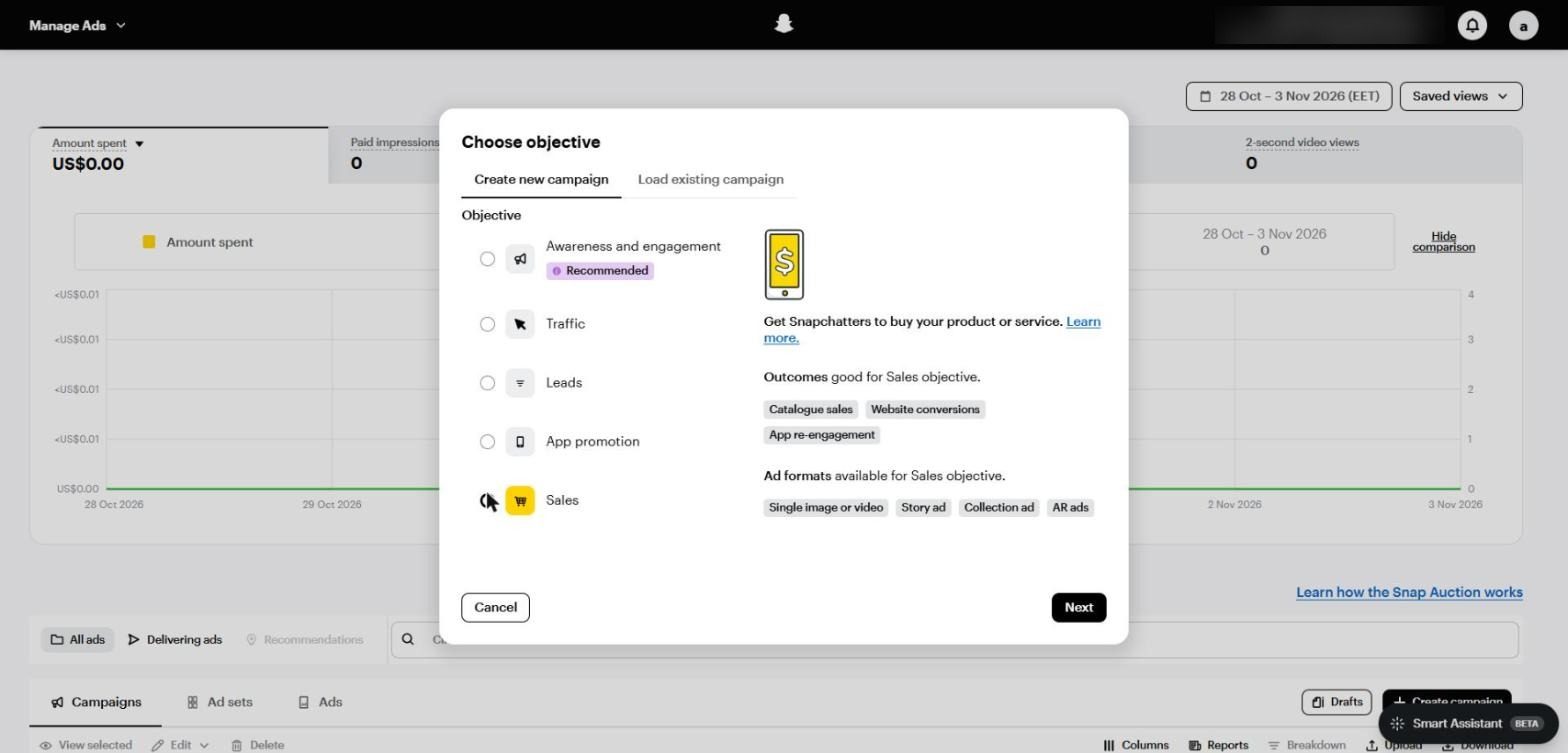
The Choose objective window: the five objectives, with the available outcomes and formats shown for Sales
Each objective shows its available outcomes and allowed ad formats on the right. For example, Sales doesn't offer Commercials, while Leads offers Single image or video, Story ad and Collection ad.
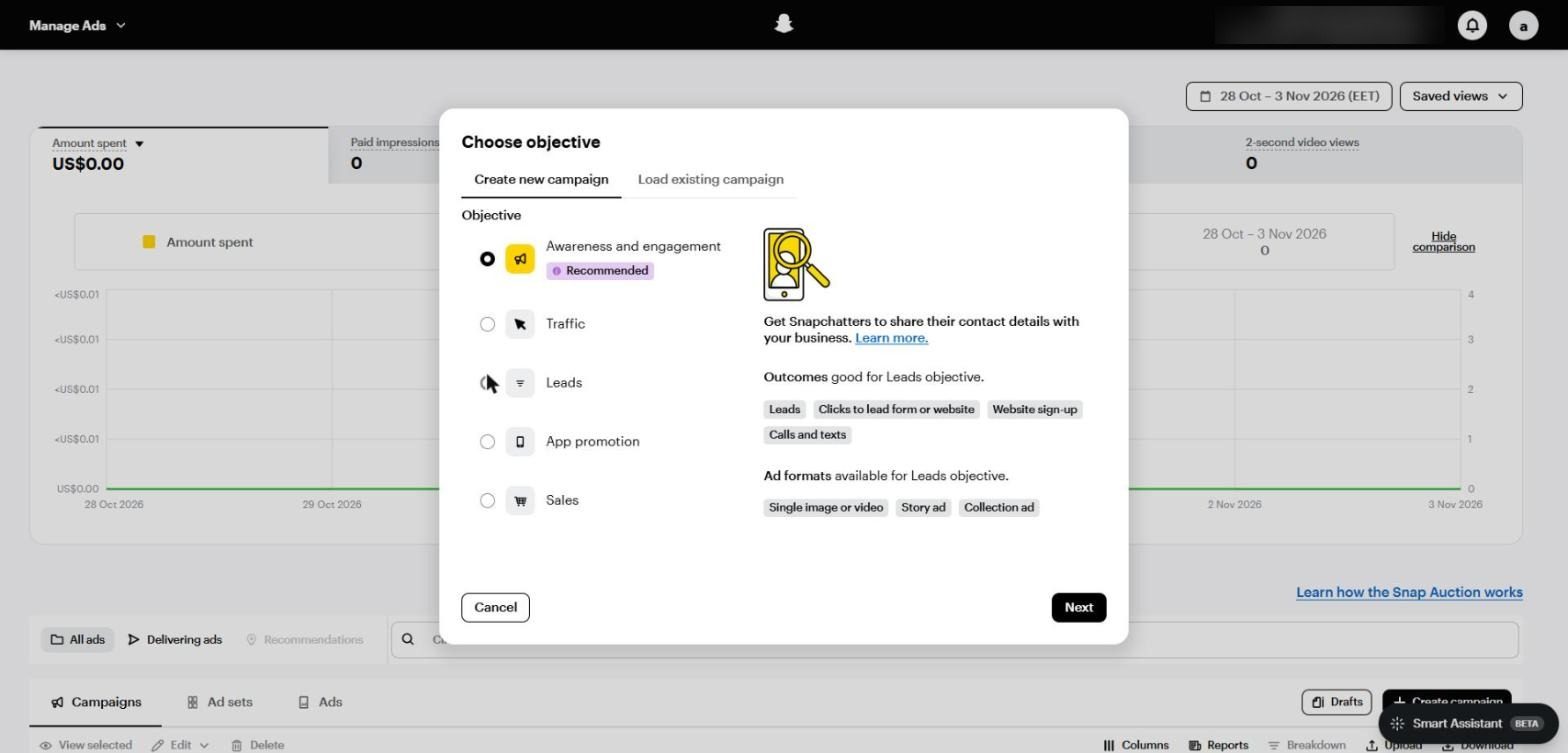
The Leads objective: outcomes include Leads, Clicks to lead form or website, Website sign-up, and Calls and texts
Automatic or Manual Build?
After you pick the objective, Snapchat offers two paths: an automatic campaign it builds entirely for you, or a Manual build you set up yourself.
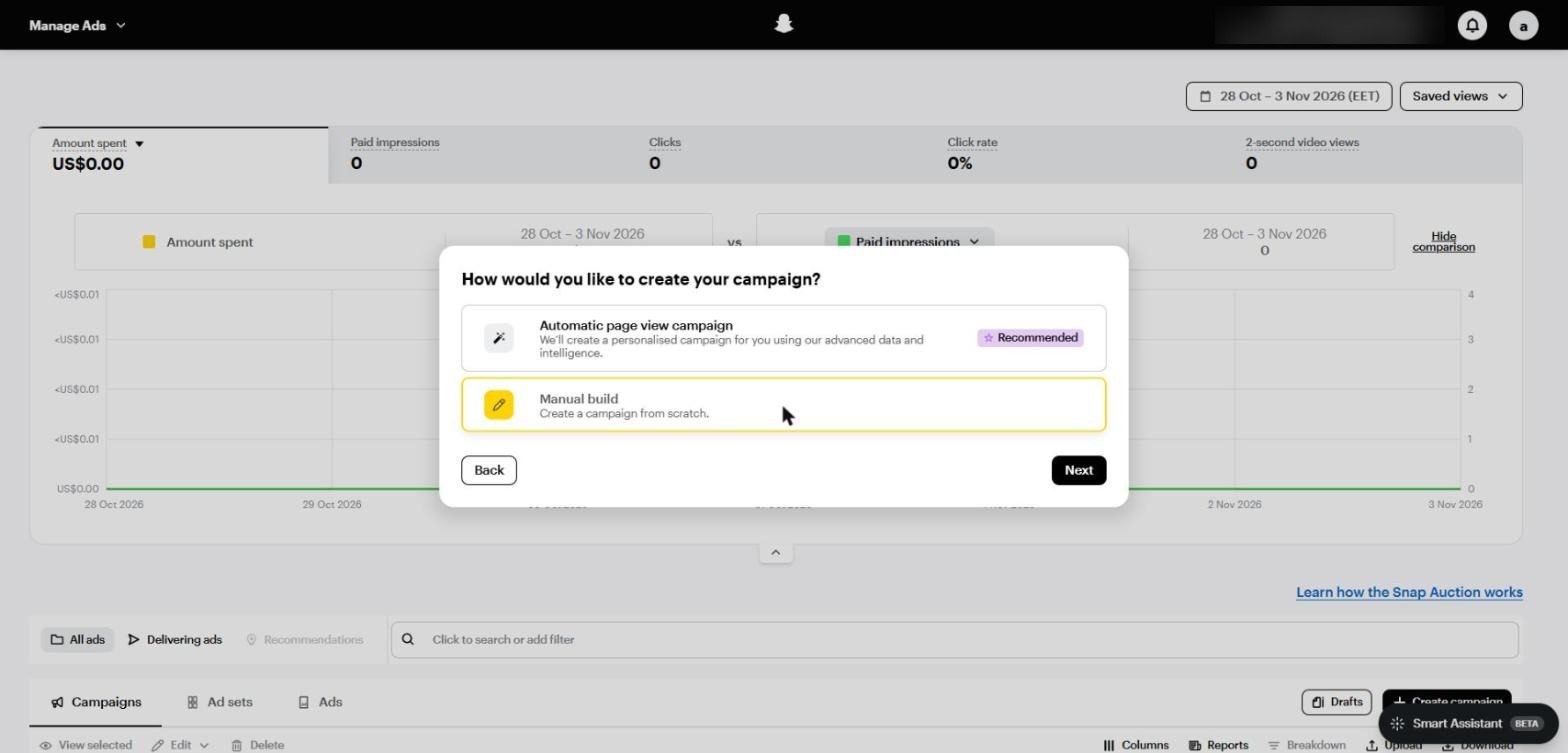
Automatic page view campaign versus Manual build
The automatic campaign suits a small business owner who wants to launch in minutes, but it usually optimises for a shallow goal such as page views or clicks.
Manual build is the right choice for any serious advertiser, because it lets you choose the deepest optimisation goal and control the bid and audience.
Campaign Settings
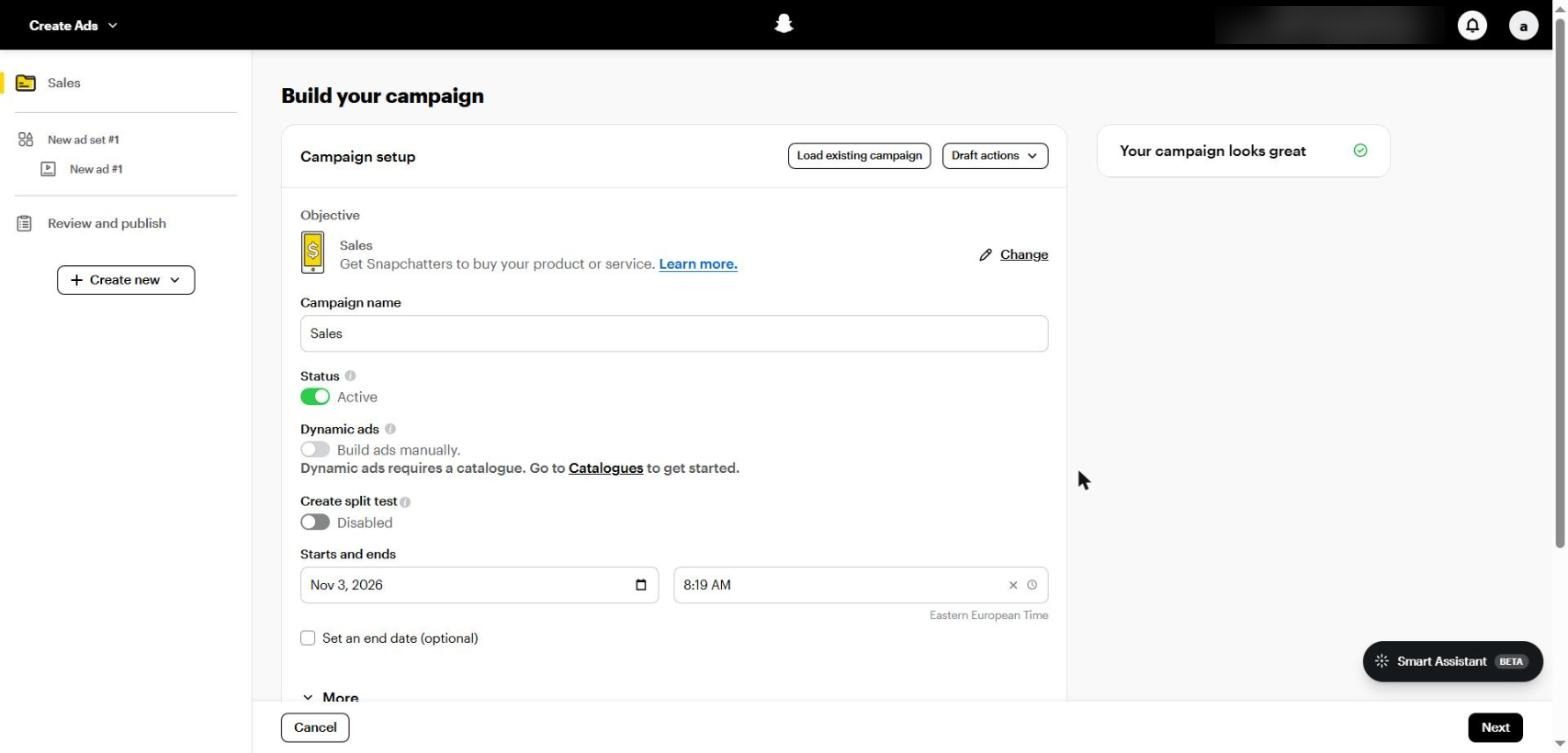
The Build your campaign screen: objective, name, status, Dynamic ads, Create split test and dates
Campaign name: use a consistent naming convention such as Sales | Product | Country | Date.
Dynamic ads: require a connected Catalogue and are the basis of product retargeting (Part 11).
Create split test: splits the audience between two versions to test one variable cleanly (Part 15).
Starts and ends: leave the end open for always-on campaigns, and set it for offers and seasons.
Daily / Lifetime spend cap: a ceiling for the whole campaign, useful as protection rather than for day-to-day control.
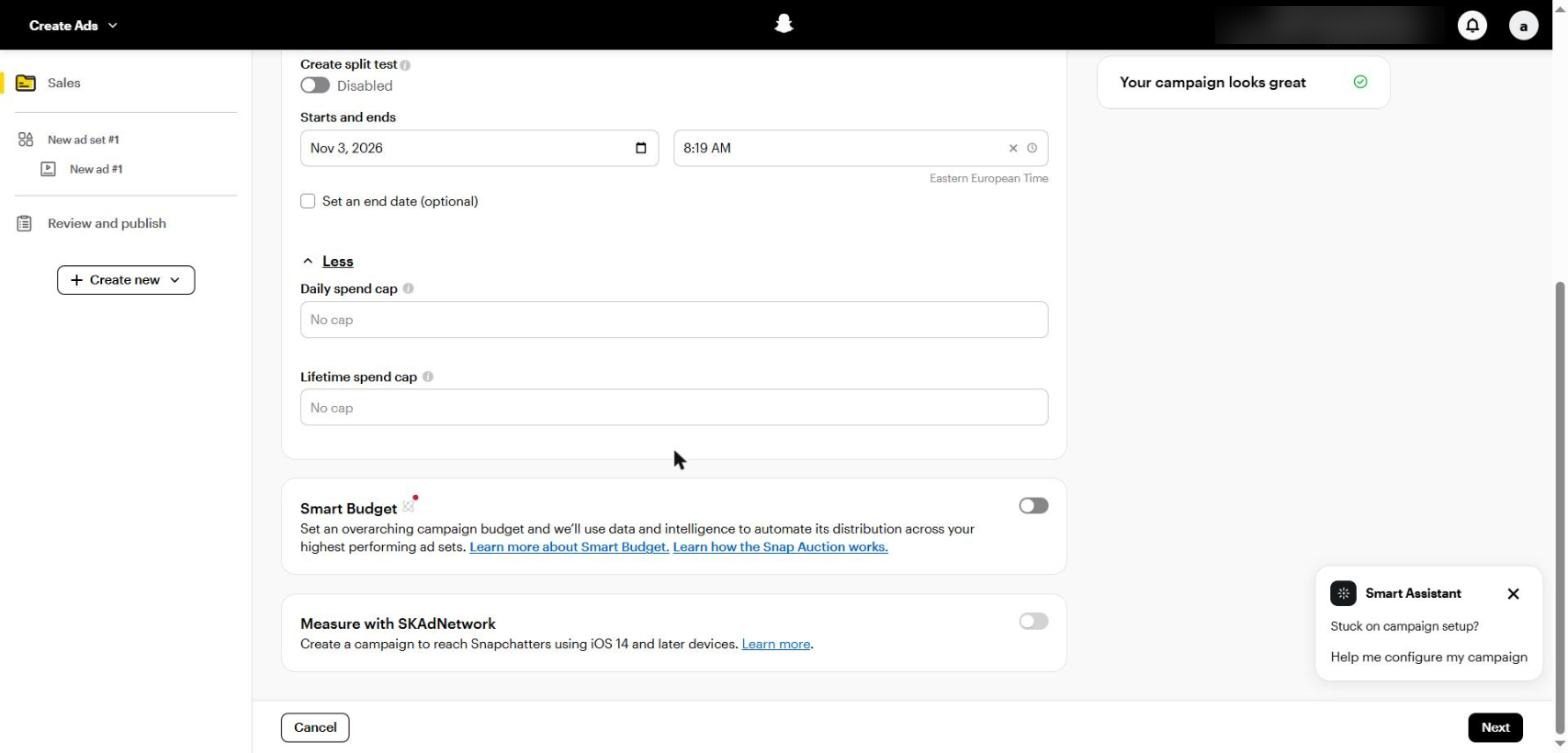
Daily and lifetime spend caps, the Smart Budget option, and Measure with SKAdNetwork
Smart Budget is the equivalent of Campaign Budget on Meta: you set one budget for the campaign and Snapchat spreads it across the best-performing ad sets. Turn it on when you have more than one ad set for the same goal, and leave it off with a single ad set. The same decision logic is covered in detail in CBO vs ABO: How to Actually Choose.
The Recommended Structure
The algorithm learns faster when data is pooled in one place, and that's as true on Snapchat as it is on Meta:
One campaign per offer or product line with a different optimisation goal.
One or two ad sets per campaign, not an ad set per interest.
Variety in the ads, not in the ad sets: different formats, hooks and faces.
Only split countries when price, language or cost of reach differ a lot, such as Saudi Arabia and Egypt.
PART 04
Ad Set Settings: Location, Goal and Bid
In short Set the conversion location, choose the deepest performance goal your tracking allows, start with Auto-bid, and keep Smart placement. |
The ad set is where you tell Snapchat exactly what you want: where the customer will convert, which event to optimise for, how much you'll pay, and who sees the ad.
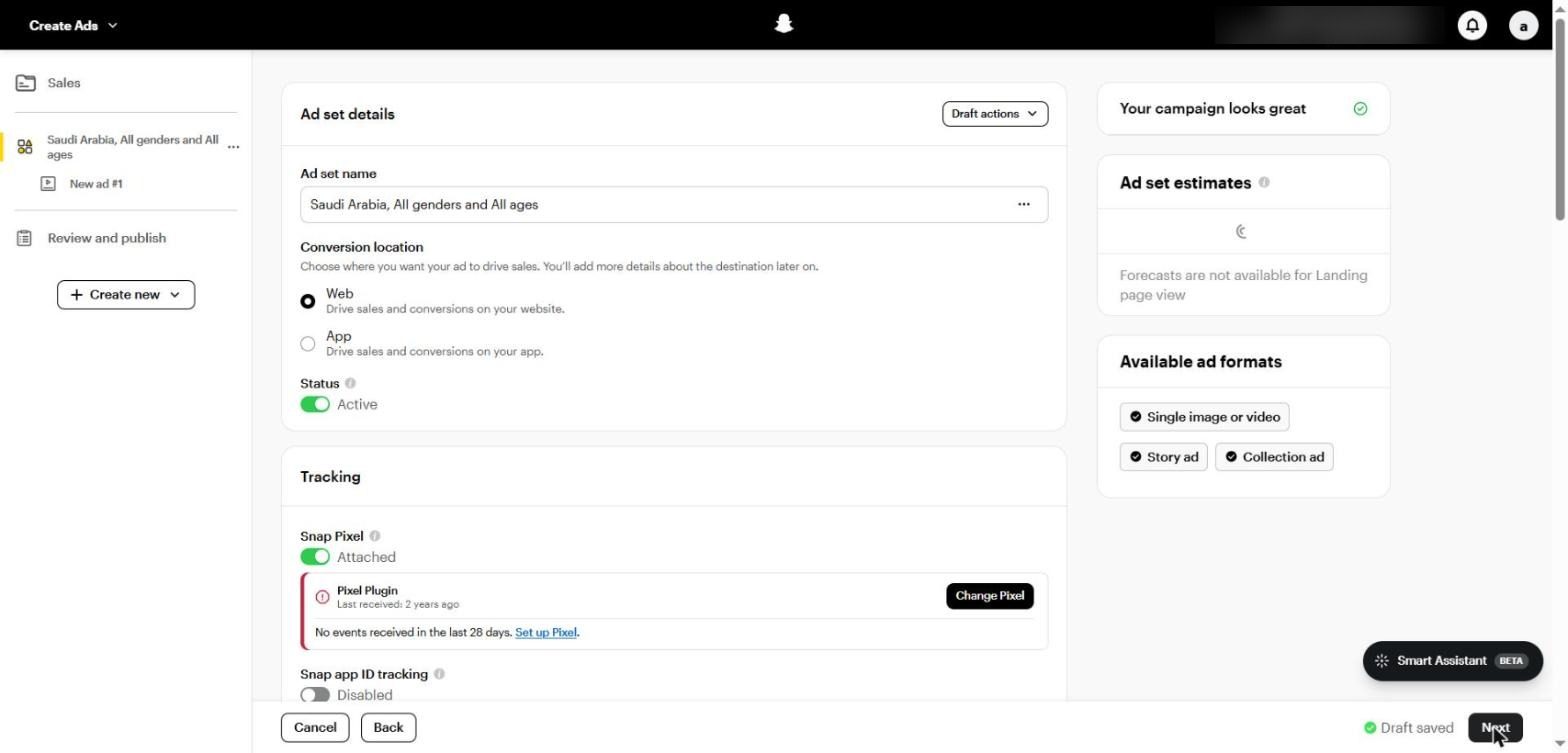
Ad set details: Conversion location (Web or App), status, and the Tracking section showing the Snap Pixel status
Step 1: Conversion location
With the Sales objective you choose between Web and App. With Leads you get four options, Lead form, Web, Call and Text, covered in Part 10.
Step 2: Performance goal
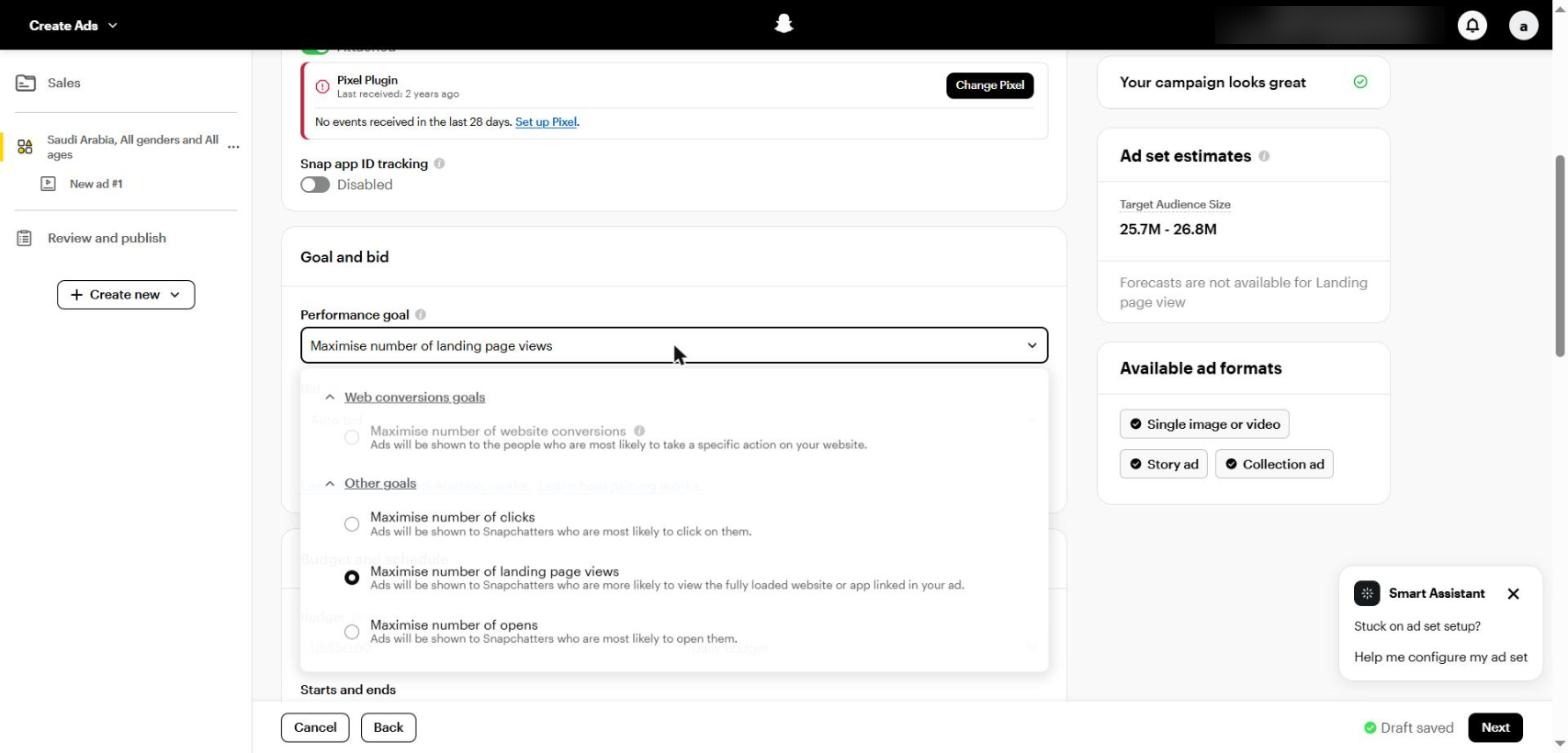
The Performance goal menu: website conversions (unavailable here because the Pixel has stopped), clicks, landing page views and opens
Goal | What it does | When to use it |
|---|---|---|
Maximise website conversions | Shows the ad to people most likely to take a specific action on your site | The default for any sale or lead on your website |
Maximise landing page views | Shows it to people likely to wait for the page to load | When there isn't enough conversion data yet |
Maximise clicks | Shows it to people likely to tap | Rarely, since a tap doesn't mean interest |
Maximise opens | Shows it to people likely to open the ad (for example a Story ad) | Engagement and awareness goals |
The rule: optimise for the deepest event you can track that happens often enough. If purchases are very rare at the start, begin with ADD_CART or landing page views for now, then move to PURCHASE once data builds up.
Step 3: Bid
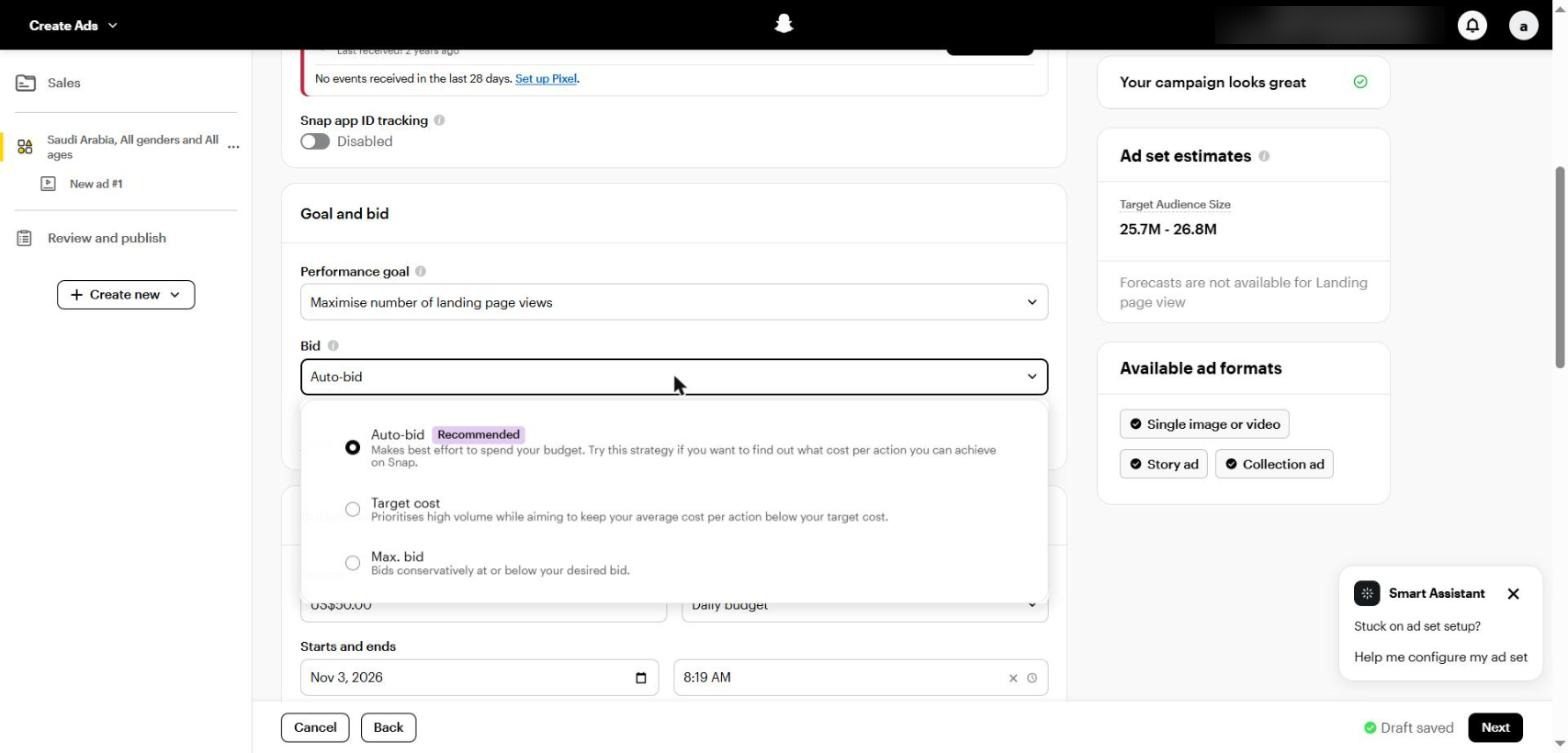
Bid options: Auto-bid (recommended), Target cost and Max. bid
Strategy | How it works | When to use it |
|---|---|---|
Auto-bid | Tries to spend your budget at the best possible cost | Always to start, to learn your real cost on Snapchat |
Target cost | Focuses on volume while trying to keep average cost under your target | Once you know your real cost and want it steady |
Max. bid | Bids conservatively at or below the amount you set | When you need a hard ceiling and accept lower volume |
The Minimum ROAS strategy was retired in February 2025, according to Snap's developer documentation, so don't look for it. And if you set Target cost or Max bid below market price, your ads will barely deliver.
Step 4: Budget and schedule
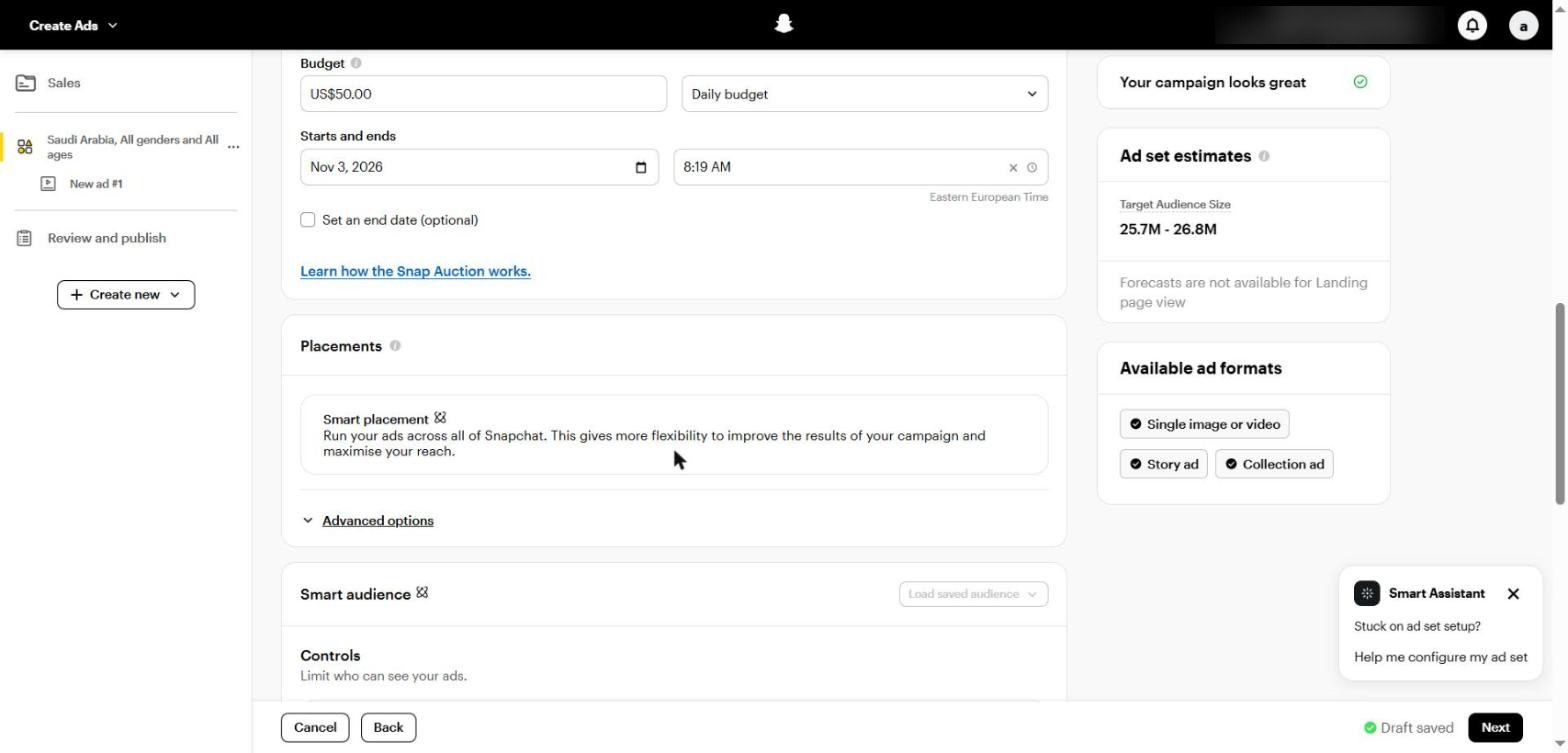
Daily or lifetime budget, dates, Smart placement and Advanced options
Minimum: $5 a day per ad set (or the equivalent in your currency).
A practical start: Snapchat says $20 to $50 a day suits the initial testing phase. The calculation is in Part 13.
Daily or lifetime: daily for always-on campaigns, lifetime for time-bound offers and events.
Step 5: Placements
Keep Smart placement in most cases. It runs your ad across all of Snapchat: between Stories, in Spotlight, Discover, the Chat feed and more. The more placements, the better the algorithm can find the cheapest results.
Under Advanced options you'll find the Brand Suitability Filter with three levels: Full inventory (the default and widest), Standard inventory, and Limited inventory (the most conservative and usually the most expensive). There's also an option to exclude news and current events.
Step 6: Attribution and delivery
Attribution window: the default is 28 days after a swipe and 1 day after a view; how it affects your numbers is explained in Part 14.
Frequency cap: available with the Awareness objective to limit how often one person sees the ad.
Third-party tagging: such as DoubleVerify, if you have a contract to verify delivery quality.
PART 05
Targeting and Smart Audience: Few Limits, Plenty of Suggestions
In short Snapchat now works with Controls and Suggestions, just like Meta. Set location and minimum age as limits, leave everything else as a suggestion, and let the creative choose the audience. |
The biggest recent change in Snapchat Ads Manager is Smart audience. Instead of defining everything precisely, you set a few hard limits and give the algorithm suggestions it can go beyond when that improves results.
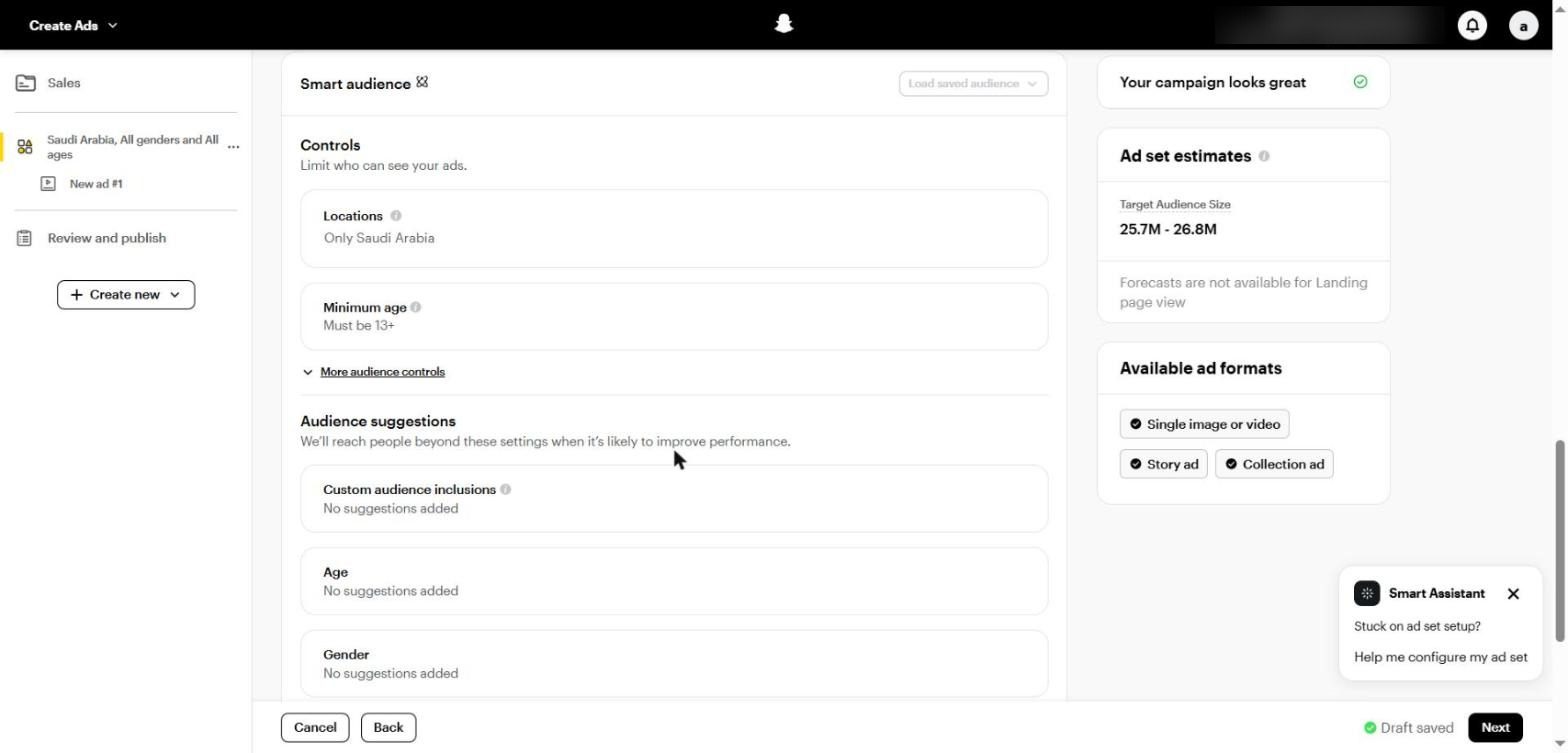
The Smart audience section: Controls (location and minimum age), then Audience suggestions
Controls vs Audience Suggestions
Type | How it works | What it covers |
|---|---|---|
Controls | Hard limits Snapchat won't go beyond | Location, minimum age, languages, devices and excluded custom audiences |
Audience suggestions | Signals only; Snapchat may reach people beyond them if that performs better | Custom audiences, age, gender and detailed targeting |
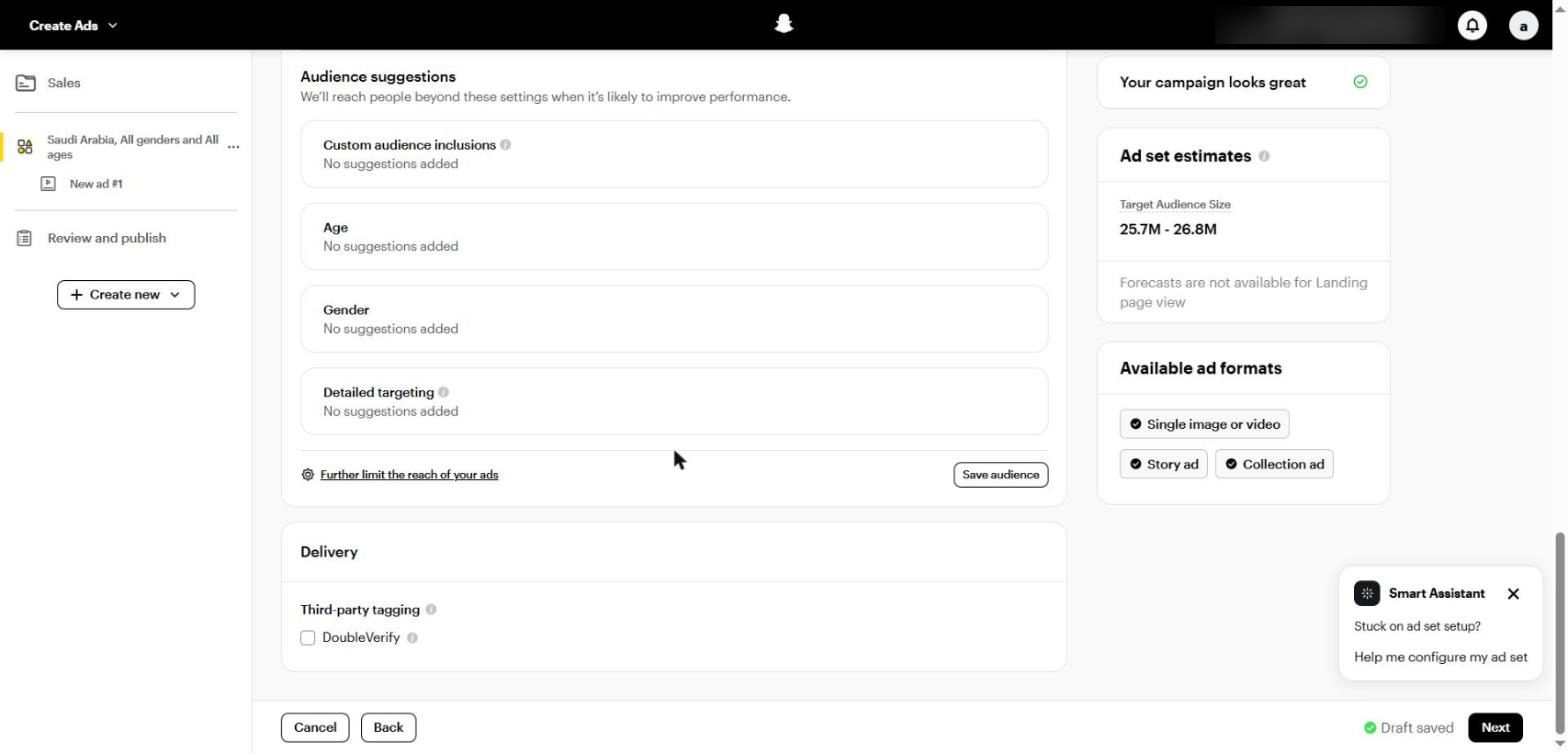
Audience suggestions: Custom audience inclusions, Age, Gender and Detailed targeting, with Further limit the reach of your ads below
Setting up the audience step by step
Locations: set the countries or cities you actually serve. Note that Snapchat includes people who live, work or have recently been in the area.
Minimum age: only raise it for a legal restriction or an adult product; the default is 13.
Under More audience controls you can exclude existing customers and set language and operating system.
Under Custom audience inclusions, add website visitors and your customer list as suggestions.
Only add age and gender suggestions if your customer is clearly defined.
Leave Further limit the reach of your ads untouched. Turning it on converts suggestions into restrictions and usually raises cost.
Detailed Targeting and Predefined Audiences
Inside Detailed targeting you'll find Predefined audiences, split into Lifestyles (interests and lifestyles such as Beauty Mavens and Automotive Enthusiasts) and Visitors (people who visit certain kinds of places).
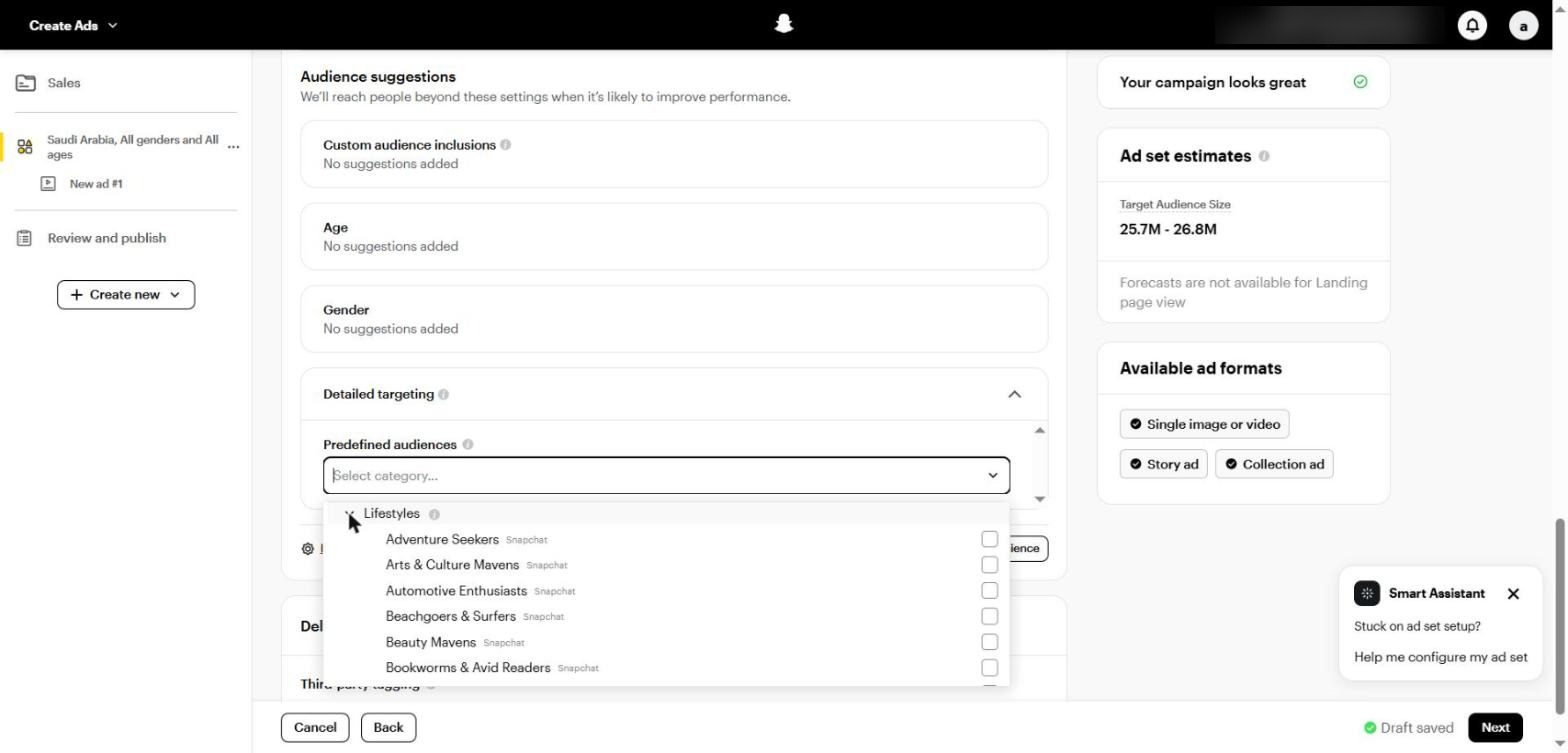
Predefined audiences: the Lifestyles category with Adventure Seekers, Automotive Enthusiasts, Beauty Mavens and more
Use them as suggestions in new accounts to give the algorithm a starting point, then rely on them less as Pixel data builds up.
Creative Is the Real Targeting
As on Meta, Snapchat shows your ad to different segments and learns from who engages and converts. So an ad in a Saudi dialect, featuring someone who looks like your customer and a clear problem in the first two seconds, will find the right people faster than any interest you pick by hand.
Cresco tip In Saudi Arabia, don't split ad sets by major city unless the offer itself differs. One nationwide ad set with strong creative learns faster than five small ones. |
PART 06
Custom and Lookalike Audiences
In short Six audience types: customer list, website visitors, app events, ad engagement, profile engagement and lookalikes. |
From the main menu, open Audiences and click New audience. Six types appear:
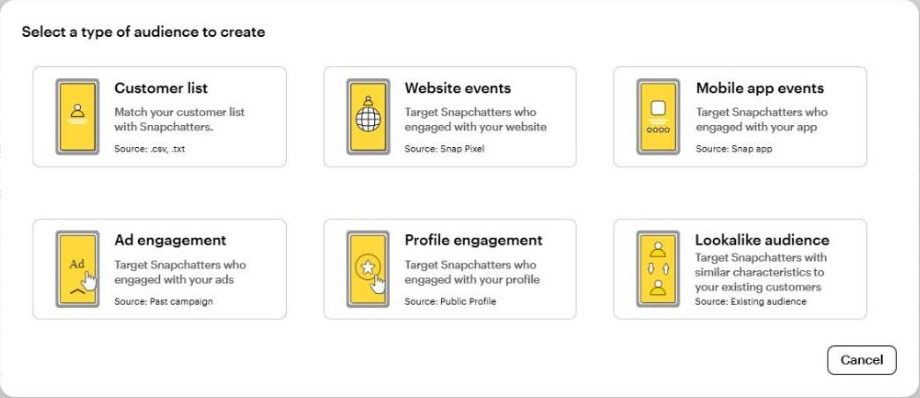
Audience types: Customer list, Website events, Mobile app events, Ad engagement, Profile engagement and Lookalike audience
Type | Source | Best use |
|---|---|---|
Customer list | A csv or txt file of your customer data | Excluding existing customers, or as a lookalike seed |
Website events | The Snap Pixel | Retargeting people who visited or added to cart without buying |
Mobile app events | Snap App ID | Re-engaging app users |
Ad engagement | Past campaigns | People who watched, opened or engaged with an ad |
Profile engagement | Your Public Profile | Followers and people who engaged with the brand account |
Lookalike audience | An existing audience | Reaching people similar to your best customers |
Creating a Lookalike Step by Step
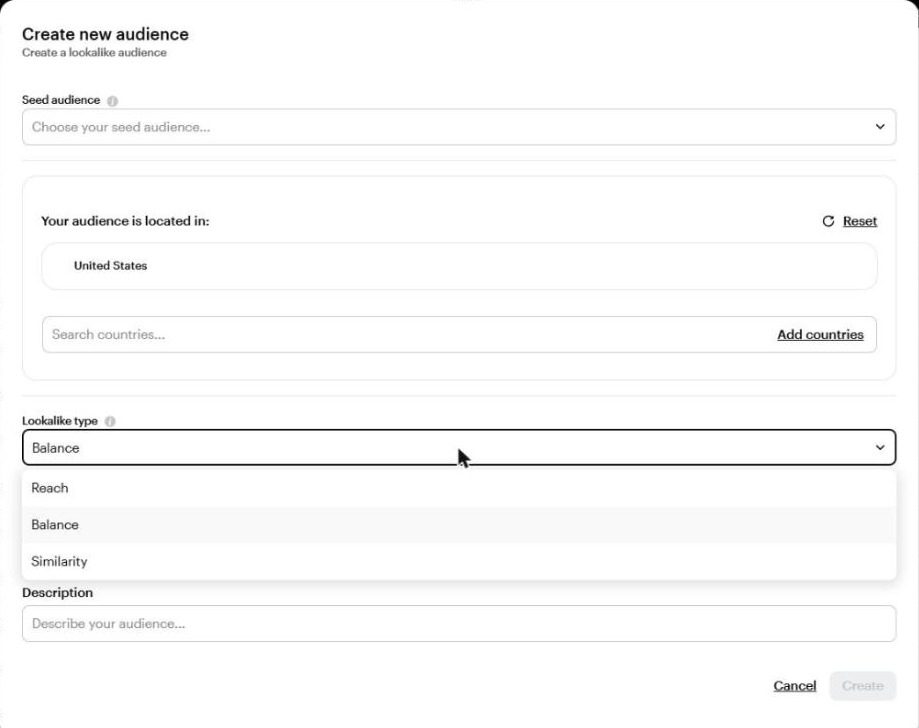
Creating a lookalike: seed audience, country, and Lookalike type with three options, Reach, Balance and Similarity
Choose a Seed audience, ideally a list of actual buyers rather than all visitors.
Set the country you want to reach.
Choose the Lookalike type: Similarity (closest to the seed and smallest), Balance (in between) or Reach (widest and least similar).
Give it a clear name such as LAL | Purchasers 180d | KSA | Balance.
Remember that in Smart audience a lookalike works as a suggestion, not a restriction. With an account that has strong Pixel data, you may not need one at all.
Practical Audience Ideas
Short retargeting: ADD_CART in the last 7 days without a PURCHASE, with an ad that reminds them of the product or offers free delivery.
Exclusions: buyers from the last 30 days in acquisition campaigns, unless it's a repeat-purchase product.
Ad engagement: people who watched 75% of the video, a cheap warm audience.
PART 07
Ad Formats: From Stories to the Chat Inbox
In short Single image or video is the core, Collection suits stores, Story ads tell stories, Commercials build awareness, Sponsored Snaps start direct conversations, and Dynamic ads handle retargeting. |
Snapchat offers more formats than most platforms, but you don't need all of them. Start with the core format, then add what fits your goal.
Format | What it is | Best for |
|---|---|---|
Single image or video | A full-screen ad shown between content | Most objectives, and always the starting point |
Story ad | A tile in Discover that opens 1 to 10 images or videos | Showing several products or a story in sequence |
Collection ad | An image or video with four tappable tiles | Stores and catalogues |
Commercials | A video that can't be skipped for the first 6 seconds | Awareness and brand launches |
Dynamic ads | Ads built automatically from your Catalogue | Retargeting products the customer viewed |
Sponsored Snaps | An ad delivered to the Chat inbox as a message | Conversion and direct conversation |
AR Lenses and Filters | Augmented reality experiences used in the camera | Awareness and sharing, especially in peak seasons |
Promoted Places | Featured placement on the Snap Map | Restaurants, branches and physical locations |
Sponsored Snaps: The Fastest-Growing Format
A Sponsored Snap lands in the Chat feed like a message, opens full screen, and users can reply to it directly. Snap says this format drives 22% more conversions at nearly 20% lower cost per action than other formats (TechCrunch, April 2026).
In April 2026 Snap launched AI Sponsored Snaps, where users chat with a brand's AI agent that answers questions and recommends products.
In Q1 2026, per-impression CTR on Sponsored Snaps rose 226% year over year, and 7-day conversion volume rose 59% (PPC Land).
You set up the chat message in the ad's Message design section (Part 8).
Core Sizes and Specs
Element | Spec |
|---|---|
Size | 1080×1920 pixels, 9:16 ratio |
Video | MP4 or MOV in H.264, 3 to 180 seconds, ideally 3 to 10 seconds |
Image | JPG or PNG |
Headline | Up to 34 characters |
Brand name | Up to 25 characters |
Safe zone | Keep about 150 pixels at the top and bottom free of text and logos |
Collection tiles | Four square images, at least 160×160 |
Commercials | The first 6 seconds can't be skipped |
Specs change from time to time, so check them in Ads Manager before production. The panel on the right of the ad set screen always shows the Available ad formats for the objective you chose.
PART 08
Building the Ad Step by Step
In short Choose the format, upload the creative, write a clear headline, pick the Public Profile, add the link with UTMs, and set up the chat message. |
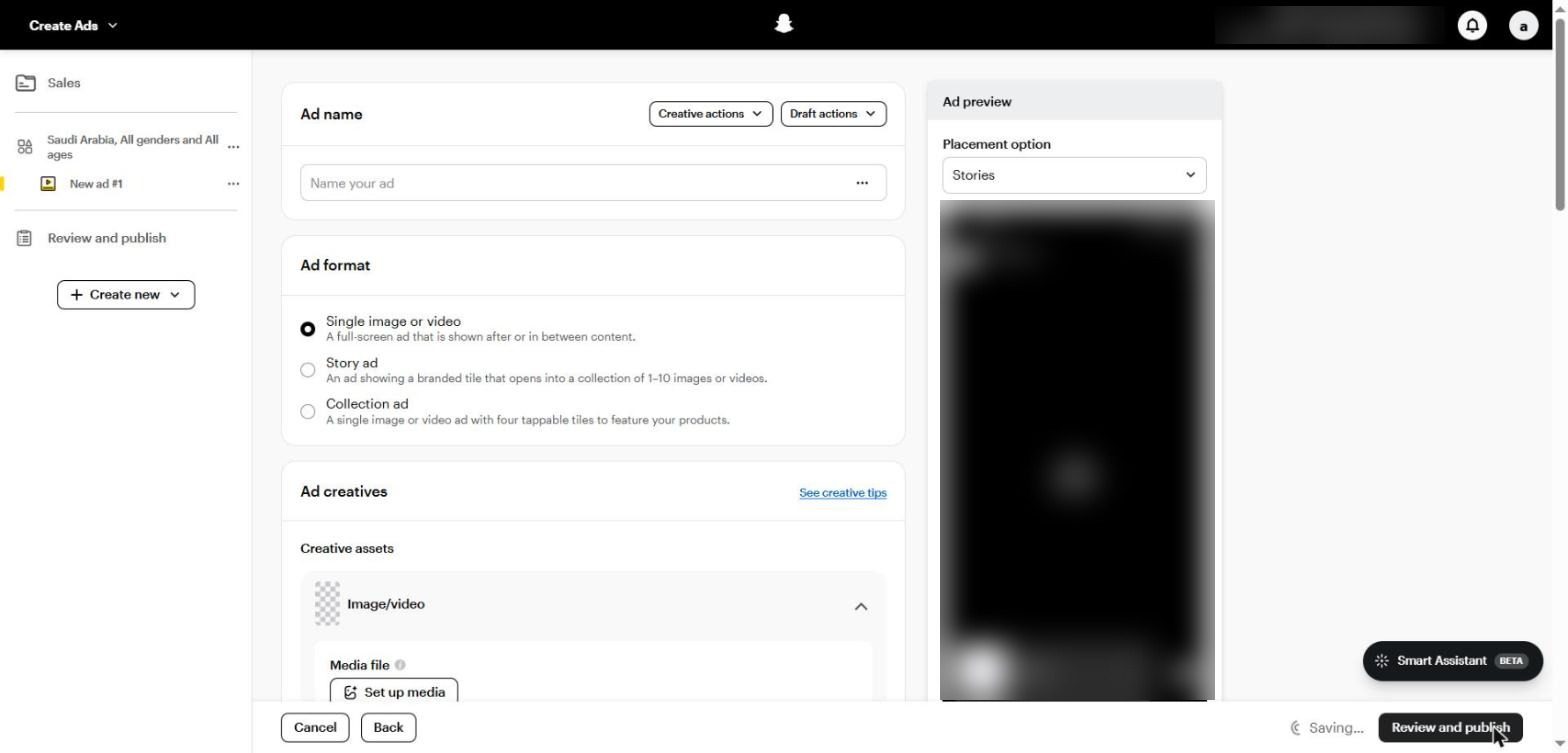
The ad screen: Ad name, Ad format, Ad creatives, and the ad preview on the right
1. Name, format and creative
Ad name: a name that describes the creative, such as UGC | Price hook | Saudi dialect.
Ad format: Single image or video, Story ad or Collection ad, depending on the objective.
Media file: under Set up media, upload the video or image, or choose from the Creative Library.
Add AI info: turn it on if the creative is AI-generated, to comply with disclosure policies.
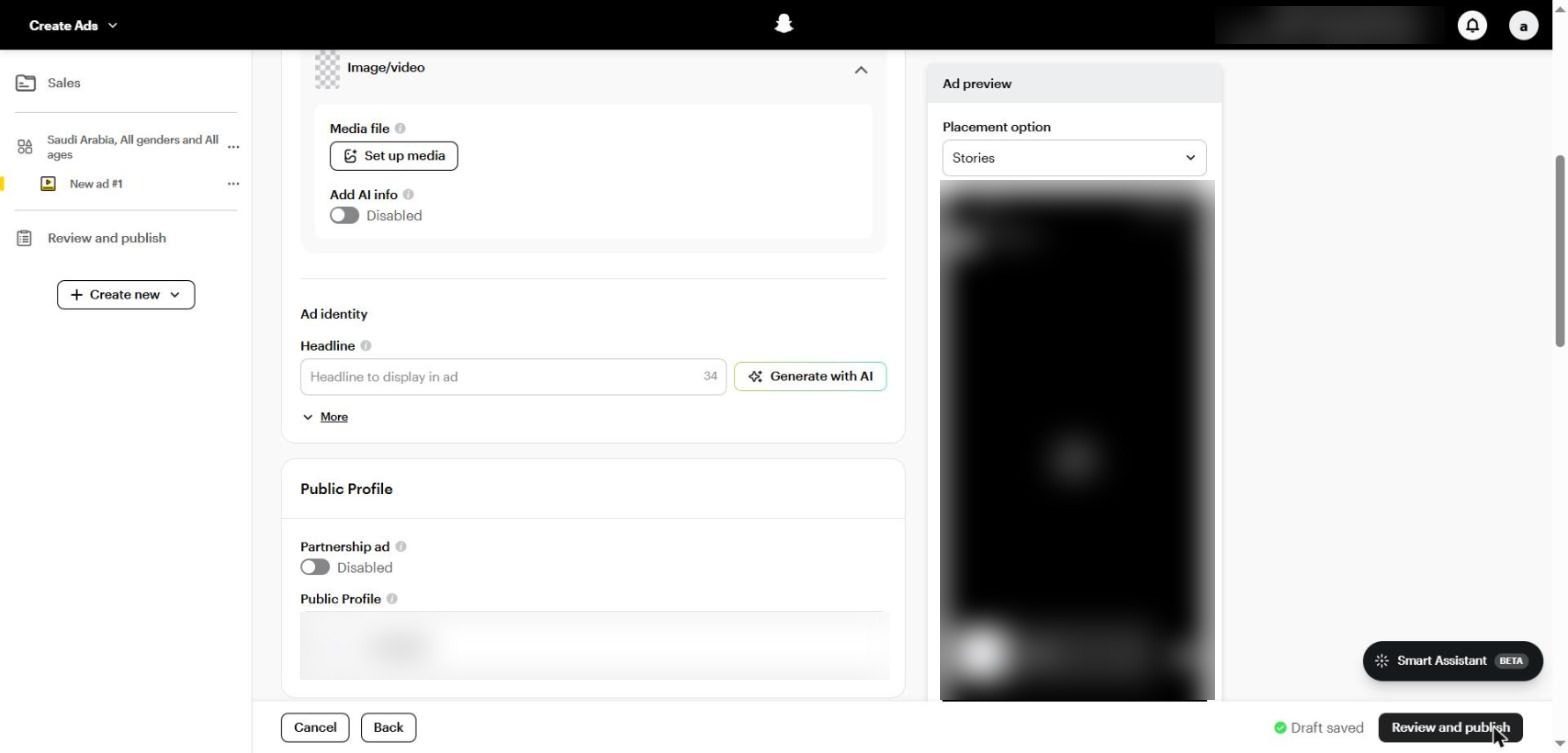
Ad identity: the headline (34 characters) with Generate with AI, then Public Profile and Partnership ad
2. Identity and profile
Headline: one clear line with the benefit or offer, not the brand name. Generate with AI suggests copy; only use what fits your message.
Brand name: shown next to the logo, up to 25 characters.
Public Profile: the account the ad runs from, which users can follow.
Partnership ad: turn it on when you run the ad under a creator's name in partnership with your brand.
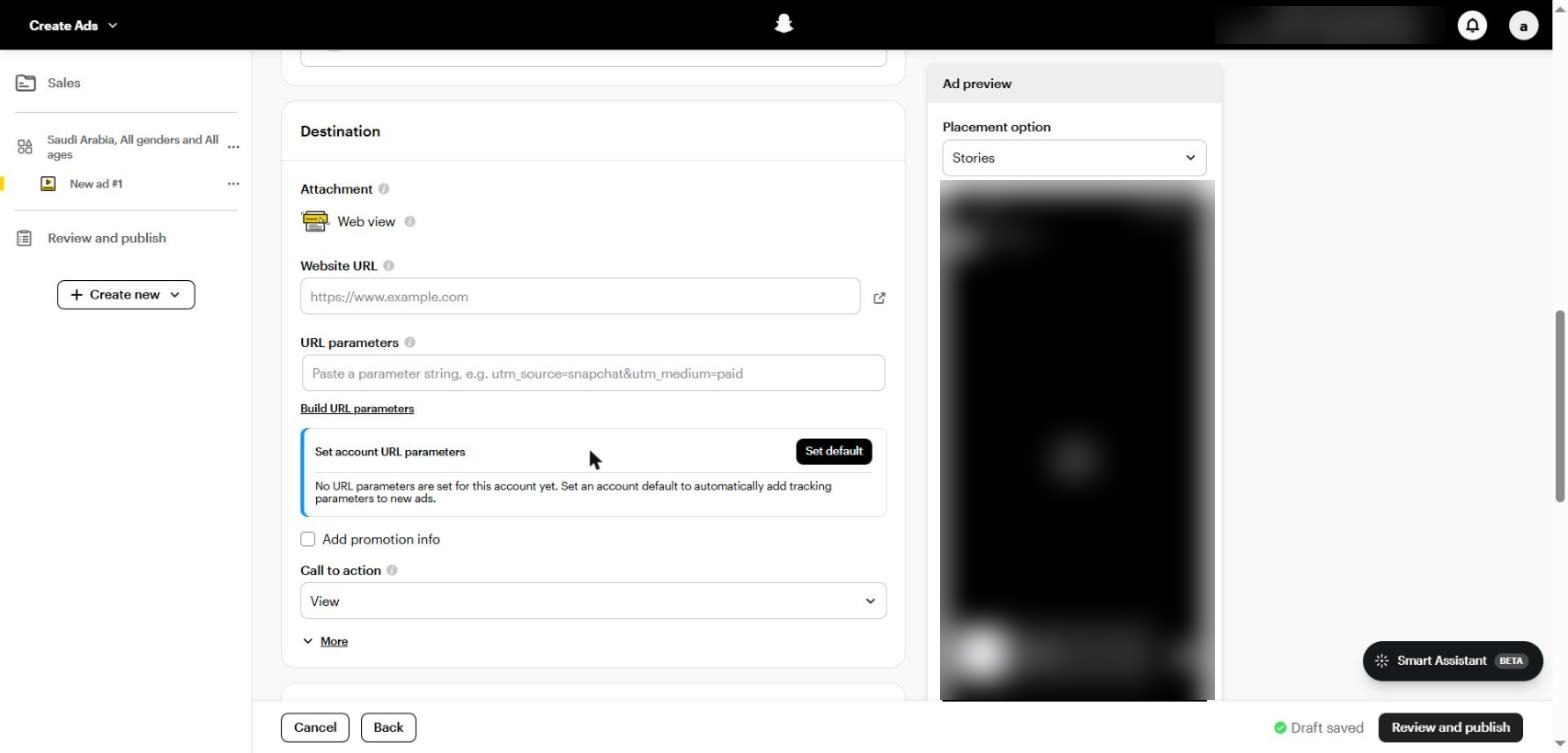
Destination: a Web view attachment, Website URL, URL parameters and Call to action
3. Destination and tracking
Attachment: the destination type. Web view opens the website inside Snapchat; the options change with the objective (Lead form, App or Call).
Website URL: link straight to the landing page, not the homepage.
URL parameters: add UTMs such as utm_source=snapchat&utm_medium=paid. Better still, set them once under Set account URL parameters so they're added to every new ad automatically.
Call to action: such as Shop now, Sign up or Book now; pick the one closest to what happens after the tap.
Under More you'll find options such as AR Video Extension and Smart Prefetching (preloading the page to speed it up).
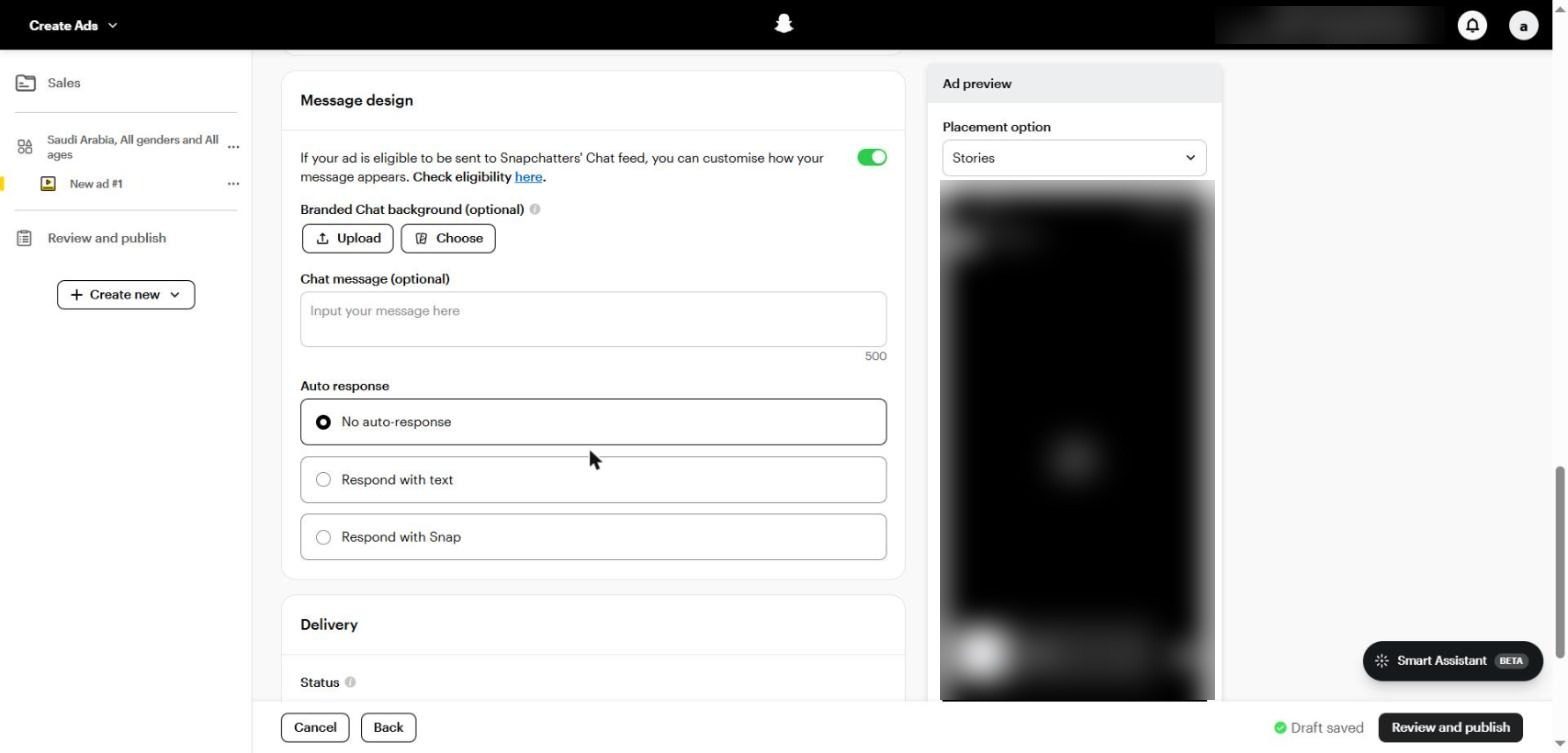
Message design: chat background, a message of up to 500 characters, and auto response with text or a Snap
4. Message design (the chat message)
If the ad is eligible to appear in the Chat feed as a Sponsored Snap, this is where you design the message:
Branded Chat background: a background in your brand identity.
Chat message: up to 500 characters shown with the ad. Write it like a personal message, not an ad.
Auto response: an automatic reply with text or a Snap when the user responds, such as the offer link or a qualifying question.
Finally, click Review and publish to review every level before publishing. Ads go through Snapchat's review before they start delivering.
PART 09
Creative on Snapchat: Local, Fast and Vertical
In short The first two seconds decide everything. Shoot on a phone, speak your audience's dialect, design for sound, and refresh creative regularly. |
Snapchat is a camera app first, and people move through it very fast. An ad that looks like a TV commercial gets skipped instantly; an ad that looks like a Snap from a friend gets a chance.
Core Creative Rules
The first two seconds: put the hook and the brand or product in the first two seconds, because that's all you get before the swipe.
Short: 3 to 10 seconds is the recommended range for the core format, and telling the story in 6 seconds or less works well.
Fully vertical: 9:16, designed for mobile, not a horizontal video with black bars.
Sound: design the ad to work with sound (voiceover, music or direct speech), and add on-screen text for people watching without it.
Authentic, not polished: phone footage, real people and natural light. Big productions usually perform worse here.
The safe zone: no text or logos at the very top and bottom of the screen, where the account name and CTA button appear.
Styles That Work in the Gulf and Egypt
Style | What it looks like | Execution tip |
|---|---|---|
UGC in a local dialect | Someone who looks like the customer shares their experience | Saudi for Saudis, Egyptian for Egyptians; the dialect is a trust signal |
Unboxing and demo | The product opened and used on camera | Show the result in the first two seconds, not the box |
Founder or staff | The owner or an employee speaks directly | Suits clinics, education and services |
Before / after | The difference, clearly | Follow platform policies in sensitive categories |
Limited offer | Price, offer and deadline on screen | Suits seasons: Ramadan, White Friday and National Day |
Creator ad | An ad through Partnership ad under a creator's name | Reaches the creator's audience and borrows their trust |
Volume and Refresh
We recommend starting with four to six genuinely different creatives per ad set, not versions of the same video.
Snapchat users scroll a lot, so fatigue sets in faster. Plan new creatives every one to two weeks depending on spend.
When you find a winning hook, make five versions of it with different faces or locations before looking for a new idea.
Hook Formulas: The First Two Seconds
The hook is the first thing said or seen. These are proven patterns that work on Snapchat, with examples in the audience's voice:
Pattern | Example | Why it works |
|---|---|---|
The problem question | “Is the heat wrecking your hair?” | Stops only the people who have the problem, so it filters the audience |
Result first | “This is the kitchen 21 days later” | Shows the promise before the explanation |
Direct call-out | “If you run a clinic in Riyadh…” | Names a specific segment |
A specific number | “We saved SAR 1,200 on the first order” | Numbers are believed more than descriptions |
The objection | “Think it's expensive? Look at the price” | Answers the biggest reason for hesitation |
Visual surprise | The product breaks, pours or transforms on camera | Unexpected motion stops the thumb |
Seasonal offer | “The National Day offer ends tonight” | Gives a reason to act now |
A 10 to 15-Second Video Template
Seconds | Part | What to say or show |
|---|---|---|
0 to 2 | Hook | The problem or result, with the product or a face in frame |
2 to 6 | Solution | The product or service in action, with no introduction |
6 to 10 | Proof | A number, a review, a real customer, or before and after |
10 to 15 | Ask | The offer and a clear CTA: “Swipe up and order now, cash on delivery” |
Pre-Shoot Production Checklist
Shoot vertically from the start; don't crop horizontal footage.
Natural window light beats a studio with flat lighting.
A simple lapel mic lifts quality more than any camera.
Shoot three different hooks for every video; they multiply your ad count with little effort.
Add large on-screen captions, and keep them inside the safe zone.
End on the product or logo with the offer, not a black screen.
AR Lenses and Filters
A Lens is an augmented reality experience people use in the camera, such as trying on glasses or make-up, or a simple branded game. You build one from Create Lens & Filter in the menu or with Lens Web Builder, or hire a professional through the Lens Creator Marketplace. Lenses suit awareness and big seasonal moments, not direct sales on a small budget.
Cresco tip For stores that rely on cash on delivery, write “Cash on delivery” on screen and say it in the voiceover. Many customers in Saudi Arabia and Egypt won't complete an order unless they're sure of it before they tap. |
PART 10
Lead Generation on Snapchat
In short Lead forms for volume, web for quality, Call and Text for fast services. Use a qualifying question or conditional logic, connect leads to your CRM, and reply within minutes. |
Snapchat is one of the strongest lead gen channels in the Gulf, especially for real estate, automotive and education. The secret isn't cheap leads; it's leads that convert.
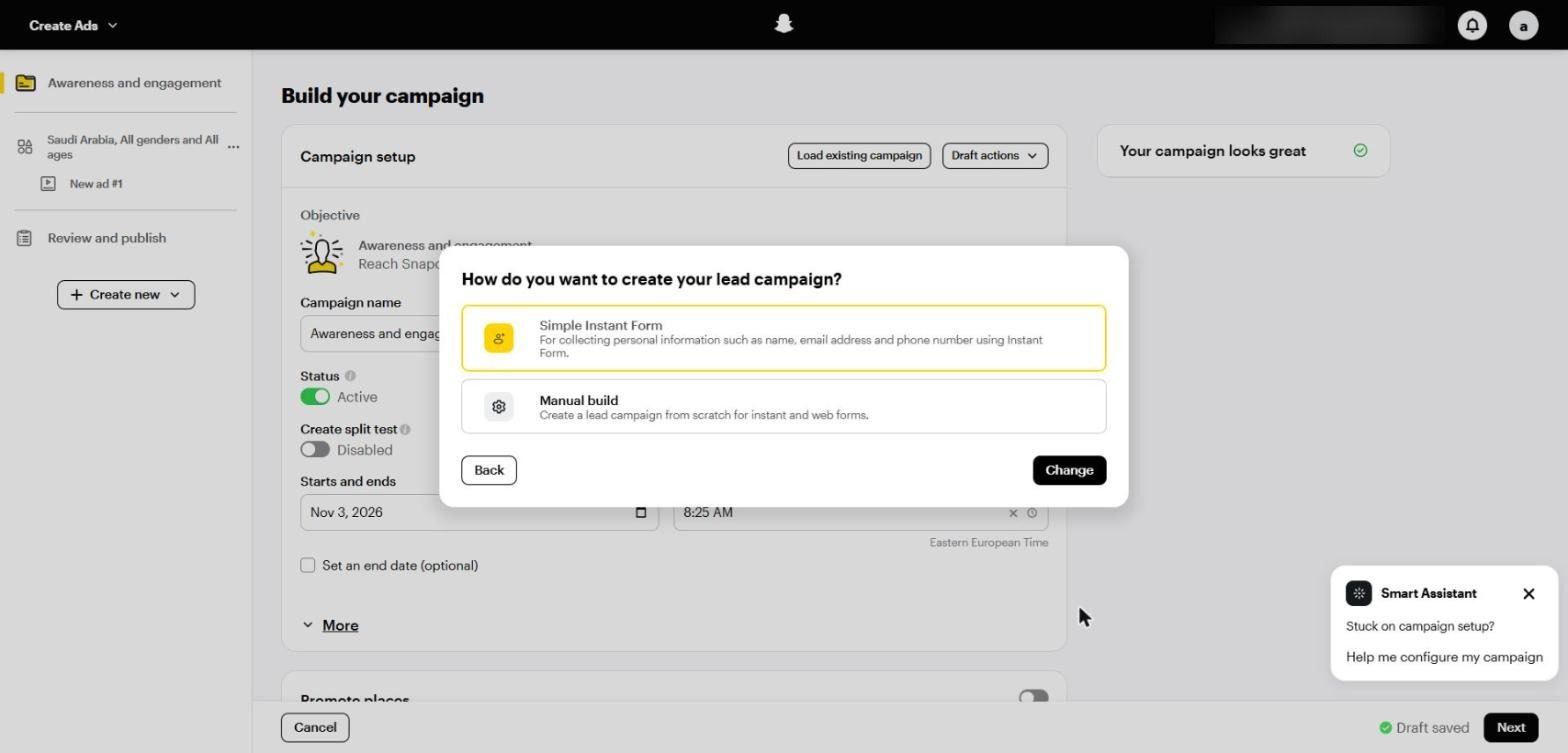
Two ways to build a Leads campaign: Simple Instant Form or Manual build
When you choose the Leads objective, Snapchat asks: Simple Instant Form (a quick form with preset settings) or Manual build. Choose Manual build to control the questions and qualification.
Conversion Location in Leads Campaigns
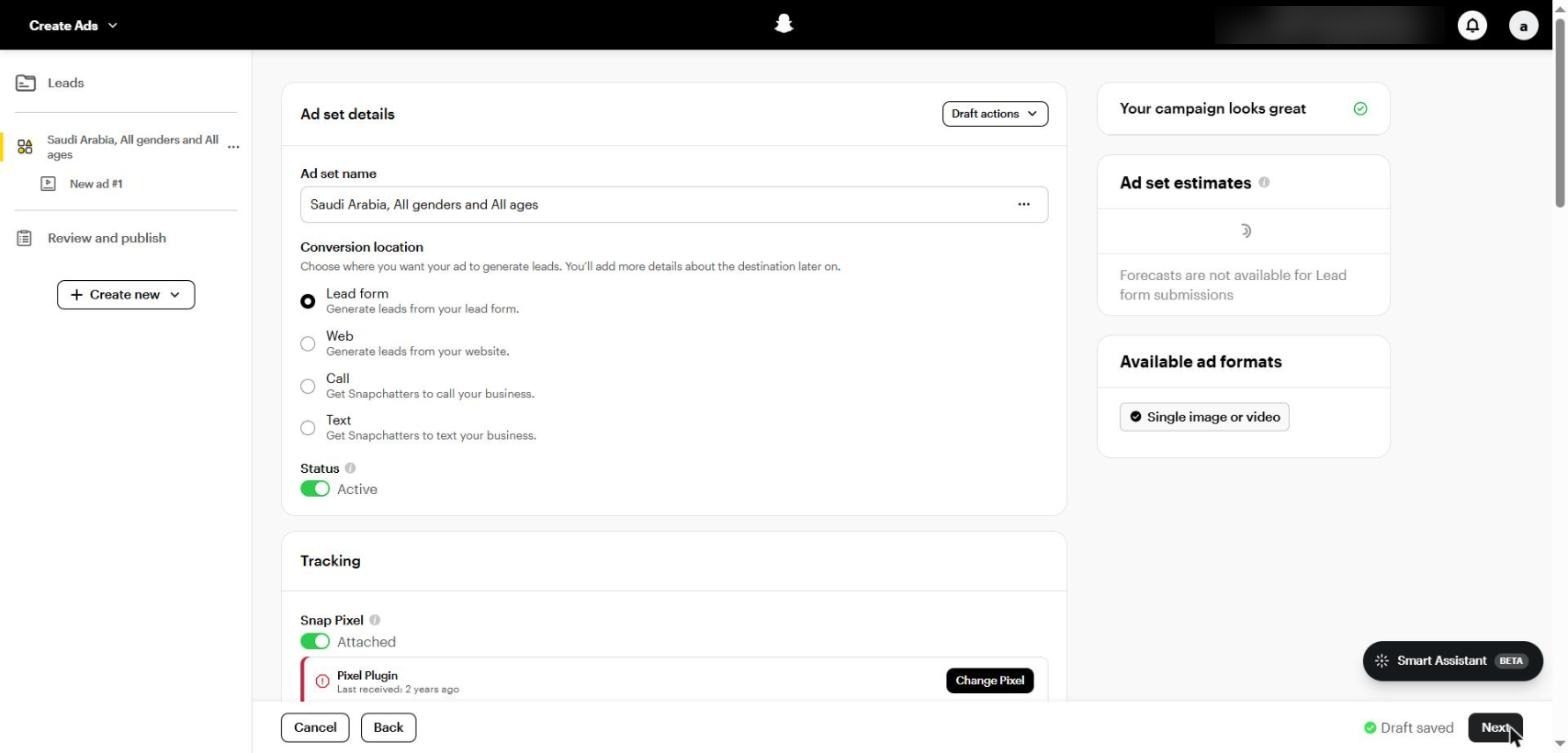
Conversion location in a Leads campaign: Lead form, Web, Call and Text
Option | How it works | When to use it |
|---|---|---|
Lead form | A form inside Snapchat with some fields pre-filled | When you want volume at a lower cost |
Web | Sign-up on your own page with the Pixel | When quality matters and you have a strong page |
Call | A direct call to the business | Urgent services, clinics and maintenance |
Text | A text message to the business | When customers prefer to ask before committing |
Building the Lead Form Step by Step
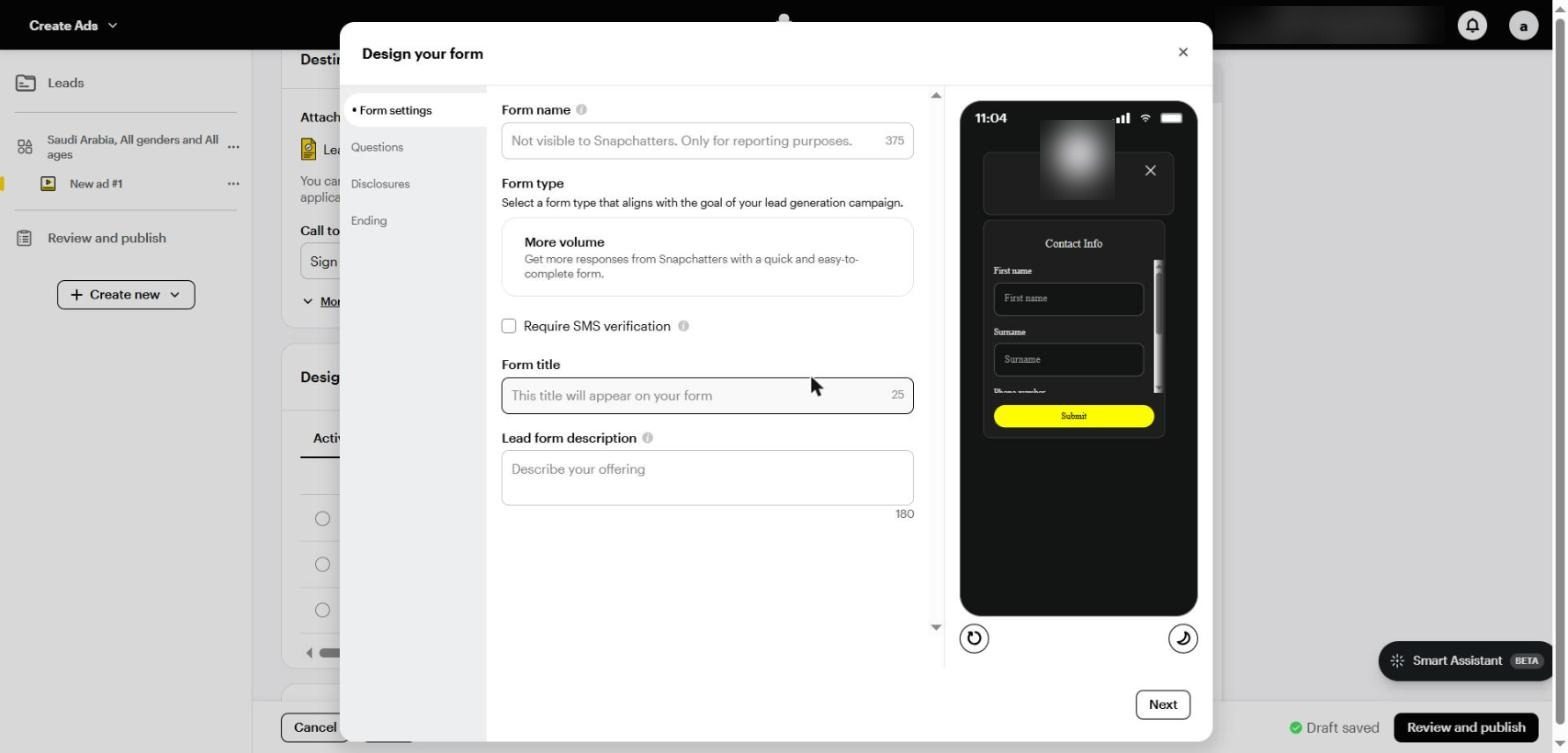
Form settings: form name, form type, Require SMS verification, title and description, with a form preview
Form name: for reporting only; users don't see it.
Form type: More volume, for a quick, easy form.
Require SMS verification: asks users to confirm their phone number with a code. It lowers volume but raises quality a lot when fake numbers are a problem.
Form title and Lead form description: state the offer clearly, such as “Book a free test drive within 48 hours”.
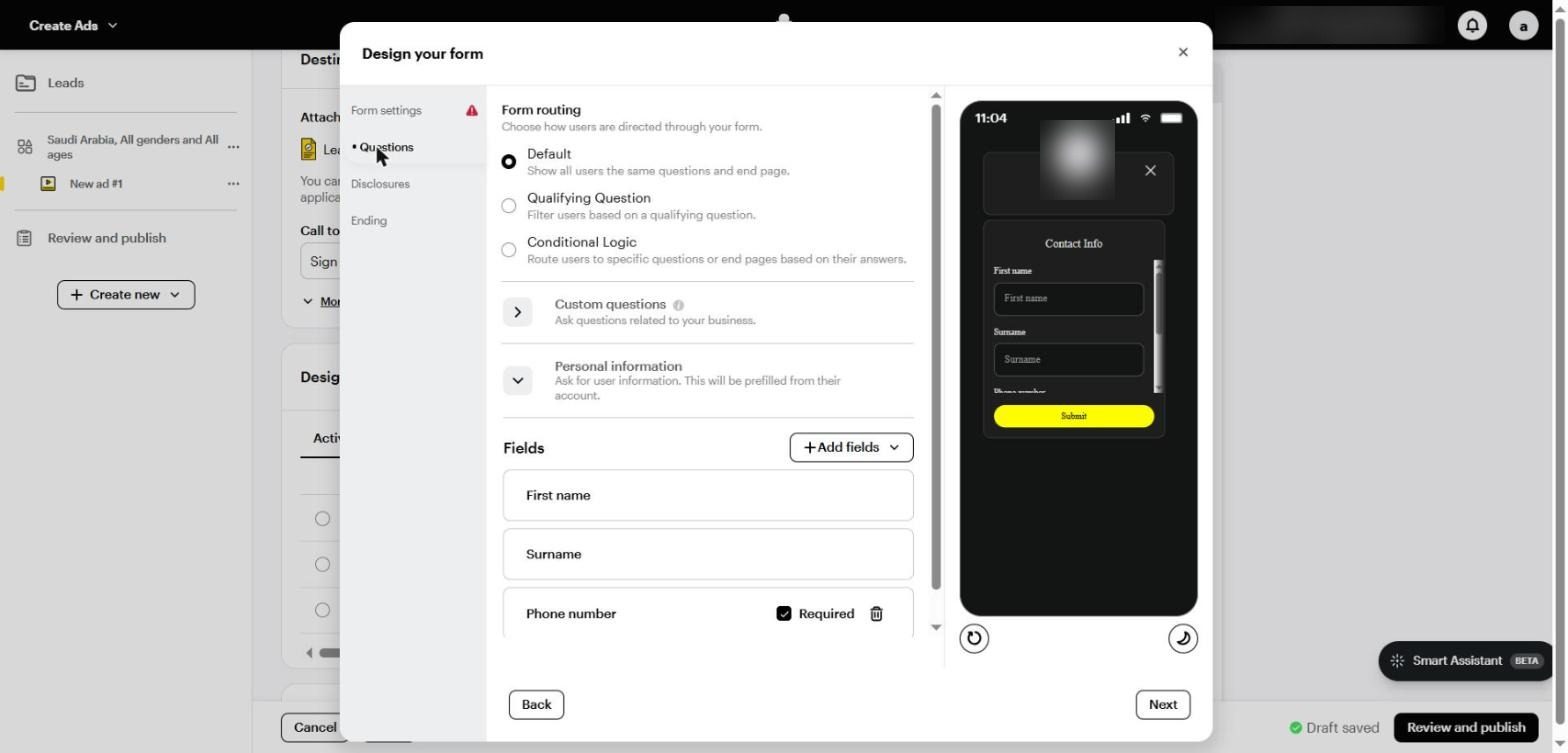
Questions: Form routing (Default, Qualifying Question and Conditional Logic), Custom questions and Personal information
Questions and qualification
Form routing | What it does | When to use it |
|---|---|---|
Default | Every user sees the same questions and the same end page | A simple offer with no conditions |
Qualifying Question | Filters users with a single qualifying question | When there's a clear condition, such as budget or city |
Conditional Logic | Routes users to different questions or end pages based on their answers | When the service or offer changes with the answer |
Personal information: name, phone and email are pre-filled from the user's account, so make the phone field required.
Custom questions: one or two at most, such as “When are you planning to buy?” or “Which city?”.
Disclosures: add your privacy policy link and any required consents.
Ending: a thank-you page that explains the next step, with a button to open the website or WhatsApp.
After the Lead: Where Campaigns Are Won or Lost
Leads that don't get a reply within minutes go cold fast, and that's even more obvious on Snapchat because the audience moves quickly. Connect the form to your CRM through a webhook or integration tool, and start the conversation on WhatsApp straight away. For more on why leads drop off before booking: why clinic leads don't book, and how to fix it.
A real example from Saudi Arabia: Ramz Elekhtear generated 12,993 leads and calls at a blended $2.38 across Snapchat, Meta and TikTok, with targeting driven by the dealer's available inventory.
PART 11
E-commerce and Catalogues
In short Connect your Catalogue, run Dynamic ads for retargeting, use Collection ads for discovery, optimise for PURCHASE, and calculate ROAS after returns. |
E-commerce is one of Snapchat's strongest use cases in the Gulf and Egypt, especially in fashion, beauty, supplements and electronics. According to Snap's Q1 2026 results, Dynamic Product Ads revenue grew more than 30%, and purchases per dollar in Pixel Purchase campaigns improved by more than 23%.
The Catalogue and Dynamic Ads
From the menu, open Catalogues and create a new catalogue.
Connect it to your store: the Snapchat Ads app on Shopify syncs products and installs the Pixel automatically, or use a CSV or XML feed.
Make sure the Pixel sends item_ids that match the product IDs in the Catalogue, or retargeting won't work.
In the campaign, turn on Dynamic ads (it appears in the campaign settings, as shown in Part 3).
Pick the template and set the audience: people who viewed a product or added it to cart in the last 7 to 14 days without buying.
An important warning: out-of-stock products in the Catalogue can stop Dynamic ads from delivering, so update the feed at least daily.
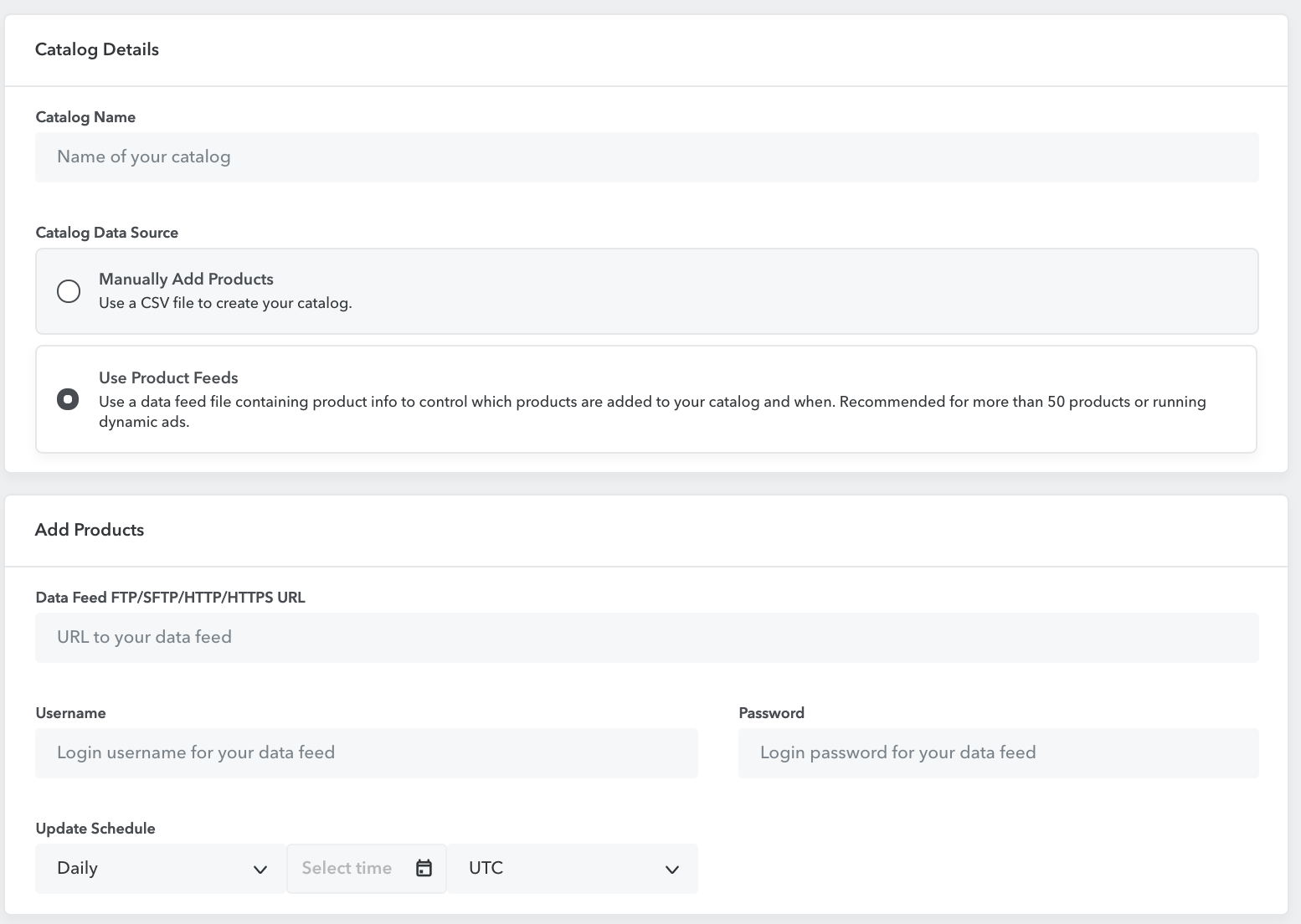
Product feed setup and refresh schedule · Source: Snapchat Business Help Center
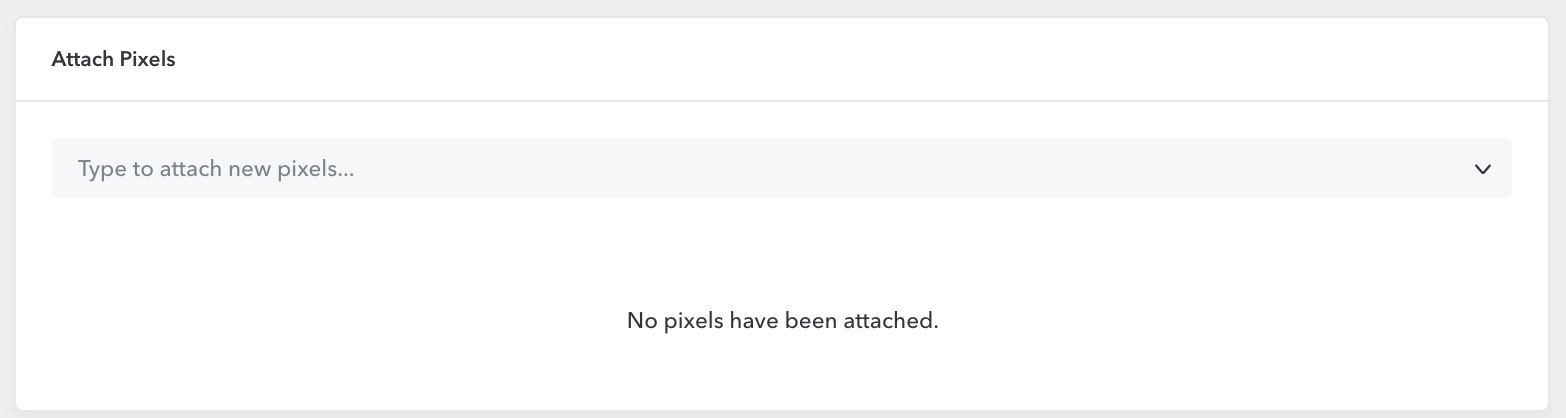
Attach the Pixel before running Dynamic Ads · Source: Snapchat Business Help Center
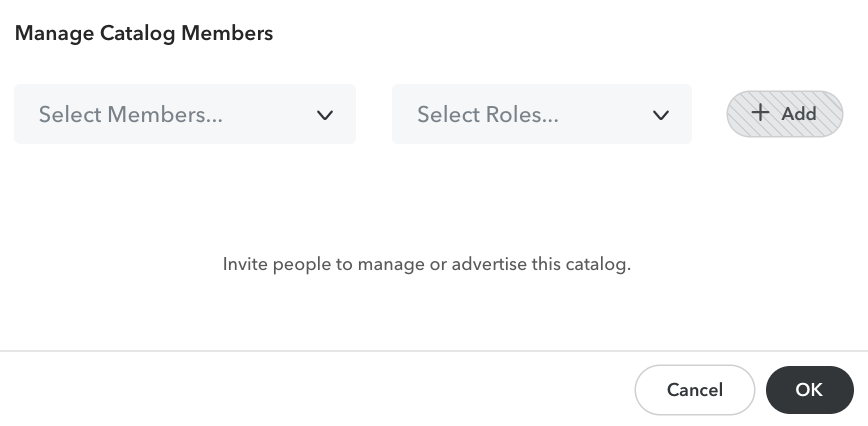
Catalog member roles and permissions · Source: Snapchat Business Help Center
A Simple Structure for an Online Store
Campaign | Objective | Format | Audience |
|---|---|---|---|
Acquisition | Sales: website conversions on PURCHASE | Single video and Collection | Broad Smart audience |
Retargeting | Sales: catalogue sales | Dynamic ads | Product viewers and ADD_CART |
Seasons | Sales with a temporarily higher budget | Limited offer + Sponsored Snaps | Broad + engagers |
Cash on Delivery: The Problem Ads Manager Doesn't Show
In Egypt and Saudi Arabia a large share of orders are cash on delivery, and Ads Manager counts an order as a purchase even if it's refused at the door. So:
Confirm every order on WhatsApp before shipping.
Calculate ROAS and CPA on delivered orders, not recorded orders.
Where possible, send the purchase event through CAPI after confirmation, so the algorithm learns from real buyers.
Further reading on the Cresco blog |
PART 12
Offers and Seasons in the Gulf and Egypt
In short On Snapchat the audience moves strongly with the seasons. Plan a yearly calendar, start a few days before each season, and make the offer real and clear on screen. |
Creative grabs attention, but the offer is what makes someone swipe up and buy. Snapchat audiences in the Gulf are very responsive to seasons and limited offers.
The Seasonal Calendar
Season | Approximate timing | What works |
|---|---|---|
Saudi Founding Day | 22 February | National identity in the creative, and short offers |
Ramadan | Per the Hijri calendar | Spend peaks at night after iftar; family, gift and food offers |
Eid al-Fitr and Eid al-Adha | Per the Hijri calendar | Clothing, fragrance, gifts and travel, with delivery before Eid |
Back to school | August and September | Education, electronics, stationery and clothing |
Saudi National Day | 23 September | Saudi Arabia's biggest sale season after White Friday |
White Friday | Late November | Highest competition and CPM, but highest purchase intent |
Year end | December | Sales, travel and events |
How to Prepare for a Season
Have creatives ready at least two weeks before the season, because ad review can slow down at peak times.
Run a warm-up campaign a few days before on a broad audience, to build Ad engagement and Website events audiences.
Raise the budget two or three days before the season, not on the day, so the campaign gets through learning early.
Put the offer and deadline on screen in clear type; users don't read small print.
Use Sponsored Snaps to remind engagers before the offer ends.
After the season, lower the budget gradually, and don't expect the same results at the same cost.
Offer Elements That Convert on Snapchat
Cash on delivery: for stores, state it clearly on screen.
Fast or free delivery: “Arrives tomorrow” beats “fast delivery”.
A guarantee or returns: lowers the risk, especially for new brands.
Limited quantity or time: as long as it's real.
Bundles: “Buy 2, get the third free” raises average order value and improves ROAS.
PART 13
Budget and Bidding: How Much and How
In short Start with $20 to $50 a day for testing, size the budget from your expected cost per conversion, start with Auto-bid, and don't edit in the first few days. |
Snapchat's minimum is $5 a day, but that's a technical number, not a practical one. A tiny budget won't gather enough data for the algorithm to learn.
Three Ways to Set the Budget
Method | How | Example |
|---|---|---|
Snapchat's starting recommendation | $20 to $50 a day during testing | $35 a day for two weeks |
From cost per conversion | Expected cost per conversion × 10, per day at least | A $4 lead = $40 a day |
From the monthly target | Customers needed × acceptable cost per customer | 100 customers × $25 = $2,500 a month |
The second method is a working rule we use, not an official Snapchat number: if you can't fund around 10 conversions a day, optimise for an event higher in the funnel for now, or pool more budget into one ad set.
What to Expect: Real Numbers from Our Campaigns
These figures come from Ads Manager reports for two campaigns we ran in Saudi Arabia, both automotive lead gen:
Campaign | Platform | Spend | Leads | Cost per lead |
|---|---|---|---|---|
AUM Isuzu (20 days) | Snapchat | $6,654 | 1,541 | $4.32 |
AUM Isuzu | Meta | $4,000 | 736 | $5.43 |
Ramz Elekhtear (45 days) | Snapchat | $9,474 | 3,685 | $2.57 |
Ramz Elekhtear | Meta | $10,810 | 4,577 | $2.36 |
Ramz Elekhtear | TikTok | $8,180 | 3,564 | $2.30 |
Snapchat average | $16,128 | 5,226 | $3.09 |
Snapchat isn't always cheaper: it beat Meta on AUM Isuzu, and was slightly more expensive than Meta on Ramz Elekhtear.
Combining wins: on AUM Isuzu leads rose 89% and blended cost fell 47% after we installed the Pixel and added Meta; on Ramz Elekhtear volume rose 50% and cost fell 20%.
Read them as a reference, not a promise: two campaigns, in one industry and one country. E-commerce and other industries have very different numbers.
How the Snapchat Auction Works
Every time a user opens Stories, Spotlight or Chat, Snapchat runs a quick auction between the ads eligible to reach them. The winner isn't simply the highest bidder but the one with the highest total value, made up of three things:
Element | What it means | How to improve it |
|---|---|---|
The bid | What you're willing to pay for the result | Auto-bid to start, Target cost once numbers are stable |
Likelihood of action | Snapchat's prediction that this person will tap or buy | Clean Pixel and CAPI data, and the right optimisation goal |
Ad quality | How people engage with the ad and their experience after it | Authentic creative, and a fast page that matches the ad |
That's why an ad with a lower bid can beat a competitor paying more, if its creative is better and its data more accurate. In practice, improving creative and tracking lowers cost more than raising the bid.
Know Your Numbers Before You Spend More
Before any budget decision, work out the most you can afford to pay:
Max store CPA = Average order × Profit margin × Share of orders delivered
Max CPL = Deal value × Profit margin × Lead-to-customer rate
Example: an average order of SAR 300, a 40% margin, and 80% of orders actually delivered. Max CPA = 300 × 0.4 × 0.8 = SAR 96. Anything higher loses money on the first order, unless customers come back to buy again.
Handling the Learning Phase
The first days of a campaign are always volatile, so don't judge or edit during the first 3 to 5 days.
Major changes to the goal, bid strategy or audience restart learning.
Batch your edits into one day a week instead of a small tweak every day.
When to Move Off Auto-bid
Once cost has been stable for two weeks and you know your real number, test Target cost in a separate ad set at a value close to your current average. If volume drops sharply, your target is below market price, so raise it gradually.
And remember that Snapchat is moving hard toward automation: according to Q1 2026 results, nearly 70% of ad spend uses at least one smart tool, Smart Audience, Smart Budget or Smart Placement.
PART 14
Measurement and Analysis: Reading the Numbers Correctly
In short One number decides (CPA or ROAS); the rest diagnose. Watch for the longer attribution window, and use UTMs and GA4 to compare channels. |
The Metrics That Matter
Metric | What it means on Snapchat | How to use it |
|---|---|---|
Paid impressions | Paid ad views | Reach and cost |
eCPM | Cost per thousand impressions | Comparing costs between markets |
Swipe-up rate / Click rate | Share of people who tapped or swiped up | Strength of the hook and CTA |
2-second video views | Views of at least two seconds | Strength of the first two seconds |
Video completions | Views of 97% of the ad | Strength of the whole story |
Landing page views | People who actually waited for the page to load | The gap versus clicks reveals a slow site |
Conversions, CPA and ROAS | The actual result | The North Star that decides |
Attribution: Why Snapchat's Numbers Differ
Snapchat's default window is 28 days after a swipe and 1 day after a view. That means Snapchat credits itself with a purchase that happened three weeks after someone tapped the ad. On Meta the default is 7 days after a click and 1 day after a view.
Don't compare ROAS directly between the two platforms.
Use GA4 or a neutral attribution tool with consistent UTMs across every channel.
Compare total revenue before and after increasing Snapchat spend; that's the most honest measure.
Reports
Use Reports in the main menu to build custom reports, and on the Manage Ads screen use Columns to choose metrics and Breakdown to split results by age, gender, placement or device.
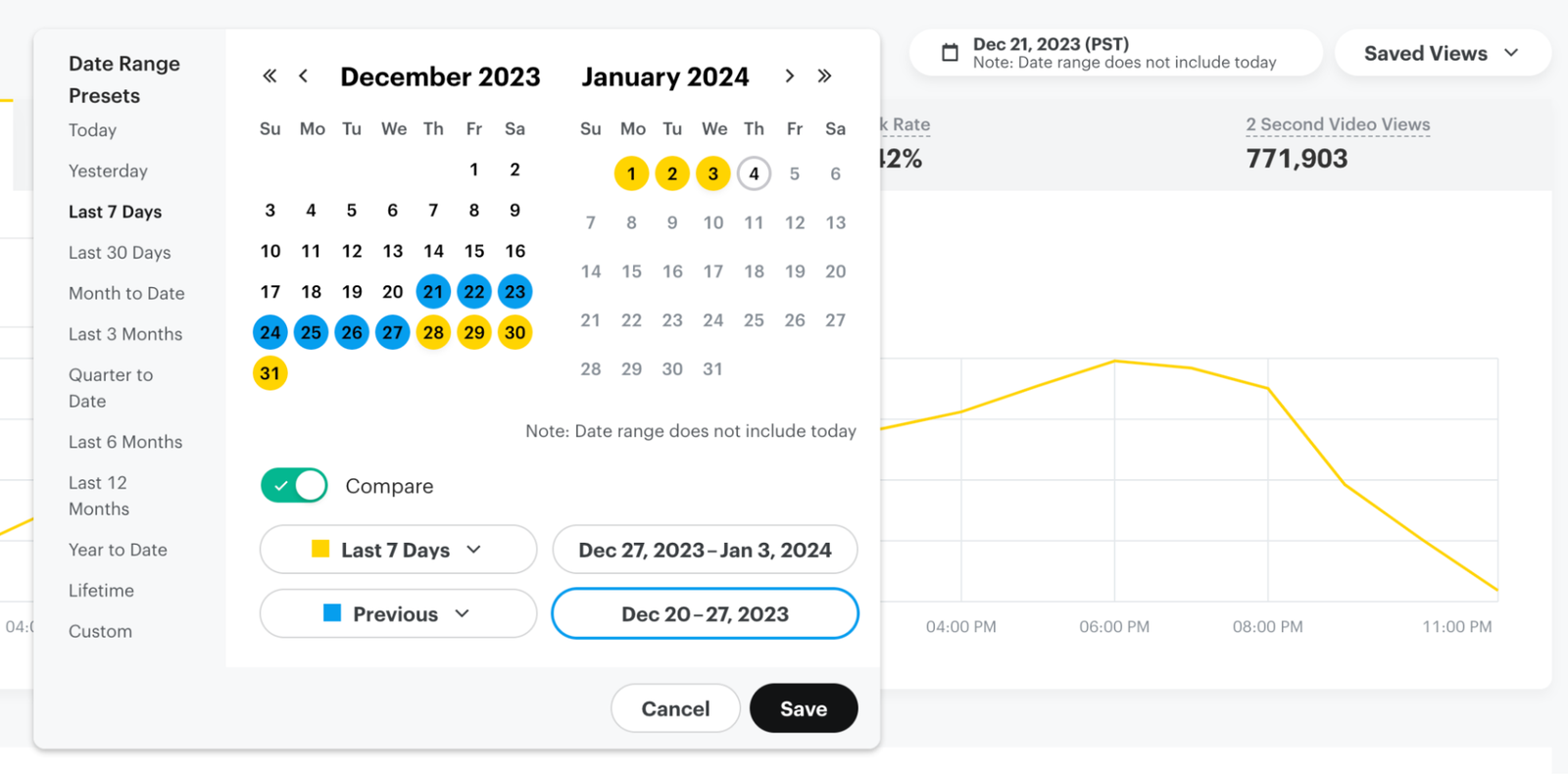
Select reporting date ranges for comparison · Source: Snapchat Business Help Center
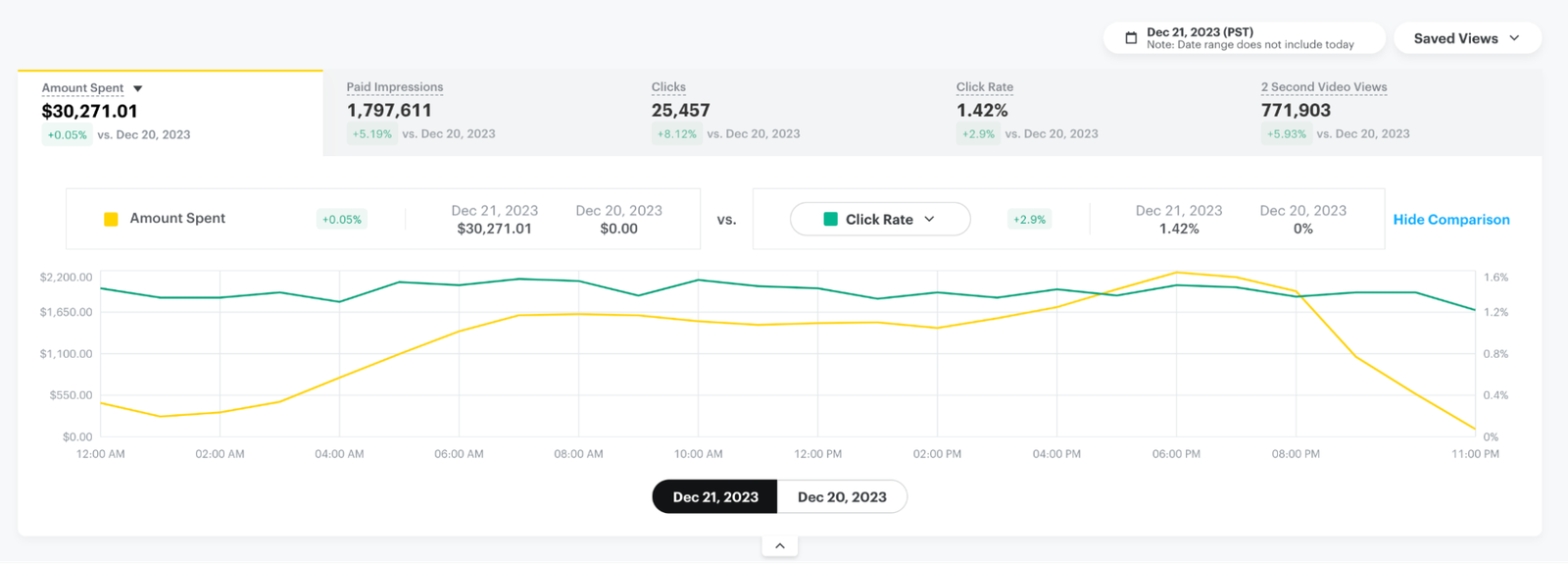
Compare performance metrics in the graph · Source: Snapchat Business Help Center
The Diagnosis Table
What you see | What it means | What to do |
|---|---|---|
Low 2-second views | The first two seconds are weak | A new hook, with a face or product from the first frame |
Good swipe rate but few landing page views | The page is slow or doesn't load well | Speed up the page and turn on Smart Prefetching |
Lots of visits, few conversions | The problem is the page or the offer | Review the page, price and trust signals |
Good CPA that slowly rises | Creative fatigue | New creatives |
Plenty of leads, few bookings | Weak quality or follow-up | Qualifying question, SMS verification and faster replies |
If the page itself is the problem, that's what we work on in our website and landing page development service.
PART 15
Testing and Scaling
In short Test one variable with a split test, raise the budget gradually, and scale through creative, formats and seasons rather than duplicate campaigns. |
Testing
Split test: in the campaign settings, to test one variable (creative, audience, placement or bid) with a clean audience split.
Creative testing inside the ad set: the fastest method. Add new ads alongside the old ones, and judge once you have enough conversions.
Campaign Lab: under Analyse in the menu, for more structured experiments.
Test one thing at a time, or you won't know what made the difference.
The Review Routine
Daily (5 minutes): is spend normal? Any rejected ads or payment issues? Are leads reaching the team?
Weekly, on a fixed day: rank ads by CPA, pause the weakest, add a new batch of creatives, and change the budget once.
Monthly: compare with total revenue and GA4, and review lead quality with the sales team.
Scaling
Gradual increases: raise the budget by a sensible amount every few days instead of doubling it suddenly, and watch CPA.
More creative: more winning creatives mean a bigger audience the algorithm can reach.
New formats: add Sponsored Snaps, Collection and Dynamic ads to a winning campaign.
New markets: from Saudi Arabia to Kuwait and the UAE, in a separate ad set if costs differ.
Seasons: Ramadan, Eid, Saudi National Day and White Friday. Raise the budget a few days before the season, not on the day.
Expect CPA to rise a little as you scale; that's normal. The real question is whether total profit is higher.
PART 16
Troubleshooting: When a Campaign Isn't Working
In short Start with the simple causes: status, review, dates, payment and the Pixel. Then the bid, then the creative. |
Symptom | Likely cause | Fix |
|---|---|---|
The ad isn't delivering at all | Paused, not approved, outside its dates, or a payment issue | Check status, dates and Billing |
Dynamic ads aren't working | Out-of-stock products, or item_ids that don't match | Update the feed and link the Pixel to the Catalogue |
Website conversions unavailable | The Pixel hasn't received events recently | Fix the Pixel and test in Test events |
Very low spend | Target cost or Max bid below market, or a narrow audience | Go back to Auto-bid and broaden the audience |
Sudden CPM spike | A crowded season or low-engagement creative | Compare with the same period and refresh creative |
Rejected ads | Policy breach or exaggerated claims | Review ad policies and edit the copy or visual |
Fake or unserious leads | The form is too easy | SMS verification and a qualifying question |
Ads Manager also includes Smart Assistant (in beta), which helps with campaign setup and understanding problems. Use it as a starting point, and check its suggestions yourself.
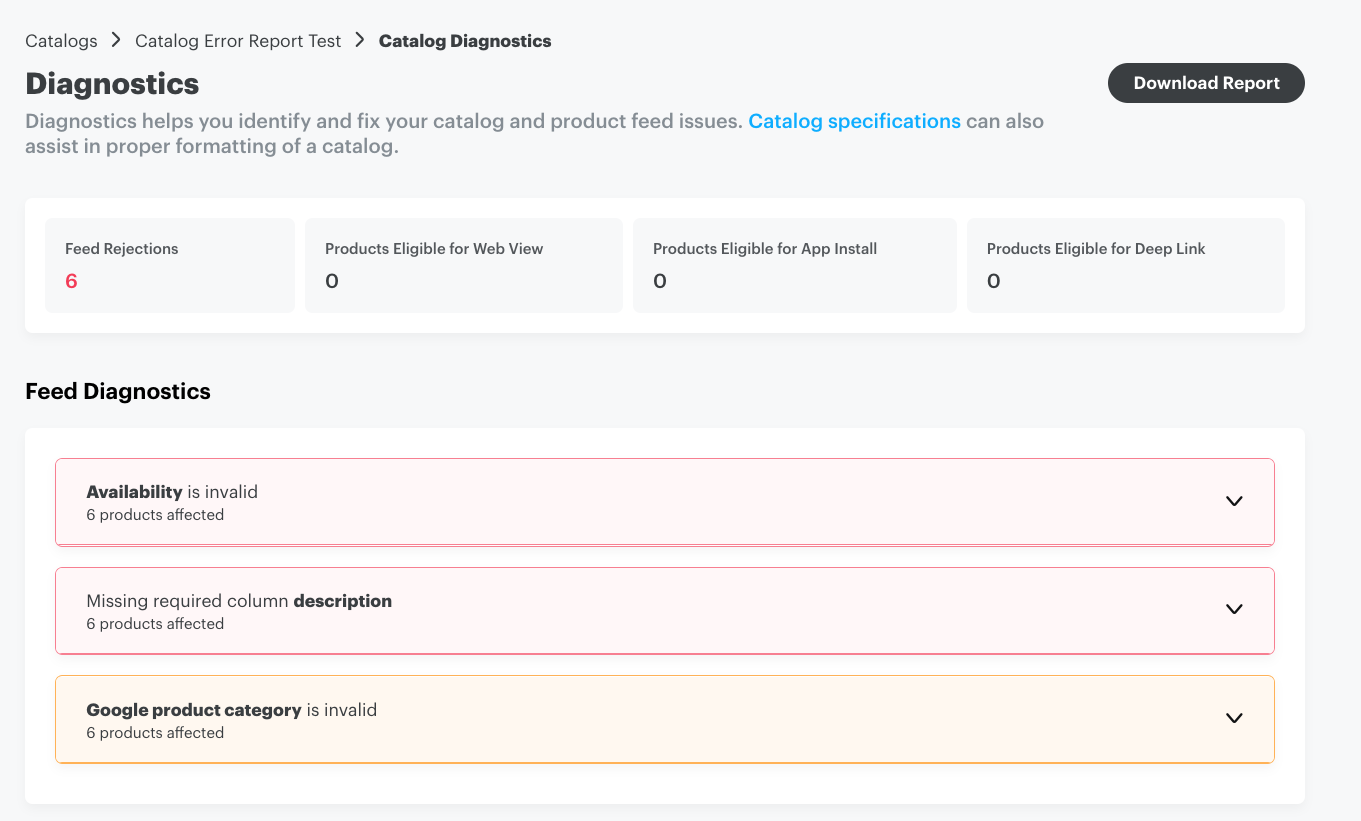
Catalog diagnostics and downloadable error report · Source: Snapchat Business Help Center

An invalid event needs investigation before measurement is trusted · Source: Snapchat Business Help Center
PART 17
Ad Policies and Review
In short Every ad is reviewed before it delivers. Avoid exaggerated claims, respect the limits on sensitive categories, and disclose AI-generated content. |
Rejected ads or a restricted account cost more than any high CPA, and most rejections repeat for well-known reasons.
Common Reasons for Rejection
Reason | Example | The alternative |
|---|---|---|
Exaggerated claims | “Lose 10 kg in a week” | A realistic result with a real experience |
Misleading before and after | Unrealistic beauty or weight-loss images | Follow the category policy, and avoid it in restricted categories |
Creative quality | Horizontal video, unreadable text or a black screen | Follow the specs and the safe zone |
Landing page | A broken link, or a page that doesn't match the ad | A fast page that matches the offer |
Restricted categories | Medicines, financial services, gambling | Check each country's requirements before launch |
Targeting minors | Products unsuitable for under-18s | Raise Minimum age in Controls |
Tips to Avoid Problems
Review Snap's advertising policies before launching in any sensitive category.
Turn on Add AI info in the ad if the creative is AI-generated.
In each batch, keep most ads safe and only a few bold, because a high rejection rate affects the account.
Keep more than one payment method; a failed payment is one of the simplest reasons campaigns stop.
Upload ads a day or two before launch, especially in peak seasons.
PART 18
Playbooks by Industry
In short Every industry needs a different objective, format and KPI. These are proven starting points for each, to adjust to your own numbers. |
The previous parts explained each tool on its own. Here we combine them into a starting plan for the industries we work with most in Saudi Arabia, Kuwait and Egypt.
E-commerce
Element | Choice |
|---|---|
Objective | Sales: website conversions on PURCHASE, plus catalogue sales for retargeting |
Formats | UGC-style single video, Collection ads and Dynamic ads |
Audience | Broad Smart audience, with website visitors as a suggestion |
KPI | ROAS on delivered orders, not recorded ones |
Biggest mistake | Not confirming cash-on-delivery orders |
More in Cresco's e-commerce marketing.
Real Estate
Element | Choice |
|---|---|
Objective | Leads: a lead form with a qualifying question on budget or unit type |
Formats | A walkthrough video of the project, with price and payment plan on screen |
Audience | The city and surrounding areas, with 25+ as an age suggestion |
KPI | Cost per qualified lead and cost per site visit, not just cost per lead |
Biggest mistake | A form so easy it brings leads without the budget |
More in Cresco's real estate marketing.
Automotive
Element | Choice |
|---|---|
Objective | Leads: a lead form or Call to book a test drive |
Formats | Video of the car actually in stock with the price or offer, and a Story ad with several models |
Audience | By branch and city, with targeting driven by available inventory |
KPI | Cost per test drive or showroom visit |
Biggest mistake | Advertising a model that isn't in stock |
This is what we applied with AUM Isuzu and Ramz Elekhtear in Saudi Arabia.
Education and Academies
Element | Choice |
|---|---|
Objective | Leads: a lead form with a question about the programme or level |
Formats | Real students talking, results, and an early-registration offer |
Audience | Students and parents depending on the programme, timed around admission dates |
KPI | Cost per actual enrolment, not cost per lead |
Biggest mistake | One generic message for every programme instead of a message per programme |
More in Cresco's education marketing.
Clinics and Healthcare
Element | Choice |
|---|---|
Objective | Leads: a lead form or Call, with SMS verification |
Formats | The doctor explaining simply, a tour of the clinic, and a consultation offer |
Audience | A geographic radius close to the clinic |
KPI | Cost per booking that actually showed up |
Biggest mistake | Breaking medical advertising rules, or replying to leads too late |
More in how to market your clinic in Egypt and in Cresco's medical marketing.
Restaurants and Branches
Element | Choice |
|---|---|
Objective | Awareness and engagement with Promote Places, or Traffic to a delivery app |
Formats | Close-up food shots, and Promoted Places on the Snap Map |
Audience | A radius close to the branch, around mealtimes |
KPI | Visits and orders, not impressions |
Biggest mistake | Targeting a whole city for a single branch |
According to Snap's Q1 2026 results, early Promoted Places campaigns drove more than 20 million incremental visits to physical locations.
PART 19
Creators and Partnership Ads on Snapchat
In short An ad from a creator's account borrows their trust and audience. Agree the right to run the content as ads, run it as a Partnership ad, and start with smaller creators. |
On Snapchat people follow friends and creators more than brands, so an ad that appears from a creator's account feels closer to organic content than any other ad.
Ways to Work with Creators
Method | How it works | When to use it |
|---|---|---|
Partnership ad | Your ad appears under the creator's name and your brand together | When you want the creator's trust with full control of targeting |
Sponsored Snaps from creators | The message lands in the Chat feed from the creator's account | Offers and launches that need a personal touch |
UGC content only | The creator films, and you publish from your account | When you want lots of creatives at a lower cost |
Lens Creator Marketplace | A professional builds a Lens for your brand | Awareness campaigns and big seasonal moments |
Practical Steps
Pick creators whose audience looks like your customers, not just the ones with the most followers.
Start with three to five small or mid-sized creators instead of one big name.
Agree in writing on the right to use the content as paid ads and for how long; it's the most important clause in the deal.
Ask for several hooks per video, and a version without copyrighted music.
On the ad screen, turn on Partnership ad and select the creator's account once they approve.
Compare creator ads with brand ads on the same goal and over the same period.
From Creator Dashboard and Lens Creator Marketplace in the main menu, you can manage these partnerships from inside Ads Manager.
PART 20
Snapchat and Meta: The Full Picture
In short Snapchat doesn't replace Meta and Google; it complements them. Use it where your audience is concentrated, and measure its effect on total revenue. |
Snapchat | Meta | |
|---|---|---|
Objectives | 5 objectives | 6 objectives |
Smart targeting | Smart audience (Controls and Suggestions) | Advantage+ audience (Controls and Suggestions) |
Campaign budget | Smart Budget | Campaign budget |
Default attribution | 28-day swipe and 1-day view | 7-day click and 1-day view |
Standout format | Sponsored Snaps in Chat | Reels and Partnership ads |
Strongest markets for us | Saudi Arabia and Kuwait | Egypt and the Gulf |
In most of the successful accounts we manage, Snapchat runs alongside Meta Ads (covered in full in The Complete Guide to Meta Ads) and Google Ads: Meta and Snapchat create demand, and Google captures it when the customer searches. In Saudi automotive specifically, Snapchat has been one of the strongest channels, as covered in Cresco's automotive marketing.
What Nobody Tells You
Snapchat isn't always cheap. CPM may be lower, but lead or order quality is what decides profit.
Local creative wins. An ad translated from a Meta campaign usually loses to one shot in the audience's dialect.
In-platform numbers are optimistic. The long attribution window makes ROAS look higher than it is.
Follow-up matters more than the campaign. In lead gen and cash on delivery, the team and operations decide the outcome.
Frequently Asked Questions
How much do Snapchat ads cost in Saudi Arabia?
It depends on the industry and objective, but in the automotive lead gen campaigns we've run in Saudi Arabia, Snapchat's average cost per lead was around $3.09, ranging from $2.57 on Ramz Elekhtear to $4.32 on AUM Isuzu. The minimum spend is $5 a day, and the full numbers are in Part 13.
Are Snapchat ads worth it, or are they just for teenagers?
In Saudi Arabia more than 26 million people use Snapchat every month, and it reaches 90% of 13 to 34-year-olds, an age group that buys and books. If your customer is under 40 and in the Gulf, Snapchat is well worth testing. If most of your customers are over 50, start with Meta or Google.
What's the minimum budget for Snapchat ads?
The minimum is $5 a day per ad set, but that's a technical floor. Snapchat itself says $20 to $50 a day suits the initial testing phase, and it's better to size the budget from your expected cost per conversion.
How do I advertise on Snapchat step by step?
Create a Business Account and Public Profile at ads.snapchat.com, install the Snap Pixel and CAPI, then create a campaign with a Sales or Leads objective using Manual build. In the ad set, choose a performance goal and Auto-bid, put location and age in Controls, upload a vertical 1080×1920 creative, then Review and publish. Parts 2 to 8 cover it step by step with screenshots.
Can I advertise on Snapchat without a website?
Yes. The Leads objective offers a lead form inside Snapchat, Call for direct calls, or Text for messages. You can also use Sponsored Snaps with an auto response, or promote an app. But without a website and Pixel you lose the Sales and website conversions goals.
Which objective should I choose: Traffic, Sales or Leads?
Choose Sales if you sell online and Leads if you collect customer details, as long as the Pixel or form is working. Traffic is rarely the right choice, because it brings taps, not buyers.
Do I need both the Snap Pixel and the Conversions API?
Yes. The Pixel tracks from the browser, and CAPI sends from the server and makes up for what privacy restrictions take away. Set up deduplication with client_dedup_id in the Pixel and event_id in CAPI. On Shopify, the Snapchat Ads app installs the Pixel automatically.
Why aren't my ads delivering, or why is spend so low?
Check in order: ad status and review, dates, payment method, then the bid. If you're using Target cost or Max bid below market price, go back to Auto-bid. If the audience is very narrow or Further limit the reach is on, broaden it. The full table is in Part 16.
How long does Snapchat ad review take?
Review usually happens within a day or two, and it can take longer in peak seasons. Upload ads ahead of launch, and avoid exaggerated claims so they aren't rejected.
What's the best length and size for a Snapchat video ad?
The size is 1080×1920 at 9:16, and the allowed length is 3 to 180 seconds, but the recommended range is 3 to 10 seconds. Put the hook and product in the first two seconds, and keep about 150 pixels at the top and bottom free of text.
How do I lower my cost per lead on Snapchat?
The biggest levers are stronger creative in the first two seconds, a broad Smart audience instead of narrow targeting, a lead form instead of a slow page, Auto-bid to start, and correct Pixel and CAPI tracking. On AUM Isuzu, the blended cost per lead fell 47% after we installed the Pixel, added Meta and tested 12 creatives a week.
How do I improve lead quality from Snapchat?
Turn on SMS verification, use a qualifying question or conditional logic, make the phone field required, and state the offer clearly in the form description. Most importantly, reply to each lead within minutes, ideally on WhatsApp, and measure cost per qualified lead, not just cost per lead.
Snapchat, Meta or TikTok in Saudi Arabia?
Don't pick just one. On Ramz Elekhtear the cost per lead was very close across channels: $2.57 on Snapchat, $2.36 on Meta and $2.30 on TikTok, but combining them increased leads by 50% and cut cost by 20%. Start with the channel where your audience is concentrated, then add the others.
What are Sponsored Snaps, and are they worth trying?
They're ads delivered to the Chat inbox as a message, and users can reply. Snap says they drive 22% more conversions at nearly 20% lower cost per action than other formats. You set them up in the ad's Message design section, and they suit offers and lead gen.
Why is ROAS in Snapchat higher than in GA4?
Because the default attribution window is 28 days after a swipe and 1 day after a view, so Snapchat credits itself with purchases that happened weeks later. Compare using UTMs and GA4, and judge on total revenue.
Can I reuse my Meta ads on Snapchat?
You can start with them if they're vertical, short and open with a strong hook, but it's better to produce native versions in the audience's dialect and shot on a phone, because Snapchat users skip anything that looks polished very quickly.
Is Snapchat a good fit for the Egyptian market?
Snapchat is far stronger in Saudi Arabia and Kuwait than in Egypt, where Meta usually remains the main channel. Before deciding, open a test ad set for Egypt, check Target Audience Size for the age group you're targeting, and start with a small test budget.
Summary: Your Action Plan from Day One
Whether you're starting on Snapchat or fixing an existing account, work through it in this order:
Phase 1: Foundations (week one) ☐ Business Account, Public Profile and payment method ready (Part 2). ☐ Snap Pixel and CAPI working with correct deduplication (Part 2). ☐ I confirmed my audience is on Snapchat in my market (Part 1). ☐ The Catalogue is connected if I'm a store (Part 11). |
Phase 2: Launch ☐ One campaign with a Sales or Leads objective and Manual build (Part 3). ☐ The deepest available performance goal, Auto-bid and Smart placement (Part 4). ☐ Smart audience: location and age in Controls, everything else as suggestions (Part 5). ☐ 4 to 6 vertical creatives in the audience's dialect (Part 9). ☐ Sponsored Snap message and UTMs set up (Part 8). |
Phase 3: Ongoing management ☐ One North Star, cross-checked with GA4 (Part 14). ☐ New creatives every one to two weeks (Part 9). ☐ Dynamic ads for retargeting (Part 11). ☐ Gradual scaling, with seasons planned ahead (Parts 12 and 15). ☐ When a campaign stalls, work through the troubleshooting table (Part 16). |
Want someone to run Snapchat for your business? Cresco Agency runs Snapchat, Meta and Google campaigns for brands in Saudi Arabia, Kuwait and Egypt, from tracking and local creative to scaling. |
Launching a project this quarter?
30 minutes, no cost. We’ll show you where your cost per lead is leaking.
Sources
Snap Inc. Second Quarter 2026 Financial Results — Business Wire
Saudi Arabia ranks as Snapchat's most important market — SPA, November 2025
Snapchat as a driver of performance in MENA — Performics and Publicis Media, May 2026
Snapchat simplifies ad objectives — Social Media Today, August 2024
Snapchat Ads: How to Advertise on Snapchat in 2026 — Shopify
Snapchat Business Help Center — source of the additional illustrative images
Screenshots from Snapchat Ads Manager, November 2026.