Google is different from every other ad platform for one simple reason. On Meta and Snapchat you interrupt someone who is scrolling. On Google, the person types their problem in themselves. Someone searching "dental implant price" or "apartment for sale New Cairo" doesn't need convincing that they want the service. They need convincing that you're the right choice.
That same strength is what makes Google expensive when it's run without a plan: costly clicks, fake leads from Performance Max, search terms that have nothing to do with your business, and a campaign that looks great in the account while the sales team complains. This guide is built to avoid all of that, and it's the same approach we use in Cresco's Google Ads service.
Every part opens with a quick summary, and each one works as a standalone chapter for video too. At the end you'll find the FAQ, then a day-one execution plan.
In this guide | |
01 What changed in 2026? 02 Is Google right for you, and is the budget enough? 03 Tracking: the foundation 04 Offline conversions and lead quality 05 Account structure: levers before campaigns 06 Keywords and match types 07 Negative keywords and search terms 08 Ad copy and assets 09 The landing page | 10 Bidding, step by step 11 Phone leads after call-only ads 12 AI Max for Search 13 Performance Max for lead gen 14 Demand Gen, YouTube and remarketing 15 The first 90 days and optimisation routine 16 Scaling 17 Troubleshooting 18 Industry playbooks |
PART 01
What Changed in 2026?
In short Most tutorials out there were written before these changes. If a tutorial tells you to create a Dynamic Search Ads campaign, a call-only ad or a standard Display campaign, it's out of date. |
These are the changes that directly affect lead generation campaigns. Each one is covered in detail later in the guide:
Change | Timing | What it means for you |
|---|---|---|
Dynamic Search Ads are being retired and replaced by AI Max for Search | New DSA creation stops January 2027; automatic migration February 2027 | Don't build new DSA campaigns. Test AI Max or use the official upgrade tool. |
Campaign-level broad match and automatically created assets moved to AI Max | September 2026 | Check the AI Max settings in your existing Search campaigns. They may have been switched on automatically. |
Call-only ads (call ads) are ending | Creation stopped February 2026; serving stops February 2027 | Move phone leads to responsive search ads with a call asset. |
Language targeting removed from Search campaigns | Late September 2026 | The language of your ad and landing page now decides who sees your Arabic or English ads. |
Display campaigns move into Demand Gen | Started June 2026, continuing into 2027 | Image and video remarketing is now built inside Demand Gen. |
Google is merging enhanced conversions for web and for leads | In phases since April 2026 | Many accounts still show two separate settings. Turn both on in Conversion settings. |
Data manager replaces Uploads and the old API route | From 15 June 2026 for new adopters | CRM connections and offline conversion file uploads now run through Data manager. |
AI Max is on by default in every new Search campaign | Visible in campaign creation now | Don't click past the AI Max step without a decision. Details in Part 12. |
Lead form assets have easier eligibility | Google documentation update, July 2026 | The $50,000 spend requirement is gone. You now need more than $1,000 spend plus advertiser verification. |
Promotions and coupons applied automatically from your website | Started 12 October 2026 | If your site prices don't belong in the ad, turn this off in Account settings. |
Sources
|
PART 02
Is Google Right for You, and Is the Budget Enough?
In short Google works when people actually search for your service, when your budget covers at least 10 clicks a day, and when you know what a lead is worth to you. |
Test 1: Is there search demand?
Open Keyword Planner and type your service the way a customer would, not the way your brochure says it. If you find clear monthly volume on purchase-intent keywords, Google is a core channel. If searches are close to zero because the service is new or unfamiliar, Google alone won't create demand. You'll need awareness channels first, such as Meta ads or YouTube, and then Google harvests the demand they create.
Sometimes you can build demand on Google itself by targeting the problem rather than the service name, as we did for Lasirena Group, a destination almost nobody was searching for by name.
Test 2: Is the budget enough?
The working rule most people managing large accounts agree on: at the start, each campaign needs at least 10 clicks a day to collect data you can actually make decisions with. Below that, you'll spend months guessing.
Minimum daily budget = 10 clicks × expected average CPC
If the average click in your niche is $1.50, you need at least $15 a day, or about $450 a month per campaign. If it's $6, as with some medical and legal keywords, you need $60 a day. You'll find the estimate in Keyword Planner under Top of page bid.
Test 3: Do you know your numbers?
You can't judge a lead gen campaign on cost per lead alone. A $5 lead who never picks up the phone is more expensive than a $30 lead who buys. Work these out before you launch a single ad:
Lead value = close rate × average profit per deal
Maximum acceptable CPA = lead value × the share you're willing to spend on acquisition
Example: a clinic closes 20% of its leads and makes $400 profit per case. A lead is worth $80, and if you're willing to spend half of that on ads, your maximum CPA is $40. That number is what your bidding will be built on later.
Realistic expectations
A new campaign usually needs 60 to 90 days to settle, and longer in competitive niches. Month one is for data, month two for optimisation, month three for the start of profitability. Judging Google after two weeks means judging the data-collection phase, not the channel.
Cresco tip A rule you'll see repeated in this guide: ads don't fix a weak offer. If your price is above market without a clear reason, or your sales team calls back two days later, the best campaign in the world won't save you. |
PART 03
Tracking: The Foundation
In short Google now optimises towards whatever you tell it counts. If a conversion fires on a page view or a 5-second call, it will bring you more of exactly that. |
Most of the losing lead gen accounts we've reviewed weren't losing because of keywords or ads. They were losing because of tracking. The logic is simple: Smart Bidding looks for people who resemble those you recorded as conversions. Record the wrong thing, and the campaign optimises in the wrong direction.
What to track
Conversion | Type | Notes |
|---|---|---|
Form submission | Primary | Track with a separate thank-you page or a successful-submit event, not the button click. |
Calls from ads | Primary | Set a minimum call length. 60 seconds is a reasonable start and can be raised gradually. |
Calls from the website | Primary if duration can be tracked | Needs Google forwarding numbers, which aren't available in many countries in the region. Use your CRM or a call tracking tool instead. |
Clicks on phone number or WhatsApp | Usually Secondary | Useful for monitoring, but not a confirmed lead. Make it Primary only if you have nothing else. |
Qualified and closed leads (from the CRM) | Primary once volume allows | This is what turns a campaign that gets leads into one that gets customers. Details in Part 4. |
Primary vs secondary
Primary conversions are what bidding optimises towards and what appears in the Conversions column. Secondary conversions appear in All conversions for monitoring only. The classic mistake is having a contact page visit or a WhatsApp click set as Primary: the campaign looks excellent and sales says the leads are worthless.
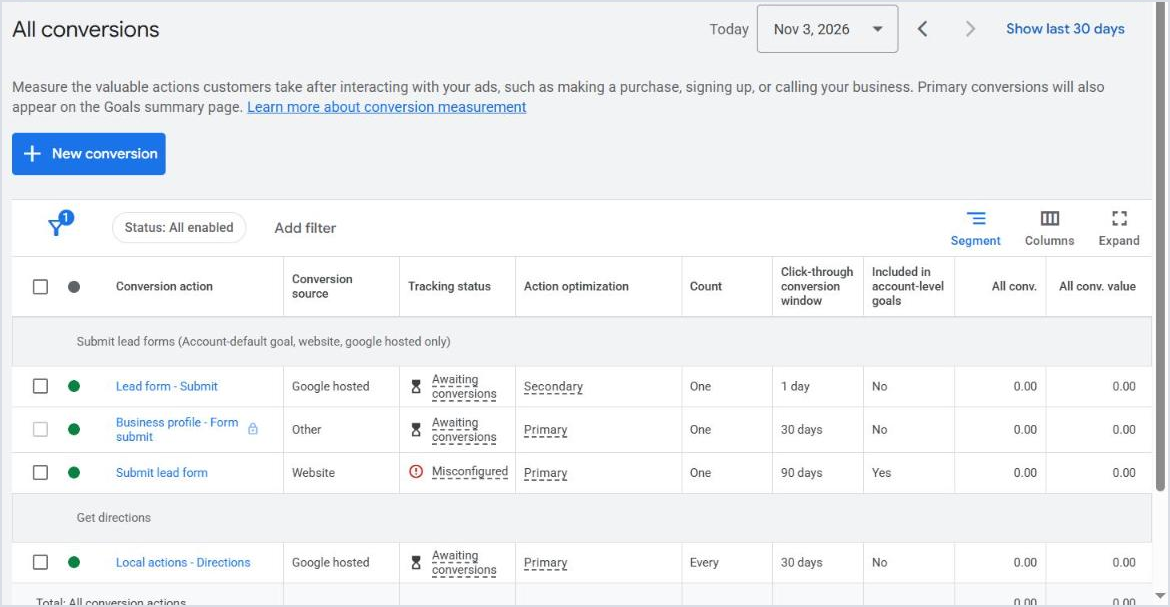
The Conversion actions list in Goals. The Action optimization column shows what's Primary and what's Secondary, and Tracking status exposes a broken conversion.
The right setup, step by step
Install the Google tag on every page of the site, directly or through Google Tag Manager.
Create a conversion action for form submissions: Goals, Conversions, New conversion action, Website, with the category Submit lead form.
Use the Google Ads tag directly for core conversions, not a GA4 import alone. Imports are delayed and counted differently.
Turn on enhanced conversions under Goals, Conversions, Conversion settings, after accepting the customer data terms. Google has started merging the web and leads versions into one setting, but many accounts still show two separate rows, so turn both on.
Create a conversion action for calls from ads and set the minimum duration.
Test it yourself: submit a test form and confirm the conversion appears within a few hours and the status in Diagnostics is healthy.
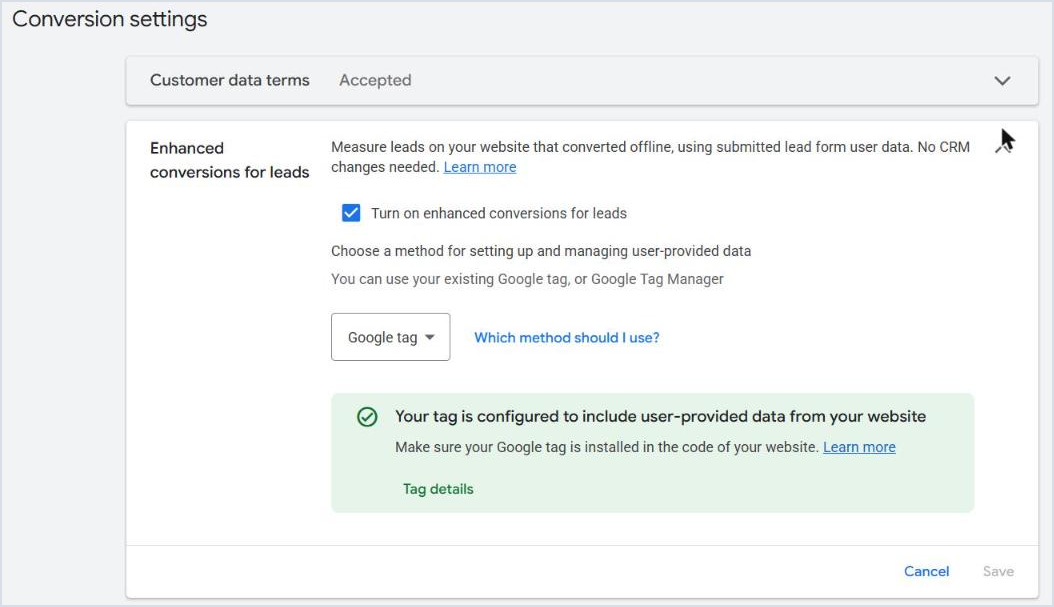
Enhanced conversions for leads in Conversion settings, managed through the Google tag. The green message means the tag is sending form data correctly.
Protect your tracking from spam
Search campaigns are less exposed to spam, but Performance Max, Demand Gen and the partner network can bring forms filled in by bots. Every fake lead recorded as a conversion teaches Google to bring you more of them.
Put reCAPTCHA on every form on the site.
Add a honeypot field: a hidden field humans can't see but bots fill in. Reject any submission that contains it.
Make the phone number mandatory and validate its format.
Only fire the conversion after a genuinely successful submission.
About consent mode If you target Europe or the UK, consent mode is effectively mandatory, or you'll lose part of your tracking and remarketing. The same requirement doesn't apply in Egypt and the Gulf, but a privacy policy on the site is always required, and it's a precondition for lead form assets. |
PART 04
Offline Conversions and Lead Quality
In short When you only record who filled in a form, you're telling Google about a tenth of the story. Uploading the outcome of every lead from your CRM is the single strongest improvement you can make to a lead gen account. |
A website conversion tells Google: this person filled in a form. It doesn't say the number was real, that they answered, that they bought, or for how much. An e-commerce store tells Google the value of every purchase automatically. In lead gen, Google will never know unless you tell it.
Lead stages to upload
Stage | Example | When to use it for bidding |
|---|---|---|
Lead | Filled in the form or called | From the start |
Qualified lead | Answered, and budget and location fit | Once you reach roughly 30 a month or more |
Converted lead | Booked, bought or signed | When volume is sufficient, with a real value |
Google lets you set the goal so the campaign optimises towards qualified or converted leads instead of raw leads, provided there's enough of that data. Very low volume makes bidding erratic, so start with the lead and keep the deeper stages as secondary until volume grows.
Upload methods in 2026
Method | How it works | Best for |
|---|---|---|
Enhanced conversions for leads | The Google tag sends hashed form data (email or phone); later you upload closed leads using the same data. No need to store the GCLID. | Most advertisers; it's what Google now recommends |
GCLID import | You save the GCLID in a hidden form field and upload it with the outcome. | Older systems that already work this way |
Data manager | Tools, then Data manager: direct connections to HubSpot, Zoho CRM, Salesforce and Google Sheets, or via the Data Manager API. | Anyone with a CRM who wants automatic uploads |
File upload | A CSV or Google Sheets file, now also done from Data manager. | Getting started, or small volumes |
An important change for developers Since 15 June 2026 Google no longer accepts new adopters for offline conversion uploads through the Google Ads API, and the Data Manager API is now the main route. If your developer is building a new CRM connection, it should be built on that. File uploads are still available, but the Uploads page itself now sends you to Data manager. |
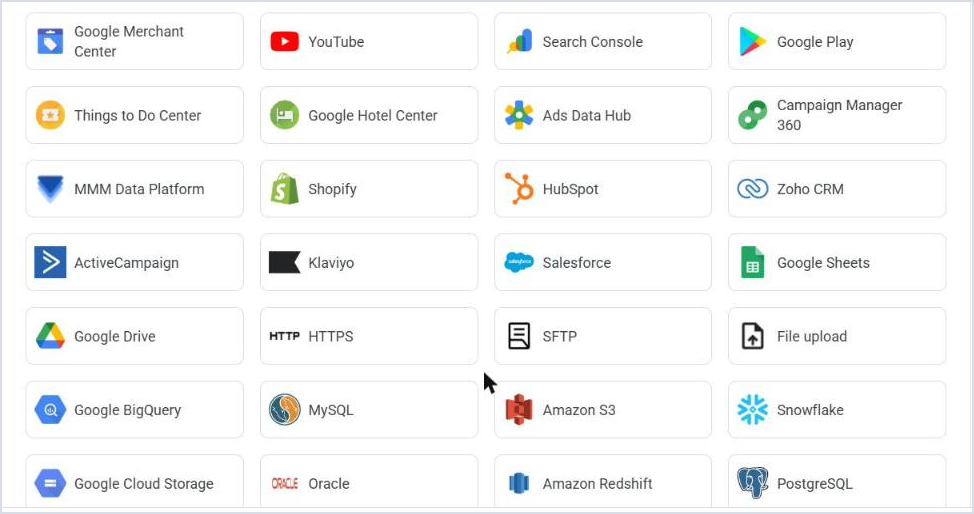
Connect a product in Data manager: the common CRMs, Google Sheets, and File upload for offline conversions.
No CRM? Use conversion values
The closest alternative is to give each conversion type a value that reflects how much it really matters, even if it's approximate. The goal isn't precision. It's telling Google what matters more.
Conversion | Suggested value | Why |
|---|---|---|
Call over 60 seconds | 100 | Highest close rate in most businesses |
Quote request form | 50 | Clear intent, but below a call |
General enquiry form | 10 | Weaker intent |
WhatsApp click | 5 (Secondary) | Monitoring only |
That lets you use Maximize conversion value later, so spend flows to the keywords and audiences that bring longer calls rather than the easiest forms. Review the values every quarter based on what sales actually closes.
Cresco tip None of this works if the sales team doesn't record the outcome of every lead. Agree on just three statuses to begin with: qualified, not qualified, sold. The simplest system that gets used beats a complete one that never gets updated. |
PART 05
Account Structure: Levers Before Campaigns
In short Every campaign needs a clear reason to exist. A good structure gives you levers to increase spend where results are good and reduce it where they're weak. |
The campaign is the level where you control budget, location, schedule and bidding. So the right question isn't how many campaigns you need. It's what you need to control separately.
The four levers
Service: a high-margin service with little search volume shouldn't compete for budget with a core service that has huge volume.
Area: if one area clearly delivers a lower cost per lead, you need to be able to raise its budget on its own.
Lead type: if calls matter most during working hours and forms are fine at night, each needs its own schedule.
Season: summer and winter services, or enrolment season in education, need budgets that move at different times.
Start, mentally, with one campaign and one ad group, then add a campaign only when you find a lever you need. The most troubled accounts we audit contain 15 campaigns all competing for the same keywords in the same place.
A suggested starting structure
Campaign | Purpose | Notes |
|---|---|---|
Search: core service | Most of your leads | One ad group per sub-service or search theme, each with its own landing page. |
Search: second service | A separate lever | Only if it has a different budget or CPA target. |
Search: Brand | Protect your name | If competitors bid on your name. Details in Part 10. |
That's all you need at the start. Performance Max and Demand Gen come later, once Search is stable. The full sequence is in Part 16.
Don't target the same thing twice
Two campaigns targeting the same keywords in the same location for the same audience compete in the same auction, and every improvement you make in one is undone by the other. Google always takes the path of least resistance: if your structure leaves a door open to cheaper, weaker traffic, it will walk through it. Before launching any new campaign, ask: what's its purpose, how will it affect current campaigns, and could the same goal be reached by optimising one that already exists?
The settings people forget
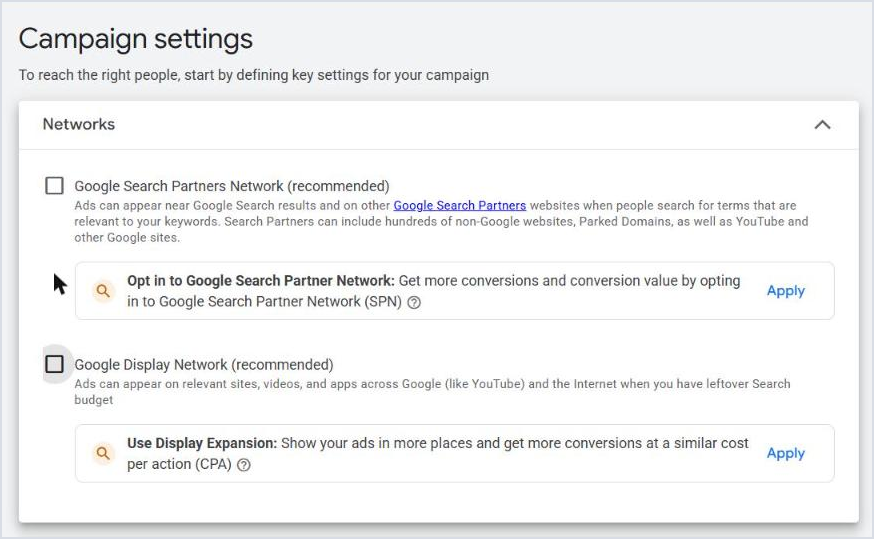
The Networks step when creating a Search campaign. Both networks are on by default; here they've been switched off.
Location options: the default is Presence or interest. Change it to Presence, meaning people actually in or regularly in the area, unless you're deliberately targeting expats, such as Egyptians in the Gulf for a real estate project.
Networks: Search Partners and the Display Network are on by default in every new Search campaign. Switch them off at the start, then test partners later as a deliberate decision.
Ad schedule: if calls are the goal, show ads only during answering hours or lower spend outside them.
Auto-apply recommendations: review them under Recommendations and turn off anything that changes keywords, bidding or budget without you knowing.
Automated promotions: since October 2026 Google may show offers from your site inside your ads automatically. If you don't want that, turn it off in Account settings.
PART 06
Keywords and Match Types
In short Start with purchase-intent keywords on exact and phrase match, then add broad once tracking is sound and you reach about 30 conversions a month. In Arabic-speaking markets, dialect and transliterated English are a core part of search behaviour. |
Sort keywords by intent
Level | Examples | How to handle it |
|---|---|---|
Urgent | emergency dentist, plumber now | Most expensive click, highest conversion. Start here if your service is urgent. |
Purchase | dental implant price, apartment for sale New Cairo | The heart of the account, with dedicated ad groups and landing pages. |
Comparison | best implant centre, X vs Y | Good if you have something clear to compare on. |
Early research | do dental implants hurt | Cheap and slower. Suits later stages, paired with an offer such as a guide or consultation. |
The higher the intent, the higher the competition and price. An account that lives on urgent keywords alone soon hits a ceiling, because every budget increase is met by an even bigger rise in CPC.
Search the way customers type
Dialect: in Egyptian Arabic, "I want to get braces", "braces fitting" and "orthodontics" are all searches for the same service.
Spelling: hamzas and the taa marbuta are rarely typed as in the dictionary. Google handles most variants, but check the search terms report.
Transliteration both ways: Arabic script for English words ("villa", "compound") and English queries for local services.
Location: "near me" and the neighbourhood or city name are usually cheaper and convert better than the generic term.
Price: "price", "cost" and "how much" signal buying intent. Don't exclude them.
Match types in 2026
Type | Format | When to use it |
|---|---|---|
Exact | [dental implants] | The tightest control, and preferred in the auction over PMax and AI Max when the query matches exactly. The backbone of any lead gen account. |
Phrase | "dental implants" | Covers searches that carry the keyword's meaning with extra words. Good at the start. |
Broad | dental implants | Relies on Google's signals about the user and their intent. Only works well with Smart Bidding, sound tracking and enough conversion volume. |
The strategy we use: start with exact and phrase on Maximize clicks or manual CPC. Once the account reaches about 30 conversions in 30 days and moves to Smart Bidding, add broad in a separate ad group or an experiment, and check the search terms report daily for the first two weeks.
Language is no longer a setting Since late September 2026 Google has removed the language targeting setting from Search and AI Max campaigns. Ads are now matched on the language of the ad itself, the language of the query and the user's settings. If you advertise in Arabic and English, separate each language into its own ad groups or campaigns, keep the ad copy and landing page in one clear language in each, then monitor performance by language. |
Keyword Planner, done properly
Start with a competitor's page or your own under Start with a website, then with your list of services.
Set the location and language precisely. Egypt's numbers are very different from Saudi Arabia's.
Sort results into a sheet: keyword, intent, service, search volume, and top of page bid.
Group keywords into themes. Each theme becomes an ad group with its own ad and page.
Start your negative keyword list now. You'll find candidates in the same results.
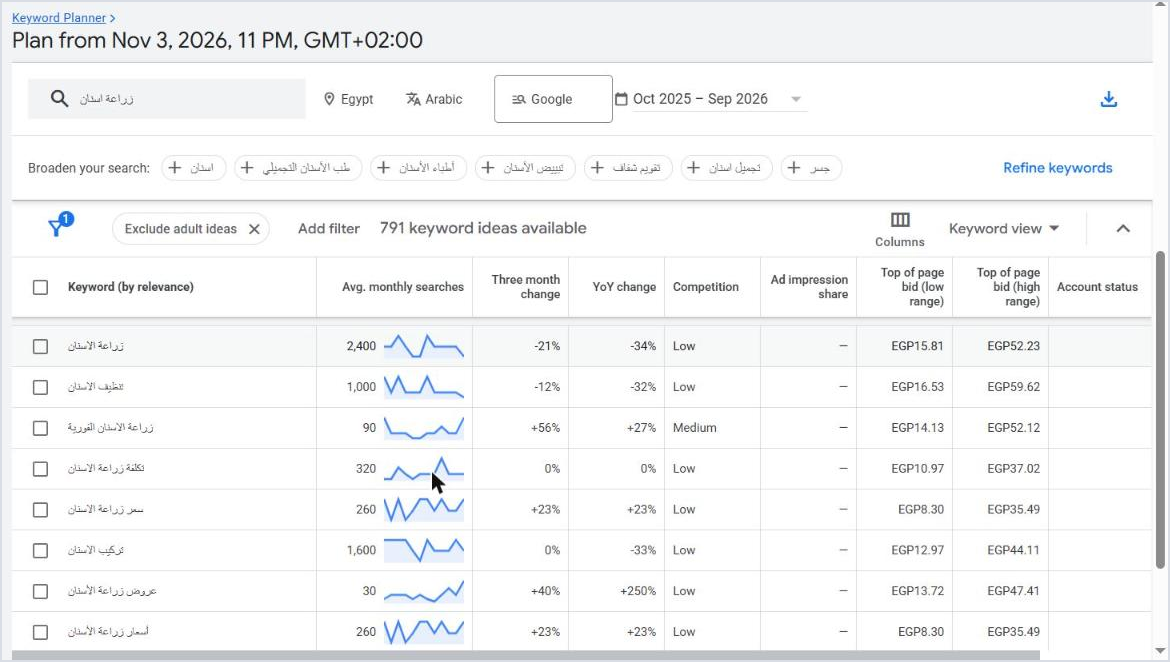
Keyword Planner for "dental implants" in Arabic, Egypt: monthly search volume and the top of page bid range for each keyword.
Notice in the example: the main Arabic term for "dental implants" gets about 2,400 searches a month, with top of page bids reaching EGP 52, while "dental implant price" gets only 260 searches but tops out around EGP 35, with clearer intent. Smaller, more specific keywords are often cheaper and closer to a lead.
PART 07
Negative Keywords and the Search Terms Report
In short The search terms report is the most important report in a lead gen account. Every irrelevant search you didn't exclude is budget paid for someone who will never become a customer. |
With broad match and AI Max, negative keywords matter more than ever. Google expands; your job is to set the boundaries.
A starter list for any lead gen account
Category | Examples |
|---|---|
Jobs | jobs, vacancy, hiring, recruitment, salary (and their Arabic equivalents) |
Education and content | course, tutorial, pdf, download, research, wikipedia |
Free | free, for free (and Arabic and dialect variants) |
Complaints | complaint, scam, problems, my experience with (depending on the business) |
What you don't offer | Services, areas or products you don't handle |
Used and cheapest | used, clearance, cheapest (if you're in the premium segment) |
Make it a negative keyword list under Tools, Shared library, Exclusion lists, and apply it to every Search and Performance Max campaign. Don't put "price" or "how much" in it; they're usually your best keywords.
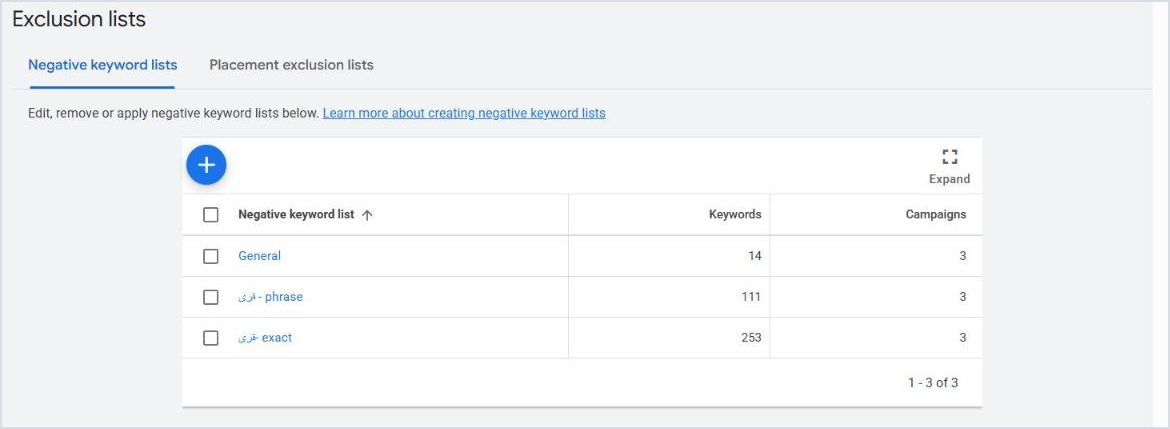
Negative keyword lists shared across campaigns: a general list plus two lists of areas the project doesn't serve, in phrase and exact match.
The search terms routine
First two weeks: daily, especially after adding broad or switching on AI Max.
Once stable: weekly on the last 7 days, and monthly on 30 days.
Sort by cost: start with the highest spend and no conversions.
Converting terms you weren't targeting: add them as exact keywords in the right ad group.
Irrelevant terms: add them as negatives in the narrowest form that blocks them without blocking good searches.
Cresco tip Don't rush to exclude every odd search that converted once or hasn't converted after 3 clicks. Exclude what's clearly wrong and let the rest collect data until a judgement is possible. |
Brand exclusions
If you have a separate brand campaign, use brand exclusions in broad, AI Max and Performance Max campaigns so they don't steal searches for your name and look better than they are. It's more precise than adding your name as a negative keyword because it covers misspellings and variants.
PART 08
Ad Copy and Assets
In short Every ad on Google uses the same font and the same size. The only difference is what you say. Use real numbers, and say what your competitors can't. |
Start with the right question
Search your main keywords yourself and read your competitors' ads. Then ask: why would someone click my ad instead of the one above it? If the answer is "because we're the best" or "experience and trust", your ad says nothing, because everyone says that.
Weak | Stronger |
|---|---|
The best dental implant centre | Dental implants from EGP 9,000 with a 10-year guarantee |
Apartments at great prices | 3-bed apartments, 10% down, 8-year instalments |
Big discounts | Free consultation and X-ray this month |
A professional team | 3,000+ cases and a 4.8 rating on Google |
In one Define Digital Academy test, replacing a generic line about saving with the actual discount percentage and the real price raised the conversion rate from 8.15% to 12.58% in four weeks, with no other change.
Building a responsive search ad
15 headlines and 4 descriptions is the maximum, but don't fill them with variations of the same line. 8 to 10 genuinely different headlines beat 15 similar ones.
Spread the ideas: the service and keyword, the price or offer, a differentiator, a proof point, and a clear call to action.
Pinning: pin a headline with the main keyword to position 1 only if necessary. Heavy pinning reduces testing.
Ad strength isn't the goal: it measures asset variety, not performance. An Average ad that converts beats an Excellent one that doesn't.
Test ideas, not words: offer vs offer, showing the price vs not. Don't test "book" against "contact".
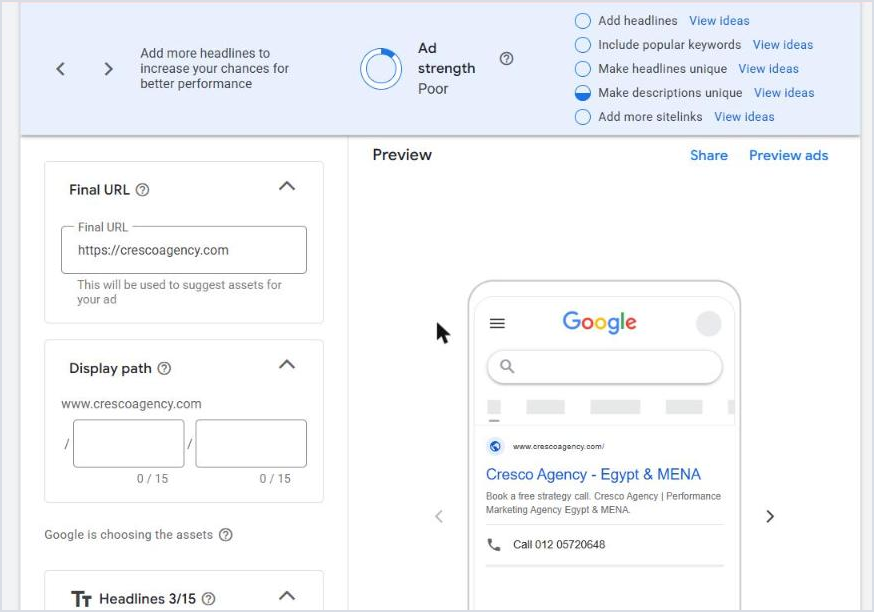
The ad editor during campaign creation: Ad strength and its suggestions at the top, and the mobile ad preview.
The assets that matter for lead gen
Asset | Why it matters |
|---|---|
Sitelinks | Links to specific services, the pricing page or case studies. Add at least 4. |
Callouts | Short phrases: free consultation, instalments, guarantee, reply within an hour. |
Structured snippets | A list of services, specialties or areas. |
Call asset | The call button, now the official replacement for call-only ads. |
Location asset | Links your Google Business Profile, shows address and distance, and opens up Google Maps placements. |
Lead form asset | A form inside Google itself. Useful on mobile, but lead quality is usually lower than a website form. |
Image asset | Increases the ad's size and appeal on mobile. |
Price asset | If you have clear prices for specific services. |
About lead form assets In Google's July 2026 documentation update, the $50,000 spend requirement disappeared. You now need a good policy compliance history, more than $1,000 spend in the account, completed advertiser verification, and a clear privacy policy. It's still available in some countries and not others, so if you can't find it, the reason is usually the country or eligibility. If you use it, connect it directly to your CRM and call the lead within minutes; people forget a lead form faster than a website form. |
If AI Max is on, text customization writes headlines and descriptions from your page content. Review them in the Search terms and landing pages from AI Max report, and switch the feature off if it writes promises or prices you don't offer.
PART 09
The Landing Page
In short The ad earns the click; the page turns it into a lead. A dedicated page per service, written in the same words as the search, asking for as little as possible, always beats the home page. |
The fastest way to double a lead gen account's results is often not in the account at all, but on the page. If your conversion rate is 2%, lifting it to 4% halves your cost per lead with the same budget and the same clicks.
What a lead gen page needs
Landing page checklist ☐ A headline that repeats the search: someone who searched "clear aligners" sees "clear aligners", not "Welcome to our clinic". ☐ The offer and the price, or a price range, on the first mobile screen. ☐ A short form: name and phone, plus one qualifying question if needed. ☐ Call and WhatsApp buttons always visible, each tracked as a conversion. ☐ Real proof: Google reviews, case photos, doctor or project names, licences. ☐ Answers to common objections: price, duration, guarantee, location. ☐ Mobile load time under 3 seconds. ☐ A separate thank-you page telling people what happens next and when they'll be called. |
Warning signs
These are thresholds Define Digital Academy uses as warning lights, not targets. When you fall below them, there's a problem to look for in the keywords, the ad or the page:
Campaign type | CTR below | Conversion rate below |
|---|---|---|
Search | 7% | 5% |
Display and Demand Gen | 0.6% | 1% |
Video | Full view rate below 10% | 3% |
In our markets the numbers can vary by industry, and the most important comparison is with yourself: is the number improving month on month? If CTR is good and the conversion rate is weak, the problem is the page or the offer, not the ad.
The offer itself is part of the page. At Sila Visions Academy, trust-led offers are what cut the cost per lead by 78%. And if the page itself is the problem, that's what we build in our web development and landing page service.
PART 10
Bidding, Step by Step
In short Start on Maximize clicks or manual CPC to collect data, move to Maximize conversions after about 30 conversions in 30 days, then set a target CPA based on your actual numbers, not on what you'd like them to be. |
Why not start with target CPA?
Because Google knows nothing about a new account. Ask for $20 leads when the account has never recorded a single conversion and the ad will barely show. It's one of the most common situations we see: a new account on target CPA, a $200 daily budget, and three impressions a day.
The stages
Stage | Strategy | When to move on |
|---|---|---|
1. Collect data | Maximize clicks (shown as Clicks) with a max CPC cap, or manual CPC | When tracking is confirmed and conversions start appearing |
2. Learn | Maximize conversions with no target | At about 30 conversions in 30 days and two stable weeks |
3. Control | Target CPA from the last 30 to 90 days | Once results settle, lower the target gradually |
4. Value | Maximize conversion value or target ROAS | When you upload real values from the CRM or clear approximate values |
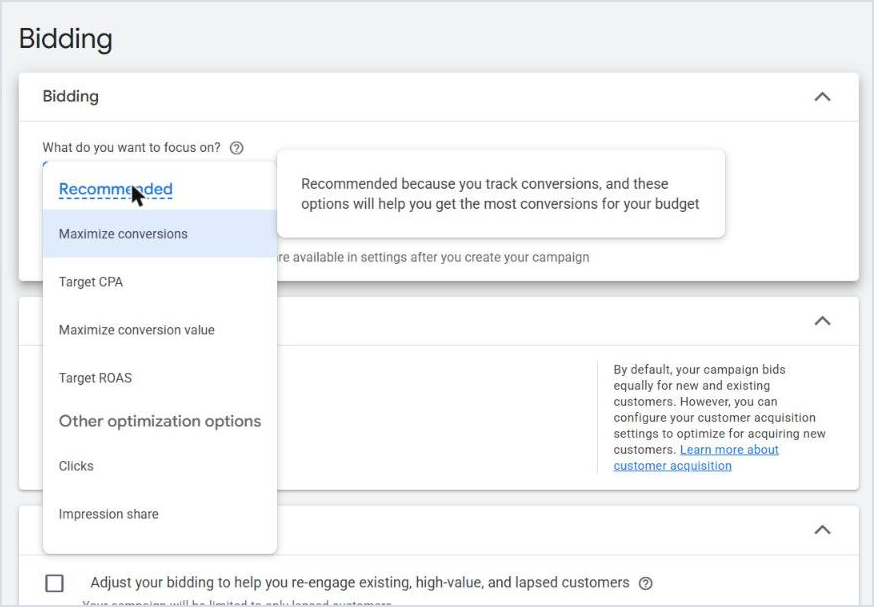
Choosing a bid strategy while creating a campaign. Manual CPC isn't offered here; you can select it from campaign settings after the campaign is created.
It's normal for average CPC to rise when you move from Maximize clicks to Maximize conversions, sometimes doubling or more. Google has stopped collecting every possible click and started bidding hard on the people who most resemble past converters. Prices usually ease within one to two weeks, so don't judge in the first few days.
Before setting or changing target CPA
If every answer is yes, you can change it ☐ Has the campaign recorded at least 30 conversions in the last 30 days? ☐ Have weekly conversions been stable over the last 4 weeks, within 20% of each other? ☐ Have 6 weeks passed since the last strategy or target change? ☐ Have 2 weeks passed since the last budget change? |
When you lower the target, step down gradually, like walking down stairs: 100, then 90, then 80, waiting between each step until results hold. A target CPA that's too low strangles the campaign and cuts volume; one that's too high brings weaker traffic.
Starting target CPA = actual average CPA over the last 30 to 90 days
The brand campaign
Here the rule flips. Searches for your name will convert anyway, and Smart Bidding often raises the CPC on those searches for no benefit. In a 50/50 test PPC Copilot published on a brand campaign, target ROAS raised average CPC by 281% and cut conversions by 35% compared with target impression share and a max CPC cap.
Use manual CPC, or target impression share at 100% top of page with a max CPC close to your current average.
If nobody bids on your name, try pausing the brand campaign and watch total leads; your organic listing may be enough.
If a competitor does bid on it, the brand campaign is cheap, necessary protection.
Budget with Smart Bidding
Keep the daily budget at no less than your target CPA, and ideally double or more. A campaign targeting $50 leads on $20 a day gives the algorithm no room to get even one conversion a day.
Cresco tip Never change the budget and the target CPA at the same time. Each change needs time to show its effect, and if you change both you won't know which one caused the result. |
PART 11
Phone Leads After Call-Only Ads
In short Google stopped new call-only ads in February 2026, and existing ones stop serving in February 2027. The replacement is responsive search ads with a call asset, and calls measured by a meaningful duration. |
For many local businesses, such as clinics, home services, maintenance and law firms, a call matters more than a form: it closes at a higher rate and the customer is ready. Call-only ads were the usual tool for that, and that tool is gone.
The replacement
Create a Search campaign for calls, or use your existing one, with a standard responsive search ad.
Add a call asset at campaign or ad group level, scheduled for answering hours only.
Write headlines and descriptions that drive calls: "Call now to book", "Instant answer", "Phone consultation".
Target mobile, and raise spend there if calls are the goal.
Start with a tight radius around your location, since call clicks are usually more expensive.
If you still have call-only campaigns, move them before February 2027 so they don't stop overnight.
Count good calls, not every call
The default counts a call as a conversion after 60 seconds. That's fine to start, but a real call where an appointment is booked or a quote requested is rarely under two or three minutes. If you'll use Performance Max or Smart Bidding on calls, raise the threshold gradually, from 60 to 90 to 120 seconds, so the campaign doesn't optimise towards short, worthless calls.
Google Maps
Link your Google Business Profile to the account and add a location asset. Your ads then become eligible for Google Maps and local results, with call and directions buttons. That matters a lot for a clinic or showroom people visit in person.
About Local Services Ads Many US tutorials talk about Local Services Ads for local businesses. That product isn't available in Egypt, Saudi Arabia or most of the region yet. The alternative here is Search with a call asset and a location asset. |
PART 12
AI Max for Search
In short AI Max isn't a campaign type. It's a setting inside a Search campaign that broadens matching, writes ads and picks the landing page. It's the official replacement for Dynamic Search Ads, and it works best in an account that already performs, tested through an experiment. |
What is AI Max?
Feature | What it does | Your control |
|---|---|---|
Search term matching | Shows your ad for searches beyond your keywords based on your pages and ads, like broad match and wider. | Negative keywords and brand exclusions |
Text customization | Writes headlines and descriptions from your site content. | Can be switched off, and since October 2026 you can preview texts before they serve |
Final URL expansion | Sends visitors to the page it thinks fits best instead of the one you chose. | URL exclusions, or switch it off |
Brand inclusions and exclusions | Limit or exclude specific brand names. | At campaign or ad group level |
Locations of interest | Target people searching for an area from outside it, at ad group level. | Optional |
Most importantly, AI Max is now switched on by default whenever you create a new Search campaign, in a dedicated AI Max step, along with text customization and final URL expansion. Click Next without paying attention and your campaign will run on full AI Max.
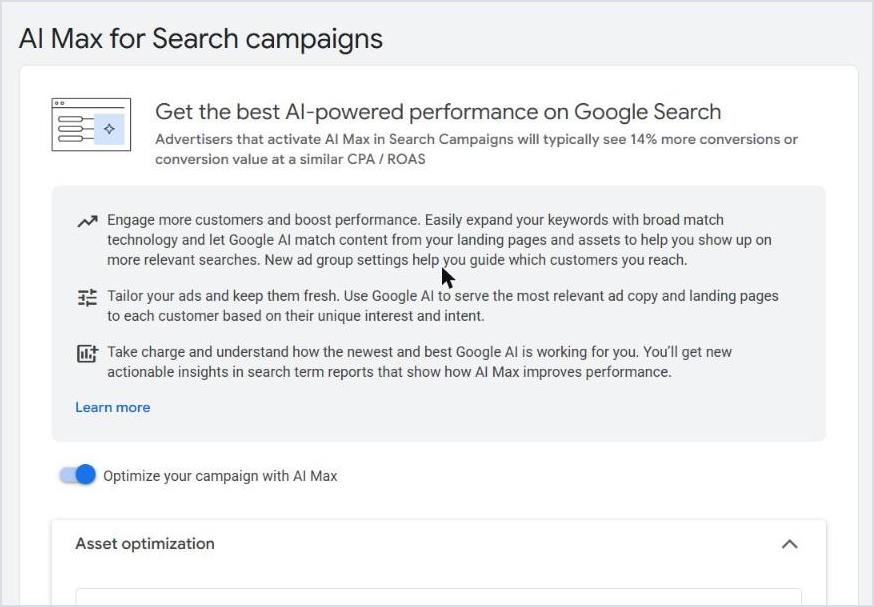
The AI Max step when creating a new Search campaign: the toggle is on by default.
What happened to Dynamic Search Ads?
DSA is on its way out, and AI Max is the official replacement. The current timeline, after the delay Google announced in June 2026:
Until January 2027: DSA campaigns can still be created and edited, but there's no point building a new one now.
January 2027: new DSA creation stops.
February 2027: remaining DSA campaigns move to AI Max automatically, with all three features on by default and legacy URL controls kept.
Now: you can upgrade yourself from campaign settings via Upgrade your Dynamic Search Ads to AI Max, or test it in an experiment first.
In September 2026, every campaign using campaign-level broad match or automatically created assets was moved to AI Max automatically. If you have an older campaign with those settings, open its settings now and check what's switched on.
When it helps and when it hurts
Situation | Recommendation |
|---|---|
Large account using broad match successfully with good conversion volume | Can be tried directly; often adds little on top of broad |
Mid-sized, successful account | A 50/50 experiment for 4 to 6 weeks |
Small or new account, or one that hasn't tried broad yet | Don't start with it. Get broad working first |
Weak tracking or fake leads | Don't switch it on at all until tracking is fixed |
The experience of people managing dozens of accounts through mid-2026 was cautious: in accounts already using broad and Performance Max well, AI Max added little; in others it brought irrelevant searches and headlines that didn't fit the query. It's expected to improve over time, as Performance Max and broad match did, but the verdict should come from your own data.
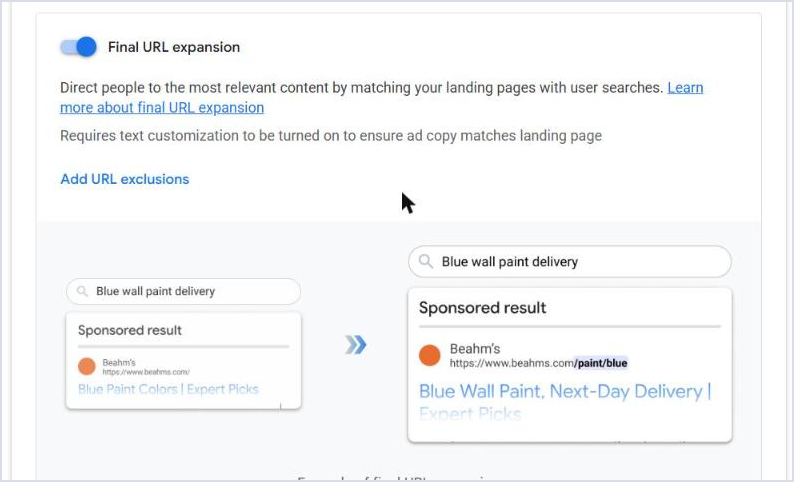
Final URL expansion is on by default with AI Max. This is where you add URL exclusions or switch it off.
How to test it safely
Create an experiment under Campaigns, Experiments, with a 50/50 split on a stable campaign.
Switch on search term matching, and think carefully before final URL expansion. If your dedicated pages convert well, turn it off or add URL exclusions for pages like careers and the blog.
Add brand exclusions if you run a brand campaign.
Review the Search terms and landing pages from AI Max report daily for the first two weeks, excluding only the obvious.
Run the test for at least 4 weeks before judging, comparing cost per qualified lead, not raw leads.
Take the good searches AI Max discovered and add them as exact keywords in your campaign, even if you switch the feature off afterwards.
PART 13
Performance Max for Lead Gen
In short Don't start lead gen with Performance Max. Add it once Search is stable, and only if you track lead quality. Otherwise you'll get plenty of cheap, fake leads. |
Performance Max shows your ads everywhere: Search, YouTube, Display, Discover, Gmail and Maps. In e-commerce it works well because the value of every purchase is clear. In lead gen it optimises towards whatever you count as a conversion, so if forms are easy to fill in from the Display network, it will bring you plenty of those.
Prerequisites
Don't run PMax until all of these are true ☐ Stable Search campaigns hitting the target CPA. ☐ Offline conversions from the CRM, or at least clear conversion values. ☐ Enhanced conversions on, and tracking through the Google Ads tag. ☐ Spam protection: reCAPTCHA and a honeypot. ☐ A daily budget no lower than the target CPA. ☐ A clear baseline of Search performance before launch, to compare against afterwards. |
The setup we use
A landing page dedicated to PMax: a copy of your best page on a different URL, so you know exactly how good its leads are.
Final URL expansion off: otherwise traffic goes to any page on your site.
One campaign per service: don't mix two services with different audiences or targets in one campaign.
A complete asset group: headlines, long headlines, descriptions, images and video. If you don't upload a video, Google will generate one, and you probably won't like it.
Few search themes: from your best keywords, bearing in mind they can pull from Search campaigns.
Simple audience signals: a customer list, site visitors and custom search terms. They're signals, not targeting, so don't waste time on ten asset groups to test them.
Brand exclusions: exclude your name and leave brand searches to the brand campaign.
Negative keywords: now available at campaign level, up to 10,000. Apply your account list.
Location: Presence only.
Placement exclusions: exclude poor apps and sites under Content suitability.
What to monitor
Channel performance: if most spend goes to Display or Discover with no real leads, it points to a tracking or asset problem.
Search terms insights: converting terms you weren't targeting in Search, add them there as exact.
Total account leads: sometimes PMax simply takes conversions from Search, so it looks good while the total hasn't moved.
Qualified lead rate: compare it with Search. If it's much lower, the cheapness is fake.
Cresco tip An exact match keyword in a Search campaign takes priority over Performance Max when the query matches it exactly. Keep your best keywords as exact in Search; that's what protects them from PMax. |
PART 14
Demand Gen, YouTube and Remarketing
In short Standard Display campaigns have been moving into Demand Gen since June 2026. Most lead gen businesses need two things from it: remarketing to people who visited but didn't get in touch, and content that builds demand when the service needs explaining. |
Remarketing
Most people who visit your page won't contact you on the first visit, especially for big decisions like buying property, starting treatment or enrolling in a programme. Remarketing reminds them of you for far less than the cost of a new visitor.
Build lists from day one: all visitors, service page visitors, people who started the form but didn't finish, and people who already got in touch, to exclude.
Start remarketing once a list reaches about 1,000 people.
Use Demand Gen with images, short video and a clear offer, not an ad that repeats the first one.
Keep frequency sensible; someone who sees your ad twenty times a week gets annoyed.
Exclude people who've already become customers, using a CRM list.
YouTube and Demand Gen to build demand
If your service is new or needs explaining, waiting for people to search won't be enough. A short video explaining the problem and the solution, a real customer testimonial, or an offer for a lead magnet such as a guide or free assessment builds a base of people who know you before they need you. When they do, they search for your name, the cheapest search in the whole account.
Why does this matter? Because urgent searches are always the most expensive. In a Define Digital Academy example, a click for "emergency plumber" cost about $52, while "local plumbing companies" cost about $26. Becoming someone's choice before they reach the emergency saves you half the price.
This is where Google works alongside other platforms, not instead of them. Much demand is created on Meta and Snapchat and harvested on Google, which is what we saw at Uptown October: 10,494 real estate leads across Meta and Google at a 30% lower cost. The other side is covered in our Meta ads guide and Snapchat ads guide.
When moving Display to Demand Gen Review before and after the move: placement exclusions, app exclusions, audience layering, devices and brand safety settings. Note that Demand Gen adds lookalike segments, which since October 2026 work in suggestion mode by default, meaning they're a signal Google expands from, not a strict limit. |
PART 15
The First 90 Days and the Optimisation Routine
In short Month one is for collecting data and confirming tracking, month two for growing conversion volume, month three for starting Smart Bidding and profitability. After that, a fixed weekly and monthly routine. |
Month | Goal | What to watch | What to do |
|---|---|---|---|
1 | 10 clicks a day and first conversions | Clicks, CTR, conversions, tracking health | Daily negatives, search terms review, confirm leads reach sales |
2 | Grow conversion volume | Conversion rate, cost per lead | Add converting terms as exact, pause weak keywords, rebalance budget |
3 | About 30 conversions a month | CPA, impression share, lead quality | Move to Maximize conversions then target CPA, test new ads |
The routine once stable
When | What to review |
|---|---|
Daily (5 minutes) | Spend vs budget, any stopped or broken campaign, number of leads |
Weekly | Search terms and negatives, cost per lead per campaign, disapproved ads, what sales says about quality |
Monthly | Upload offline conversions, compare 30, 60 and 90 days, auction insights, areas, devices and hours, test a new ad |
Quarterly | Review conversion values, structure and pages, and plan the next quarter |
Recommendations: don't accept them blindly
The Recommendations page and Google reps always suggest broad match, a bigger budget, AI Max, removing the max CPC cap. Some of it helps, but a recommendation doesn't know your goal, your margin or what your sales team says. Accept what fits your plan, dismiss the rest, and turn off auto-apply for anything that changes keywords, bidding or budget.
Auction insights
It tells you who competes on your keywords, their impression share and how often they appear above you. If a new competitor suddenly appears and pushes CPC up, you'll find the reason here instead of assuming the campaign broke.
PART 16
Scaling
In short Raise budgets by about 20% every 5 to 7 days, and never raise budget and cut CPA at the same time. When your current keywords hit their ceiling, expand to new campaigns, areas and audiences, in order. |
The bodybuilder principle
A bodybuilder doesn't build muscle and cut fat at the same time, but in seasons: bulking, then cutting. An account works the same way: periods where you grow spend and volume and accept a slightly higher CPA, then periods where you hold spend and bring CPA down. Trying to do both at once usually means achieving neither.
Raising the budget
Increase by about 20% every 5 to 7 days, or once numbers return to their level after the last increase.
In practice, two or three increases a month, then a period of stability.
On small budgets under $50 a day, you can increase by fixed amounts such as $10 instead of a percentage.
The bigger the spend, the more careful you should be. Doubling $50 isn't like doubling $1,000.
When you hit the ceiling
There comes a point where a 10% budget increase pushes CPC up 20%. That means your current keywords have reached their limit, and the next growth comes from expansion, not pressure. The sequence we use, adapted from Define Digital Academy's lead gen playbook:
Stage | Add | Condition to move on |
|---|---|---|
1 | Search campaigns by service and area | Profitable, CTR above 7%, conversion rate 3% to 5%, remarketing lists above 1,000 |
2 | Demand Gen remarketing, a brand campaign, and testing Maximize conversions | Search stable on Smart Bidding, and 20% to 30% extra budget |
3 | Performance Max with brand exclusions and offline tracking, a competitor campaign, and video to build your base | PMax profitable, Search impression share above 60% |
4 | Demand Gen and YouTube at the top of the funnel | As needed for more volume |
The usual split keeps 80% to 90% of budget at the bottom of the funnel, in Search, and the rest for remarketing and demand building. Most local businesses will never need stage four.
Geographic expansion
Instead of one campaign for the whole city, split it into areas: north and south, or specific neighbourhoods. You'll find one area delivering half the cost per lead of another, so you move budget there, and add local keywords with the area name, which are usually cheaper than the generic term.
PART 17
Troubleshooting
In short Most lead gen account problems fall into five recurring situations. Always start with tracking, then bidding, then keywords and the page. |
Problem | Most likely cause | Fix |
|---|---|---|
The campaign doesn't serve, or barely does | Target CPA on a new account, budget below one click, or exact keywords with tiny volume | Maximize conversions or Maximize clicks, raise budget or broaden keywords, check ad status |
Plenty of leads, but fake | PMax, Demand Gen or search partners, an unprotected form, or a conversion firing before submission | reCAPTCHA and honeypot, a dedicated page, offline conversions, review channel performance |
Cost per lead suddenly jumps | A new competitor, a bidding or budget change, or seasonality | Auction insights, Change history, and comparing with the same period last year |
Good leads that don't become customers | Response speed, qualification or the offer | Reply within 5 minutes, structured follow-up, a qualifying question in the form |
More conversions in the account than in the CRM | A duplicate conversion, a secondary counted as primary, or counting WhatsApp clicks | Review Goals, set Count to One for all leads, align the definition with sales |
The fourth situation is more common than business owners think. We cover it in detail for clinics in why clinic leads don't turn into bookings, and the same principles apply to real estate and education.
PART 18
Industry Playbooks
In short The same structure changes by industry: a clinic needs calls and Google Maps, real estate needs strict quality tracking, education needs seasons and specific offers. |
Clinics and medical centres
A Search campaign per main service: implants, orthodontics, cosmetic, each with a page and a price or price range.
A call asset scheduled for reception hours, and a location asset for Maps.
Area and proximity keywords: "dentist Nasr City", "clinic near me".
Negatives: faculty, internship, jobs, medicines, home remedies.
Mind Google's healthcare policies: no guaranteed outcomes and no non-compliant before-and-after images.
The full detail is in Google Ads for clinics, and what we offer the sector is in healthcare marketing.
Real estate
A campaign per project or area, not one generic campaign for every project.
Project, developer and area keywords, with "prices", "down payment" and "instalments".
A competitor campaign for directly competing projects in the same area, with ads that compare clearly.
Offline conversions matter more here than in any industry, because the gap between a lead with budget and a curious one is huge.
A form that asks about budget or unit type for early qualification.
More in real estate marketing.
Education and training
A campaign per programme, with specific rather than generic messaging. Specific messaging for named programmes cut the cost per enrolment lead by 53% at Nokhba Institute.
Plan budget around enrolment seasons: increase weeks before, reduce after.
A lead magnet such as an intro session or level assessment for early-stage searches.
Negatives: pdf, download, free, tutorial, unless your offer genuinely is free.
More in education marketing.
Local services and B2B
Local services: Search by area, a call asset, a tight radius at first, and separate campaigns for urgent services.
B2B: a longer sales cycle, so offline conversions and remarketing matter more than lead volume. Exclude consumer and job keywords.
In both cases, the qualified lead is the metric, not the number of forms.
Frequently Asked Questions
How much do Google Ads cost for lead generation in Egypt and Saudi Arabia?
There's no single number, because the auction sets the price for every keyword. In our Keyword Planner example for "dental implants" in Egypt, top of page bids ranged from about EGP 16 to EGP 52 per click, and in Saudi Arabia and Kuwait competitive industries usually cost more. Work out your own: average CPC divided by conversion rate gives your expected cost per lead. A EGP 20 click with a 5% conversion rate means a lead of about EGP 400.
What's the minimum budget to start?
Multiply 10 clicks a day by the average CPC in your niche. That's the practical minimum per campaign to collect data you can rely on. If you'll use target CPA, keep the daily budget at no less than that CPA. Less can work, but every decision ends up resting on very few numbers.
Google or Meta for leads?
They aren't alternatives. Google harvests existing demand: people searching for your service right now. Meta creates demand: it reaches people who haven't searched yet. If there's clear search demand for your service, start with Google; if the service is new or sells on visuals and offers, start with Meta. Most successful accounts use both, as at Uptown October, which generated 10,494 real estate leads across Meta and Google together.
Have Dynamic Search Ads really been discontinued?
They're being retired. New DSA creation stops in January 2027, and in February 2027 remaining campaigns move to AI Max for Search automatically. So don't build anything new on DSA now, and if you have a DSA campaign running, test upgrading it to AI Max in an experiment before it's moved automatically.
Should I turn on AI Max?
AI Max is on by default in every new Search campaign, so you need to decide for each one. In a new or small account, or one where broad match hasn't worked yet, switch it off until the campaign is stable. In a successful account with good conversion volume, test it with a 50/50 experiment for at least 4 weeks and compare cost per qualified lead, not raw leads. Details in Part 12.
Call-only ads are gone. How do I get phone calls now?
New call-only ads stopped in February 2026, and existing ones stop serving in February 2027. The replacement is a standard responsive search ad with a call asset scheduled for answering hours, plus adding Phone call lead to the campaign's goals so bidding optimises for it, and measuring calls with a minimum duration of 60 seconds that you raise over time.
Why am I getting lots of leads that are fake or have wrong numbers?
Usually one of three causes: a Performance Max or Demand Gen campaign serving on Display and apps, search partners switched on, or a form with no bot protection. The fix: reCAPTCHA and a honeypot field on the form, a dedicated landing page for PMax, reviewing channel performance, and above all uploading the outcome of every lead from your CRM so Google learns the difference between real and fake.
Why isn't my campaign spending, or showing at all?
The most common causes: target CPA on a new account with no data, a budget below the price of one click in your niche, exact keywords with very low volume, disapproved ads, or a payment problem. Check ad status and billing first, then move the campaign to Maximize conversions or Maximize clicks, then broaden keywords.
Which bid strategy should I start with?
In a new account: Maximize clicks with a max CPC cap, or manual CPC from campaign settings after creation, until you've confirmed tracking works. Then Maximize conversions once conversions start coming in, then target CPA after about 30 conversions in 30 days with stable numbers.
When should I set a target CPA, and at what level?
When the campaign has at least 30 conversions in the last 30 days, weekly numbers are stable within 20%, and you haven't changed the strategy in 6 weeks or the budget in 2 weeks. Set it at your actual average CPA over the last 30 to 90 days, not the number you'd like, then lower it gradually.
Is Performance Max suitable for lead gen?
It can be excellent, but not as a starting point. Run it after Search is stable, with offline conversions or clear conversion values, a dedicated landing page, final URL expansion off, brand exclusions and spam protection. Without those, it usually brings cheap leads that are mostly not real.
Broad match or exact?
Both, in order. Start with exact and phrase for clear-intent keywords, because exact gives you control and takes priority over PMax and AI Max when the query matches exactly. Add broad once the account is on Smart Bidding with enough conversion volume, and check the search terms report daily at first.
How do I advertise in Arabic and English now that language targeting is gone?
Since late September 2026 the language setting no longer exists in Search campaigns, and Google matches ads by the language of the ad text, the query and the user's settings. Separate each language into its own ad groups or campaigns, write the ad and the page in one clear language in each, and put transliterated English keywords in the Arabic group.
Lead form asset or landing page?
A landing page is better in most cases: it gives people more information before they get in touch, so leads come in higher quality, and it gives you full control over tracking. A lead form asset is useful on mobile and when your page is slow, but it needs very fast follow-up because people forget they filled it in. Current requirements: more than $1,000 spend in the account, advertiser verification and a privacy policy.
How do I track leads that come through WhatsApp?
Track clicks on the WhatsApp button on your site as a secondary conversion, because a click doesn't mean a conversation actually started. For real measurement, record the source of every chat in your CRM, or use a different opening message per campaign, then upload qualified leads as offline conversions.
Are offline conversions necessary? I don't have a CRM.
They're the most powerful thing you can add to a lead gen account, especially before running PMax or broad match. Without a CRM, start with a Google Sheet where sales records the status of each lead, and upload it through Data manager. If even that isn't possible, give each conversion type an approximate value that reflects its importance, with a call over a minute worth more than an enquiry form.
What are enhanced conversions for leads?
A method where the Google tag sends form data, such as email and phone, hashed at the moment of submission. When you later upload the leads that became customers using the same data, Google matches them to the original click. You don't need to store the GCLID, and it's the method Google now recommends. Turn it on under Goals, Conversions, Conversion settings.
Do I need a brand campaign for my own name?
If competitors bid on your name, yes, and it's one of the cheapest, highest-converting campaigns you'll run. Use manual CPC or target impression share with a max CPC cap, not Smart Bidding. If there's no competitor, try pausing it and watch total leads; your organic listing may be enough.
Can I advertise on Google without a website?
Yes, to a limited extent: a call asset for calls, a lead form asset if the account is eligible, and Google Business Profile for Maps visibility. But you'll lose much of your tracking, remarketing and ad quality, because Google evaluates the page you send people to. One good landing page is better than none.
How long does a campaign take to deliver results?
The first leads can arrive in week one, but stability usually takes 60 to 90 days: a month to collect data, a month to optimise, and a month to start Smart Bidding and profitability. Judging after two weeks means judging the learning phase, not the channel.
Why did my CPC suddenly go up?
Open Auction insights to see whether a new competitor has appeared or an existing one has increased their presence, then Change history to see whether the strategy, target or budget changed. It's also normal for prices to rise temporarily when moving from Maximize clicks to Maximize conversions; they usually ease within one to two weeks.
Should I accept recommendations and auto-apply?
Review them, but don't accept them all. Some help, like fixing disapproved ads or adding missing assets; others serve Google more than you, like raising the budget or removing the max CPC cap. Turn off auto-apply for anything that changes keywords, bidding or budget, and turn off automated promotions in Account settings if you don't want Google showing your site's offers automatically.
Is Display finished? How do I do remarketing now?
Standard Display campaigns are moving into Demand Gen gradually from June 2026 through 2027, and still appear in some accounts during the move. Build new remarketing in Demand Gen with images, short video and a clear offer, exclude people who've already got in touch, and review placement exclusions before launch.
Should I manage the account myself or use an agency?
If your budget is small and you have weekly time to review, this guide is enough to get started. If the budget is large, the industry is competitive, or you need CRM and offline conversion integration, experience saves more than it costs, and that's what we offer in our Google Ads service. Either way, always insist the account is in your name and that you see qualified lead reports, not just clicks.
Wrap-Up: Your Day-One Execution Plan
Whether you're starting a new account or fixing an existing one, follow this order:
Week 1: tracking ☐ I know my lead value and maximum acceptable CPA (Part 2). ☐ The Google tag is installed and forms are tracked by a thank-you page or successful-submit event (Part 3). ☐ Enhanced conversions are on, and calls are measured with a minimum of 60 seconds (Part 3). ☐ Only real leads are Primary; everything else is Secondary (Part 3). ☐ reCAPTCHA and a honeypot are on the forms (Part 3). ☐ Sales has agreed to record the status of every lead (Part 4). |
Week 2: launch ☐ A Search campaign per core service, and an ad group per search theme (Part 5). ☐ Search partners and Display Network off, location set to Presence (Part 5). ☐ Exact and phrase keywords for purchase intent, and a negative list ready (Parts 6 and 7). ☐ AI Max off at the start, as a conscious decision (Part 12). ☐ Two RSAs per ad group with real numbers and offers, and complete assets (Part 8). ☐ A dedicated landing page per service (Part 9). ☐ Maximize clicks with a cap, or Maximize conversions if the account has history (Part 10). |
Months 1 to 3: optimise ☐ Review search terms daily for two weeks, then weekly (Part 7). ☐ Add converting terms as exact, pause what doesn't convert (Part 15). ☐ Move to Maximize conversions, then target CPA when the conditions are met (Part 10). ☐ Upload offline conversions at least monthly (Part 4). ☐ Demand Gen remarketing once lists reach 1,000 (Part 14). |
After month 3: scale ☐ Raise budgets by 20% every 5 to 7 days (Part 16). ☐ Test AI Max and broad match in experiments (Parts 6 and 12). ☐ Performance Max once all prerequisites are met (Part 13). ☐ Expand to new areas and services (Part 16). |
Launching a project this quarter?
30 minutes, no cost. We’ll show you where your cost per lead is leaking.
Appendix: Video Map
The guide is structured to work as one long YouTube video or as a series of shorter ones. These are the suggested chapters and what to show on screen in each:
Chapter | Parts | On screen |
|---|---|---|
1. What changed in 2026 | 1 | The changes table, and the AI Max step switched on by default |
2. Is Google right for you? | 2 | Keyword Planner, and the budget and lead value formulas |
3. Tracking done right | 3 and 4 | Conversions and Primary/Secondary, enhanced conversions, Data manager |
4. Building the campaign | 5, 6 and 7 | Creating a Search campaign: networks, location options, keywords, negatives |
5. The ad and the page | 8 and 9 | The RSA editor, assets, and a real landing page |
6. Bidding | 10 | The strategy list and the target CPA checklist |
7. Calls and AI Max | 11 and 12 | Call asset, AI Max settings, the AI Max search terms report |
8. PMax and Demand Gen | 13 and 14 | Channel performance and brand exclusions |
9. Optimising and scaling | 15, 16 and 17 | Search terms, auction insights, experiments |
10. FAQ | FAQ | The top 8 questions as a separate video or Shorts |
Cresco tip Every FAQ question works as a standalone Short under a minute: the question in the first two seconds, then the short answer, then a link to the full guide. |
Want someone to build or audit your account? We build and audit Google Ads lead gen accounts across Egypt and the Gulf, from tracking and CRM integration to scaling. |